


This revenue operations playbook explains how marketing, sales, and customer success can use shared definitions, reliable information, and clear customer handoffs. RevOps is not simply a new name for sales operations or a software project. Its value appears when teams can explain how a prospect becomes a customer, how a customer receives value, and who owns each decision along that path.
This playbook maps one customer lifecycle, defines ownership rules, establishes governance, aligns CRM workflows, and connects pipeline measures to customer outcomes. Adapt examples to your products and contracts.
Map the Full Revenue Lifecycle and Define Cross-Functional Handoffs
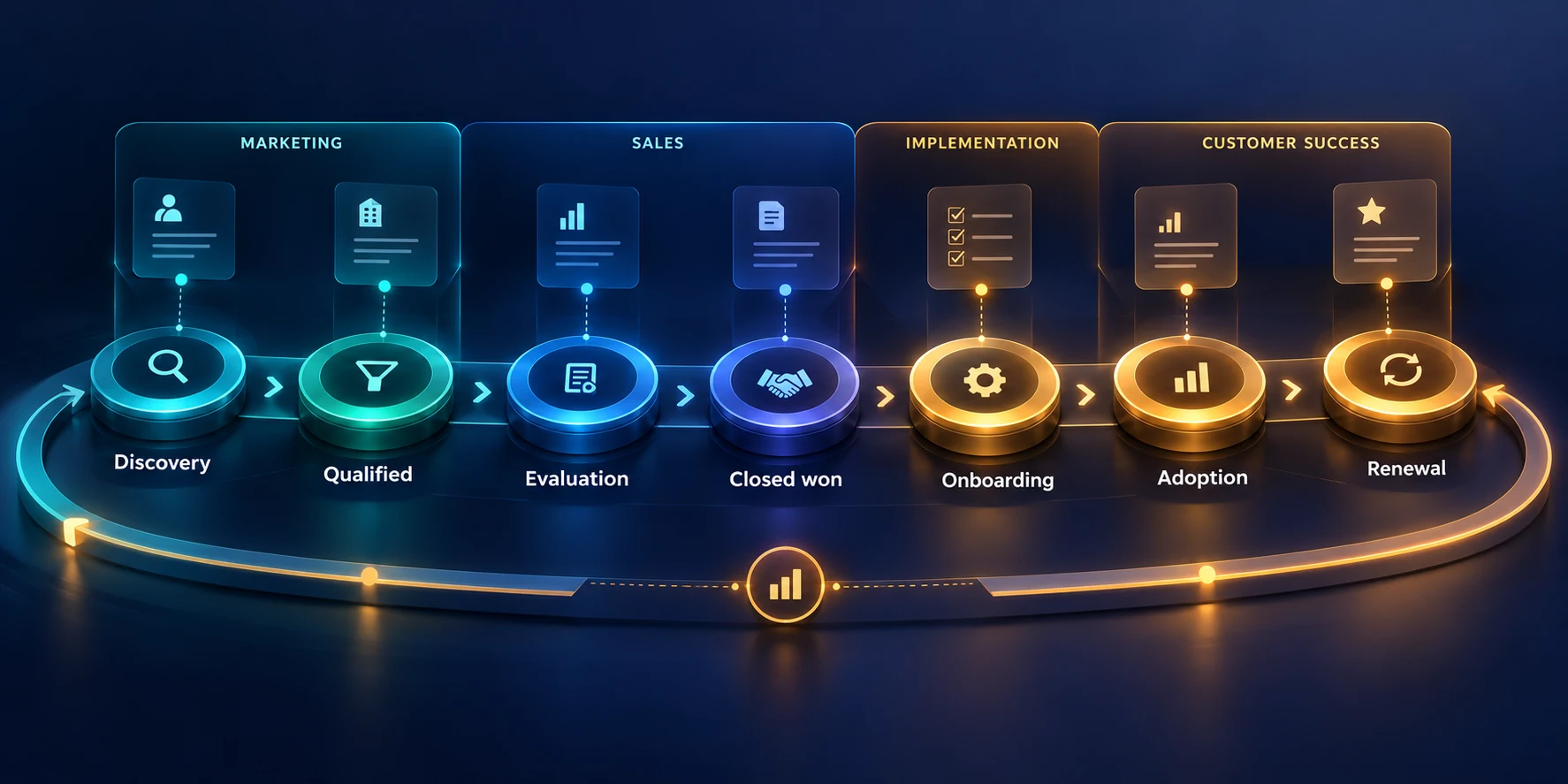
Start with one segment or journey rather than trying to redesign every process at once. A mid-market subscription company, for example, might begin with inbound opportunities from the United States, define the marketing-to-sales handoff, and then connect the same account record to onboarding and renewal. A narrow pilot exposes real gaps before they become company-wide policy.
A lifecycle map gives teams a shared view of what happens before and after a deal closes. Draw the stages from the customer’s perspective, not from the names of software fields. Include the first meaningful interaction, qualification, evaluation, commitment, onboarding, adoption, renewal, and expansion only where those steps match your business model.
Separate account, contact, and opportunity progress
Do not assume that every contact travels through one linear funnel. A buying committee can include a champion, economic buyer, technical evaluator, and procurement lead, each with a different relationship to the account. Map account-level progress separately from contact-level engagement, then define how the CRM represents those relationships without treating a single person as the whole opportunity.
Separate lifecycle stages from sales opportunity stages
Lifecycle stages describe a person or account’s broader relationship with the business; opportunity stages describe progress on a particular potential purchase. Conflating the two creates confusing reporting: a customer may evaluate a second product while remaining a customer, and an existing account can contain a new buying group that is still learning about that product.
HubSpot’s documentation distinguishes lifecycle stages for contacts and companies and describes ways to update them through settings, workflows, imports, and integrations. Treat its defaults as an example, not a universal model. Before automating stages, write down which object each stage describes and which event can legitimately move that object forward.
- Contact lifecycle: the person’s relationship to your organization, including their role in a buying group.
- Account lifecycle: the organization’s overall relationship, such as prospect, customer, former customer, or partner.
- Opportunity stage: the state of one defined buying initiative, with a next action and accountable owner.
- Customer journey milestone: a value event such as implementation completed, first successful use, renewal decision, or expansion.
For example, a manufacturer can be an active customer at the account level while a new division is a qualified prospect for an additional service. If the CRM has only one status field, the new opportunity can accidentally make the whole organization appear to have moved backward. Separate fields or related records prevent that ambiguity.
Define acceptance rules at every handoff
A handoff is a transfer of context and responsibility, not merely an owner-field change. Marketing may create demand, sales may qualify and develop an opportunity, implementation may coordinate delivery, and customer success may guide adoption. Each transition needs an entry condition, required context, a receiving owner, a response expectation, and a path for rejection or reassignment.
Write those conditions in observable terms. “High intent” is too vague unless the team can point to the behavior or conversation that qualifies it. A more useful rule might say that a request for a security review plus a named business initiative routes to sales, while a newsletter signup alone stays in nurture. The precise threshold depends on evidence from your buyers.
- State the event that triggers the handoff, including the record type and the field or activity that records it.
- List the minimum context the receiving team needs, such as problem, use case, source, timeline, relevant stakeholders, and previous commitments.
- Set a response window that matches capacity and customer expectations; define working hours and escalation handling.
- Choose one accountable owner for the next action, even when several teams contribute.
- Define a return path with a reason code, owner, and follow-up date so rejected records do not disappear.
Keep service targets realistic. If a team cannot meet a one-hour response time on weekends, do not encode that promise as an automated SLA. Pilot a target with actual queue volume, staffing, time zones, and customer expectations. Review missed handoffs for process causes before blaming an individual or increasing alerts.
A practical handoff card can include the customer’s stated problem, why the request is timely, relevant products or systems, the people involved, next agreed action, and the person accountable. It should not ask the sending team to write a second version of information already captured in the CRM. Use structured fields for repeatable data and a concise note for nuance.
Walk the lifecycle with one real-world scenario
When the bank accepts a discovery meeting, sales records the problem and stakeholders on the opportunity instead of moving every associated contact into a generic “sales ready” state. The account remains a prospect until the first contract is won. After the contract closes, implementation receives the agreed scope, security requirements, data dependencies, and success criteria.
Customer success then confirms that the first required workflow is live and that the customer knows how to get help. If a second division starts a buying process, the account remains a customer while a new opportunity records the expansion. This small example makes lifecycle boundaries concrete and shows why account, contact, opportunity, and adoption milestones should not be interchangeable.
| Lifecycle point | Customer-facing event | Responsible team | Evidence to record |
|---|---|---|---|
| Qualified handoff | A defined use case and credible next conversation | Marketing to sales | Trigger, source, problem, stakeholders, next step |
| Opportunity accepted | Sales confirms an active buying initiative | Sales | Opportunity owner, stage, decision process, timeline |
| Closed won | Contract terms and delivery scope are agreed | Sales to implementation | Products, obligations, risks, success measures |
| First value | Customer completes a meaningful workflow | Implementation to customer success | Activation event, blockers, owner, follow-up |
| Renewal or expansion | Customer evaluates continuation or additional scope | Customer success and sales | Usage context, outcomes, risks, commercial owner |
Design the RevOps Operating Model, Team, and Decision Rights
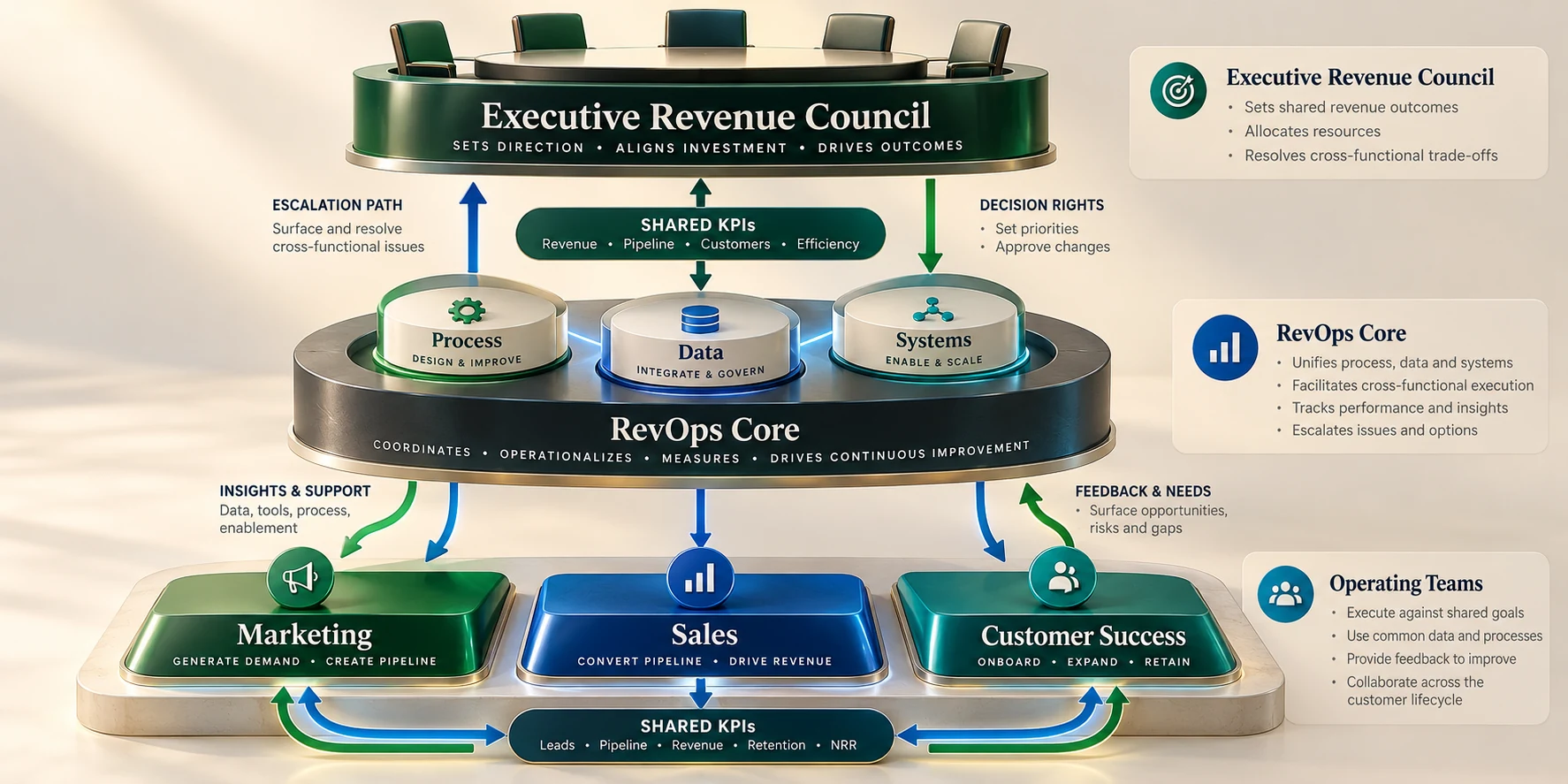
RevOps can live in one central team, in functional operations teams with shared standards, or in a hybrid structure. The right model depends on company size, complexity, acquisition channels, product lines, and current operations maturity. The goal is consistent decision-making and dependable execution, not a specific reporting line or title.
A small company may combine operations responsibilities under one leader; larger companies may use specialists linked by shared governance. Centralization supports consistency, while embedded teams stay close to work. Both models need clear decision rights and accountable owners.
Give the executive group a narrow charter
An executive revenue council should resolve cross-functional trade-offs that individual teams cannot settle alone. Its charter might include approving lifecycle definitions, deciding priority customer segments, accepting shared process changes, reviewing significant forecast risks, and assigning resources to bottlenecks. It should not become a meeting where every field change or campaign detail waits for senior approval.
- Executive sponsor: sets cross-functional priorities and resolves resource or policy conflicts.
- RevOps lead: owns the process model, governance calendar, measurement definitions, and change coordination.
- Functional leaders: own team execution, capacity, customer commitments, and adoption of agreed workflows.
- Data or systems owner: maintains access, integration controls, data quality rules, and technical change records.
- Frontline representatives: test whether procedures match actual work and surface exceptions early.
Keep final accountability explicit. A shared objective does not mean every participant has equal authority. For instance, sales leadership may own opportunity coaching, while RevOps owns the integrity of stage definitions and forecast methodology. Customer success can own health-review actions, while the executive sponsor decides whether renewal risk changes company resource priorities.
Clarify the RevOps core team’s work
The core team translates approved strategy into repeatable processes, usable systems, reliable data, and evidence about results. That work includes process design, routing, CRM configuration, analytics, documentation, release management, enablement, and post-change measurement. It does not mean RevOps should personally own every campaign, every deal, or every customer conversation.
Write down the boundary between a process owner and a platform administrator. A process owner decides what the business needs to happen and how exceptions should be handled. An administrator configures fields, permissions, automation, and reports to support that process. The same person may hold both roles in a small organization, but the decisions remain distinct.
| Decision | Accountable owner | Consulted roles | Example evidence |
|---|---|---|---|
| Lifecycle definitions | RevOps lead | Marketing, sales, customer success | Stage dictionary and sampled records |
| Lead routing rules | Marketing operations or RevOps | Sales managers, data owner | Queue volume, coverage, response history |
| Opportunity stages | Sales leadership | RevOps, finance, customer success | Buyer evidence and exit criteria |
| Customer adoption milestone | Customer success leadership | Implementation, product, RevOps | Product event or documented customer outcome |
| System access and integration | Platform owner | Security, functional administrator | Access review and change record |
| Capacity or priority conflict | Executive sponsor | Affected functional leaders | Impact, options, decision date |
Use a decision table to name one accountable role, the decision forum, and an escalation path. For example, the RevOps lead may own stage definitions while sales leadership owns coaching. A RACI chart alone cannot resolve ambiguity when several roles are marked accountable or consulted.
Create a change process that frontline teams can trust
Operational changes fail when a technically correct workflow surprises the people expected to use it. Before implementation, identify affected roles, describe what changes in their daily work, include examples of old and new behavior, and provide a simple route to report an exception. For a high-impact change, test with a small group before expanding.
A change request should name the problem, affected customer journey, requested outcome, systems, data fields, risk, and success measure. RevOps can group related requests and distinguish required fixes from preferences. A request to speed up lead assignment may be valid, but if the territory field is incomplete, automating more quickly could route the wrong accounts faster.
- Record the request and the evidence behind it.
- Classify the change as a defect, customer-risk reduction, compliance need, efficiency improvement, or optional enhancement.
- Identify who approves process meaning, who implements system changes, and who verifies the result.
- Test a sample of records and an exception case before enabling the workflow broadly.
- Communicate the effective date, owner, training, rollback plan, and where questions should go.
Sequence initiatives around dependencies and team capacity. For example, stabilize account matching before automating territory assignment. A short, owned backlog is more useful than running a CRM migration, routing redesign, and renewal changes at once, when the same operators and data owners are needed for each.
Standardize Revenue Definitions, Data Ownership, and Governance
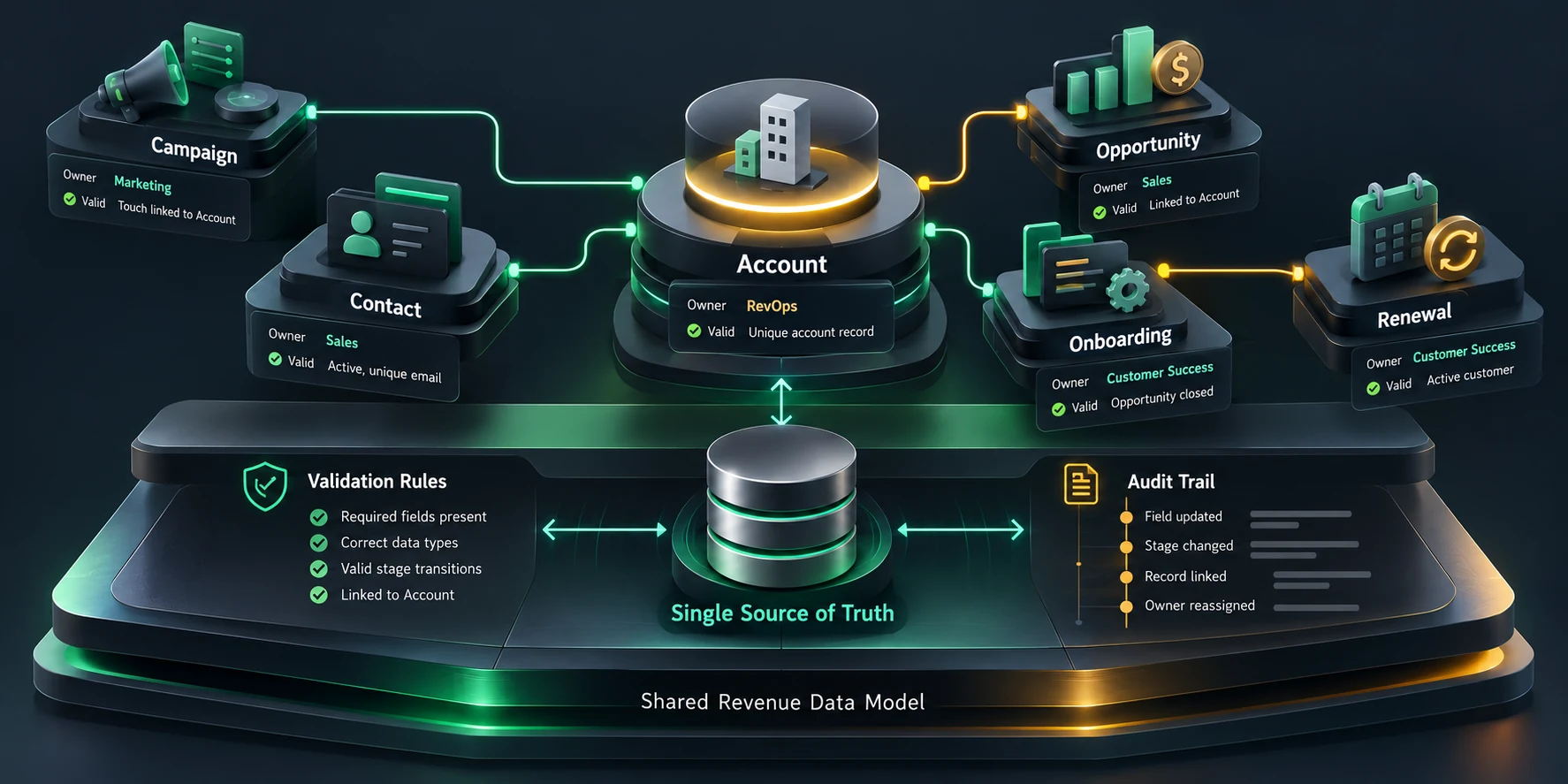
Before comparing teams, define each key record and metric in plain language, name its source field and owner, and document exceptions. For example, define whether pipeline includes only accepted opportunities and how reopened deals count. This keeps teams from comparing dashboards that use different populations.
Build a practical revenue dictionary
A revenue dictionary is a compact agreement between teams. It records the term, why it matters, the record or event that carries it, how it is calculated, who maintains it, and which reports use it. Keep definitions next to the people and systems that depend on them, not only in a document that no one checks.
| Term | Working definition | Owner | Validation question |
|---|---|---|---|
| Sales accepted | A routed request reviewed and accepted by a named sales owner | Sales operations | Can acceptance or return be seen in the CRM history? |
| Qualified opportunity | A distinct buying initiative with an agreed problem, stakeholders, and next step | Sales leadership | Does a sampled record show buyer evidence rather than a rep opinion alone? |
| Pipeline value | Open opportunity amount included under the agreed stage and date rules | RevOps and finance | Can the report be reproduced from the same filters and snapshot date? |
| Customer activated | A customer has completed the first agreed value event | Customer success | Is the event observable and tied to the right account or contract? |
| Renewal risk | A documented condition that may affect continuation or timing | Customer success | Is there an owner, evidence, action, and next review date? |
Definitions depend on the business model: project kickoff may signal customer value for a services firm, while verified activation may fit self-service software. State the value promised and the observable event that records it.
Assign ownership at the field and metric level
Every important field needs a business owner and a system owner. The business owner approves meaning and acceptable values; the system owner configures permissions, validation, synchronization, retention, and reporting behavior. When no one is accountable, teams invent local workarounds and the CRM eventually contains several nearly identical fields.
- Source of truth: identify where the authoritative value originates and how changes reach downstream tools.
- Completeness: specify when a value is required and who resolves missing data.
- Validity: list allowed formats, ranges, and state transitions that can be checked without guessing intent.
- Timeliness: define how quickly an update matters for the process and what delay is acceptable.
- Access and retention: grant the minimum required access and follow the organization’s privacy and records policies.
A practical field standard for lead source might include a controlled channel, campaign identifier, first-touch context, latest meaningful touch, and the system that generated the record. Avoid making the user choose among dozens of values that mean nearly the same thing. Use “unknown” only when it is a legitimate condition and provide a path to correct it when evidence becomes available.
Reconcile records without destroying context
Duplicate records can distort account ownership, campaign attribution, pipeline, and customer support. Decide which identifiers can match safely, which data source has precedence, and who reviews uncertain merges. Email address may help identify a contact, but shared inboxes, aliases, and job changes make it unsafe as the only identity rule for every organization.
Before a bulk merge, export or otherwise preserve the records and review a sample of proposed matches. Confirm how activities, subscriptions, consent, ownership, opportunities, and support history will be retained. Test the merge in a limited set, inspect the surviving record and downstream integrations, and document how to recover if an unexpected association disappears.
- Detect likely duplicates using stable identifiers and meaningful supporting attributes.
- Group matches by confidence; route ambiguous pairs to a human rather than merging automatically.
- Choose the surviving account or contact using a documented precedence rule.
- Preserve activity, ownership history, consent, and active business relationships.
- Review reports and integrations after merge, then log the result and exception.
For example, two records may share a company domain but represent separate legal entities or subsidiaries. A rule that merges every matching domain can erase territory and contract distinctions. The review should consider names, country, parent relationship, active opportunities, and customer agreements, then record the reason when separate records remain.
Turn data-quality findings into an owned queue
Give each data-quality issue a visible owner and next action. A dashboard that shows “12 percent incomplete” does not tell anyone what to fix. A useful queue identifies affected records, the missing or conflicting field, the responsible team, the last update, and whether the issue blocks a handoff or simply needs cleanup.
Microsoft’s customer-engagement architecture is a reference for connecting sales, marketing, service, and data. Use it to ask which records move, who owns them, and what controls apply; adapt it to your systems.
Connect the Revenue Stack and Automate Handoffs
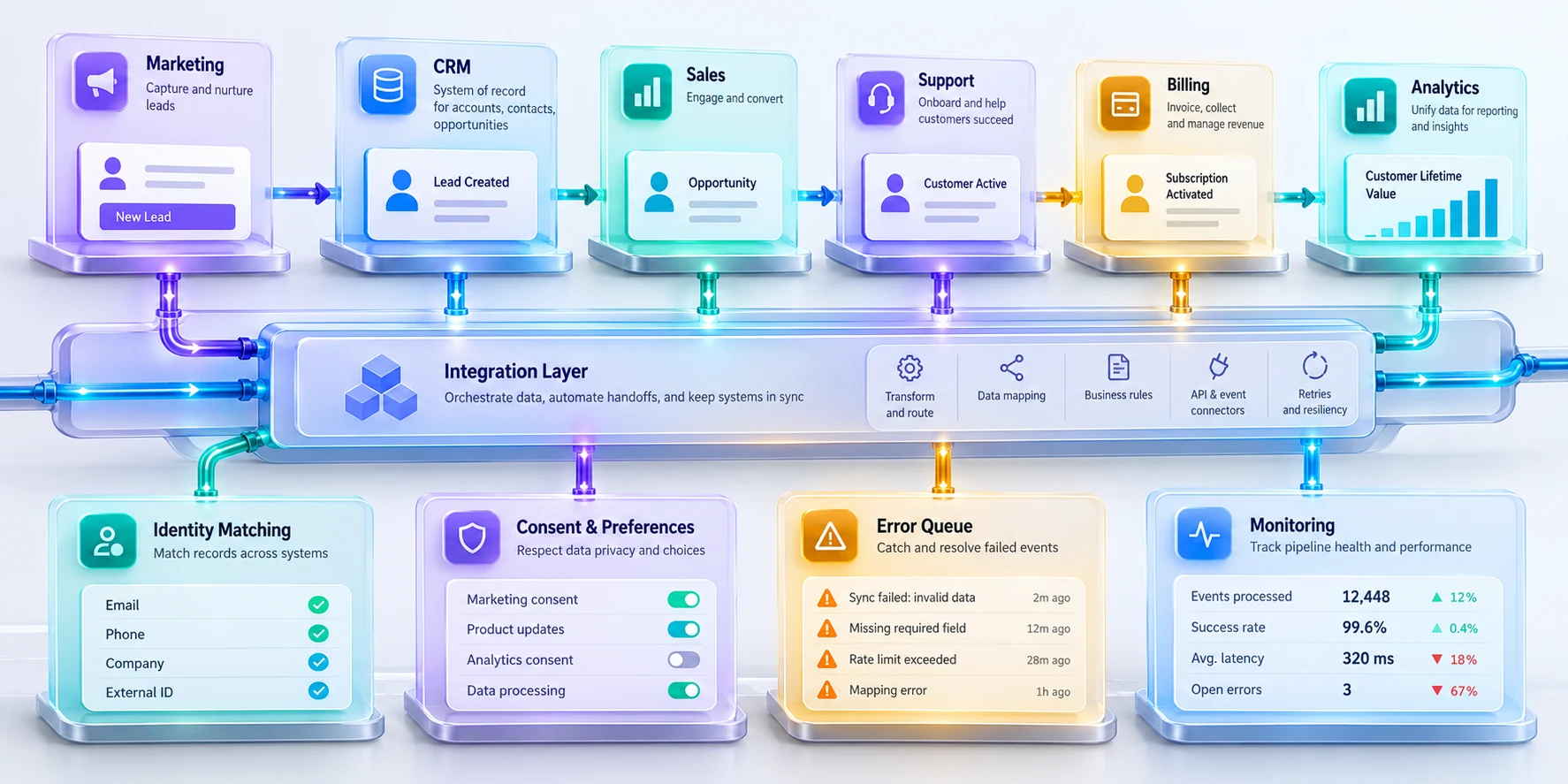
Start a revenue-stack design from the customer event and required decision, not from a list of software products. Ask which system records the event, which team needs to act, what context must travel, how the receiver confirms success, and how errors are detected. This reveals whether an integration is necessary or whether a simpler process change would solve the problem.
Diagram systems, record types, update direction, identifiers, sync frequency, and connection owners before changing an integration. Mark authoritative fields and read-only copies. For example, if both CRM and marketing automation can overwrite lifecycle stage, choose one owner and document the permitted update path.
Use a minimum viable integration contract
An integration contract describes what an event or record means at the boundary between systems. For a marketing-qualified handoff, it might specify the source record ID, account match, qualification signal, consent status, timestamp, owner, and expected receiving state. It should also state what happens when required context is missing or a duplicate is found.
| Contract item | Question to answer | Example for a lead handoff |
|---|---|---|
| Trigger | What event starts the transfer? | A defined qualification rule is met and the record is eligible for sales review. |
| Identity | How do both systems identify the same person and account? | Stable source ID plus a reviewed company match. |
| Payload | Which values must arrive together? | Use case, source, qualification evidence, consent, owner, and timestamp. |
| Acknowledgment | How do we know the receiver got it? | Receiving system stores a transfer status and accepted owner. |
| Failure path | What happens after timeout, invalid data, or duplicate? | Place the item in an owned error queue; do not silently discard it. |
| Monitoring | Who is notified and how is recovery measured? | Operations owner reviews failed events and age of unresolved items. |
Assign one authoritative owner per field and make the rule visible. Marketing automation may own campaign response, the CRM account and opportunity state, and a warehouse historical analysis. Keep the warehouse from becoming a second place where frontline users edit operating records.
Automate only a process that already works manually
Automation scales an existing rule; it does not make an unclear rule correct. First measure the manual workflow and identify repeated decisions, common exceptions, and data gaps. Then automate a small, deterministic step, such as assigning a complete record to an available territory queue, while leaving a human decision for ambiguous accounts or exceptions.
- Collect a representative sample of recent records, including successful handoffs and failures.
- Write the decision rule in plain language and identify the exact fields and events it depends on.
- Run the proposed rule against the sample without changing records; review false matches and missed matches.
- Test a small live pilot with an owner, an exception queue, and an agreed rollback condition.
- Compare outcomes with the baseline, then expand only if data quality and customer experience remain acceptable.
A lead-routing example illustrates why an exception path matters. The rule may assign enterprise accounts by territory, segment, and product specialization. If a record has no country or contains an unrecognized subsidiary, sending it to a default owner may appear faster but can violate coverage expectations. Route it to an owned review queue with a service target and visible reason.
Make retries safe and manage exceptions
Before repeating a failed handoff, check whether the receiving team already acted; missing confirmation does not always mean it failed. Record completion and prevent duplicate customer messages.
Provide a dead-letter or exception queue for events that cannot be processed safely. The queue needs a responsible person, age threshold, error explanation, replay or correction steps, and an escalation route. Monitor the oldest unresolved item, not only the number of successful API calls. An integration that reports 99.9 percent success can still hide a critical customer record stuck for several days.
Operate integrations as products
Assign an owner to each important integration and document its purpose, data classification, systems, dependencies, service expectation, alert route, and recovery steps. Keep credentials out of code and ordinary notes; use the organization’s approved secret-management process. Review access when system ownership changes and remove connections that are no longer needed.
Monitor both technical health and business outcomes. A connection can be online while sending the wrong stage, omitting a new product, or associating a lead with the wrong account. Pair technical checks such as latency and error rate with operational checks such as unassigned records, missing owner, duplicate growth, or handoff delays.
Release integrations safely
Before a production workflow change, save its current configuration, test normal and exception cases, and communicate the release window. If errors rise, disable the narrow affected rule and restore the known-good version.
Measure Pipeline, Forecasts, and Customer Outcomes
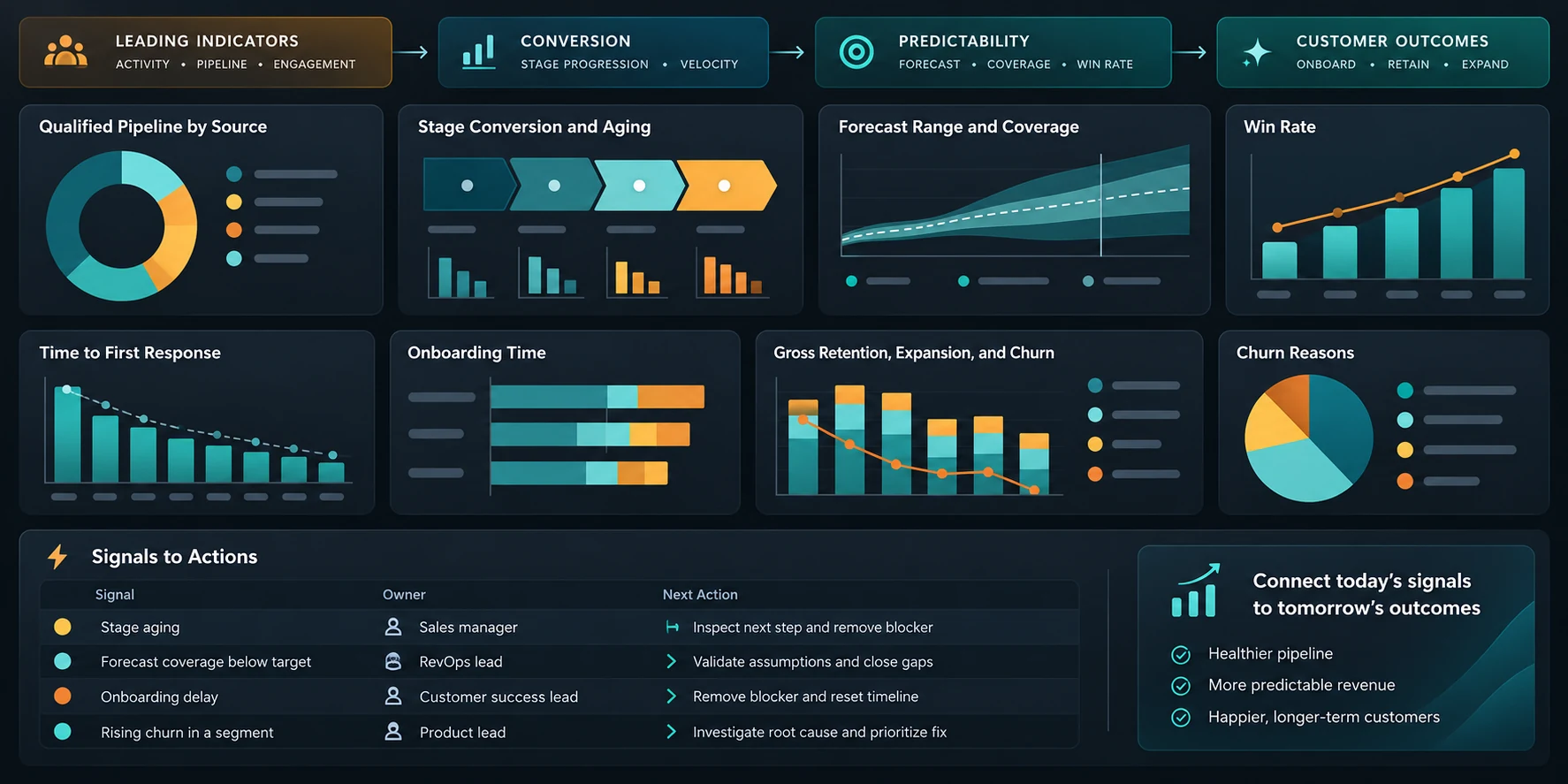
A RevOps scorecard connects leading signals, commercial results, and customer outcomes without pretending that one metric explains everything. Use a small set of measures tied to decisions: whether demand becomes qualified pipeline, whether opportunities progress with evidence, whether forecasts are calibrated, whether customers reach value, and whether they renew or expand for a reason the business understands.
Choose a metric only after defining its unit, population, date logic, exclusions, source, owner, and refresh cadence. A “conversion rate” needs a numerator, denominator, cohort period, and stage definitions. Without those, two dashboards can show different values while each is internally consistent. Make the definition visible next to the visualization.
Balance leading and lagging measures
Use leading indicators for early action and lagging measures for outcomes. Meeting volume may rise while opportunity quality falls; closed revenue arrives too late to explain every delay. Pair each measure with a decision, such as reviewing qualification when accepted pipeline falls for a target segment.
| Measure | What it can show | Common misuse | Action to consider |
|---|---|---|---|
| Qualified pipeline created | Whether target segments are producing active buying initiatives | Counting every open record regardless of evidence or age | Inspect qualification quality and source mix |
| Stage conversion and aging | Where decisions stall or criteria are inconsistent | Comparing stages that mean different things by team | Review exit evidence and common blockers |
| Forecast error by horizon | How estimates compare with eventual outcomes | Rewarding only conservative calls or treating one quarter as proof | Calibrate assumptions and review categories |
| Time to first value | Whether onboarding reaches an agreed customer outcome | Measuring a setup task that does not matter to the buyer | Remove blockers in the customer workflow |
| Renewal and expansion outcomes | Whether customer value supports continuation or growth | Treating expansion as proof of satisfaction without context | Review adoption, stakeholder change, and commercial fit |
| Handoff acceptance and delay | Whether context and ownership transfer reliably | Optimizing speed while sending incomplete records | Improve required context or receiving capacity |
Compare cohorts with similar buying and service motions, such as enterprise, self-service, and channel-led customers. Label small samples clearly; a sharp percentage change across five records is not a company-wide trend. Keep the cohort definition and observation window beside the reported metric.
Make forecasts explainable
A forecast should describe the expected business outcome and the evidence behind it. Define how opportunity stages connect to forecast categories, what counts as committed, how changes are recorded, and who may override the default. Salesforce documentation, for example, describes stage-to-forecast-category mappings and how those mappings affect forecast amounts; the exact configuration differs by organization.
Stage probability alone is not a reliable forecast. Review deal size, sales cycle, legal risk, buyer next steps, timing evidence, competition, and close plan. If a large deal has no confirmed decision date, record that uncertainty instead of letting a default probability create false confidence.
- Take a dated snapshot of open opportunities at a consistent point in each forecast cycle.
- Separate amount and timing assumptions from the confidence category, so each can be challenged independently.
- Record material changes, such as a pushed close date or reduced scope, with a reason and owner.
- Compare the snapshot with actual outcomes at a fixed horizon and by useful segment.
- Review systematic bias, such as late-quarter pushes, optimistic stages, or underreported expansion.
A forecast review should produce a decision. For a “commit,” name customer evidence, next step, owner, and risk that could change the call. If the buyer has not confirmed timing, adjust the category or document a justified exception rather than relying on confidence alone.
Connect acquisition, retention, and expansion
Trace campaign context through qualification, closed business, onboarding, and later outcomes only when the data and attribution method support it. A renewal after campaign exposure does not prove causation. Compare defined cohorts and state limitations before using the result to reallocate budget.
When time to value worsens for a segment, identify the workflow, training, data dependency, or product limit involved. Assign an owner and test one specific change. For example, sample stalled onboarding records before prescribing broad training; the missing step may be a permission or integration issue.
Implement RevOps in 90 Days and Keep Improving
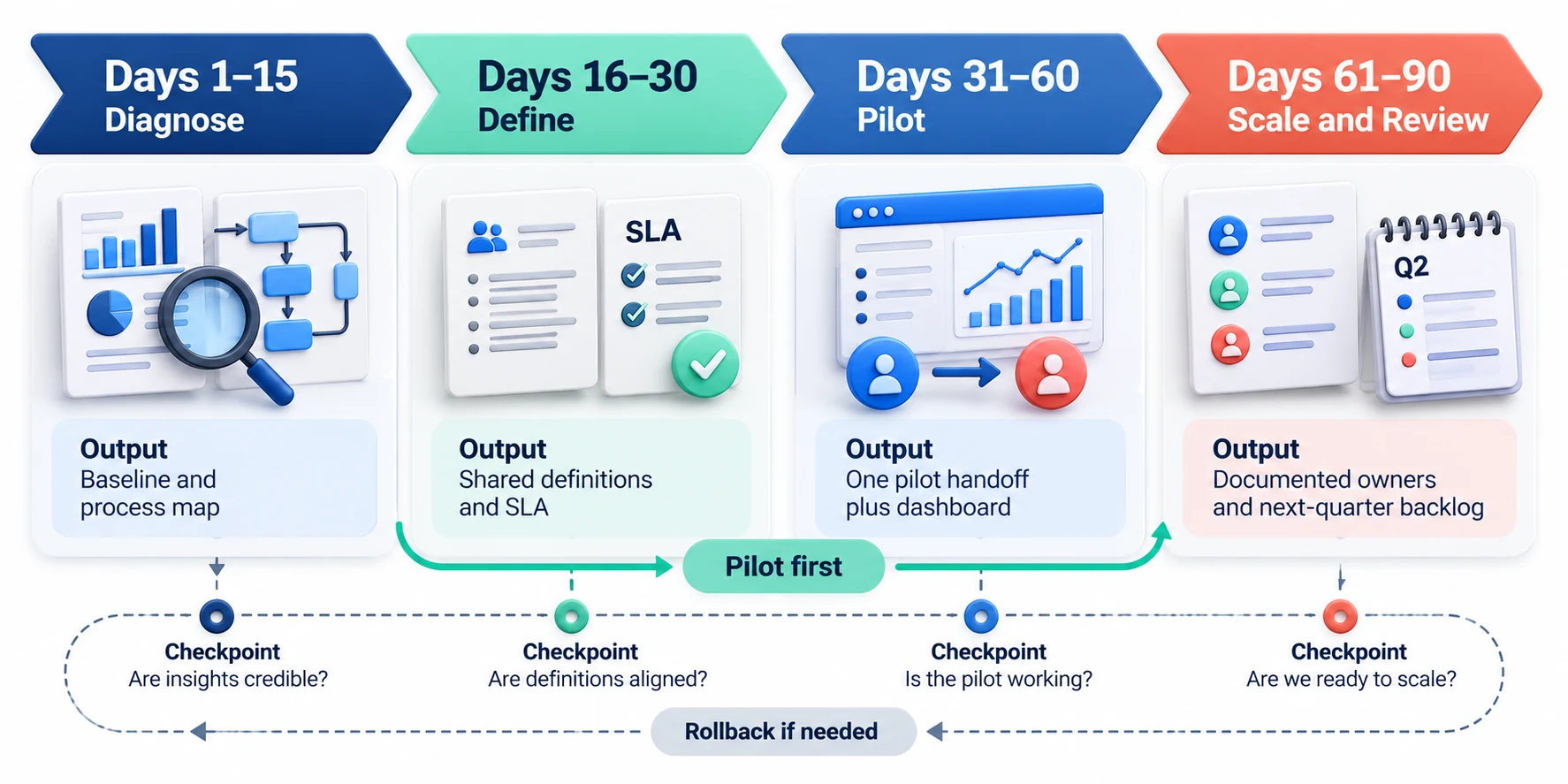
Treat 90 days as a planning frame, not a promise. Migration, regulatory deadlines, or a changed sales model may require more time. Set phase gates around evidence and capacity, and report unfinished work honestly instead of claiming a broad rollout is complete.
Choose a tractable problem with visible impact, such as unowned leads or recurring onboarding delays. Confirm it by sampling records and interviewing the people doing the work. Define one measurable baseline before choosing a solution, so the pilot can show whether the change helped.
Days 1–15: diagnose the workflow
Charter the pilot with its segment, journey, problem, sponsor, owner, teams, constraints, measures, and explicit exclusions. For example, a lead-routing pilot might exclude renewals and partner referrals. This keeps the first iteration focused and prevents scope from becoming a general CRM cleanup.
- Review a sample of recent records across successful, stalled, lost, and at-risk customer paths.
- Interview people at each handoff and ask them to walk through their last real example.
- Map systems, fields, ownership changes, queues, and customer communications.
- Document current definitions and mark disagreements, missing evidence, and risky assumptions.
- Set a baseline from data you can reproduce; label limitations and gaps.
Days 16–30: agree on one process and its data
Choose one handoff or decision; define its trigger, acceptance criteria, owner, required context, response target, exceptions, measures, and necessary fields. Create a before-and-after guide showing an accepted record, a returned record, and an incomplete account match. Use interface terms and link to current internal instructions when menu paths vary.
Before the pilot, confirm permissions, consent, reporting effects, and customer communications. Involve responsible specialists when contracts, compensation, regulated data, or security controls are affected. Record who approved those conditions and how the team will stop or roll back the pilot if they fail.
Days 31–60: pilot and instrument
Configure the minimum fields, routing, dashboard, and alerts needed for the pilot. Test normal records, duplicates, missing data, reassignment, after-hours arrival, and a failure from a connected system. Record what the operator should do for each case. Do not send automated customer messages until the trigger, audience, timing, and fallback have been reviewed.
Include varied roles and account types in the pilot; one expert seller may mask usability problems. Name a contact for questions and set a short feedback routine. For example, sample both accepted and returned handoffs each week and note where instructions or required fields were unclear.
- Check that every pilot record has the required evidence and one accountable next owner.
- Track handoff acceptance, response time, return reasons, and unresolved exceptions.
- Ask users where the new workflow creates duplicate entry or uncertainty.
- Review customer impact for missed commitments, confusing messages, or repeated requests.
- Pause expansion if data integrity, permissions, or customer experience worsens.
Days 61–90: decide, scale, or revise
Compare pilot and baseline using consistent definitions and similar populations. Account for seasonality, staffing, campaigns, and lead mix. Decide to scale, revise, or stop based on evidence; each is a useful outcome when the decision and its limits are recorded.
Before scaling, verify owners, documentation, support, training, exception handling, access, and monitoring. Expand by team or region in stages, with a rollback trigger and a named decision-maker. A staged release makes it easier to isolate problems before they affect the full customer base.
| Checkpoint | Question before proceeding | Possible decision |
|---|---|---|
| Process clarity | Can a user explain why a record enters or leaves the workflow? | Revise definitions if reasonable users disagree. |
| Data quality | Are required fields complete and traceable to evidence? | Fix source capture before adding more automation. |
| Operational capacity | Can owners handle normal volume and exceptions? | Limit rollout or add coverage before expansion. |
| Customer experience | Did the pilot reduce friction without creating missed promises? | Keep, adapt, or stop based on customer evidence. |
| Measurement | Can the reported result be reproduced from stated filters and dates? | Correct the metric before presenting a performance claim. |
Pair an efficiency measure with a quality or customer outcome. For example, target fewer returned handoffs without slower response, or faster time to value without more setup errors. Review both together so an apparent speed gain does not simply transfer work or risk to another team.
FAQ
What does RevOps mean in practical terms?
RevOps coordinates the processes, information, systems, and decisions that connect marketing, sales, and customer success. In practice, it can mean agreeing on a lead handoff, defining opportunity stages, connecting customer context to onboarding, and reviewing shared measures. Its exact team structure varies; the operating goal is clear accountability across the customer lifecycle.
How is RevOps different from sales operations?
Sales operations usually focuses on the sales organization’s workflows, tools, planning, and performance. RevOps extends coordination across marketing, sales, and post-sale teams, so shared lifecycle definitions and customer outcomes are included. Some companies keep separate specialists under a common operating model; others build a centralized RevOps team.
Does a company need a dedicated RevOps team?
Not necessarily. A smaller company can assign RevOps responsibilities to an operations leader or a cross-functional working group. The essential requirement is ownership of shared definitions, handoffs, systems, and measures. As complexity grows, dedicated specialists may help, but adding a title without decision rights or frontline trust will not fix the process.
Where should a company start with RevOps?
Start with one customer journey or handoff that causes visible delay, confusion, or lost context. Review real records, map how work moves today, agree on a measurable improvement, and pilot a narrow change. Avoid beginning with a company-wide CRM migration unless the existing platform is demonstrably preventing the target process.
What metrics belong in a RevOps dashboard?
Use a small set tied to decisions: qualified pipeline, stage movement and aging, forecast performance, handoff acceptance, time to first value, renewal outcomes, and data-quality exceptions. Define the population, formula, owner, source, and refresh schedule. A dashboard should explain what action a team takes when a measure changes.
How often should teams review revenue forecasts?
Choose a cadence that matches sales-cycle length and planning needs, such as weekly or biweekly operating reviews with a monthly leadership view. Use consistent snapshot dates and category definitions. Avoid changing the process so frequently that users cannot learn it, and do not present a forecast as certainty when buyer evidence is incomplete.
Should RevOps automate every handoff?
No. Automate stable, repeatable decisions after the rule and data are understood. Keep a human review for ambiguous account matches, unusual customer commitments, and exceptions that could create risk. A workflow should include acknowledgments, an owned error path, monitoring, and a safe recovery method rather than silently dropping failed records.
Which system should be the source of truth?
There is rarely one system that should own every kind of data. Define authority field by field: the CRM might own account assignment and opportunity state, a marketing platform might own campaign response, and a product system might record activation. Document synchronization direction and precedence to prevent circular updates.
How can teams reduce CRM data problems?
Identify the decisions that depend on the data, define required fields and allowed values, assign business and system owners, and validate a sample of records. Fix the source workflow where information is created. Use duplicate detection and exception queues, but keep human review for uncertain matches and preserve customer history during merges.
What should a 90-day RevOps pilot deliver?
A useful pilot delivers a tested process, clear ownership, usable instructions, a reproducible baseline and result, known exceptions, and a decision to scale, revise, or stop. It does not need to transform every team. The goal is evidence that one change improves work for customers and operators without adding hidden risk.
Conclusion: Start with One Customer Journey

RevOps works when teams share a coherent customer process, clear ownership, and trusted data; scale only after the pilot demonstrates reliable results.
For SaaS teams aligning revenue operations with product delivery, see the SaaS product development lifecycle guide.
Sources
- HubSpot Knowledge Base: Use contact and company lifecycle stages — lifecycle stage concepts and supported update paths.
- Salesforce Help: Manage Opportunity Stage to Forecast Category Mappings for Pipeline Forecasts — an example of stage-to-category forecasting behavior.
- Microsoft Learn: Unified customer engagement solution with Dynamics 365 — an architecture example connecting sales, marketing, service, and data components.

Leave a Reply