


Cross-platform mobile app development is a product and operating decision, not simply a choice between Flutter, React Native, and native code. The right cross-platform strategy begins with the work people must complete on a phone, the devices and networks they actually use, and the business systems the app must trust. It then draws a boundary between shared product behavior and platform-specific capabilities, and gives the team a release plan it can support after launch.
This guide uses a recurring example: a field service company whose technicians receive assigned jobs, inspect equipment, capture evidence, and record work in locations with intermittent connectivity. The same reasoning applies to sales, logistics, healthcare operations, financial services, and customer-facing apps, but the controls change with the data and consequences involved. Use the decisions below to shape a pilot before committing to a large multi-year build.
1. Define the mobile job and its constraints
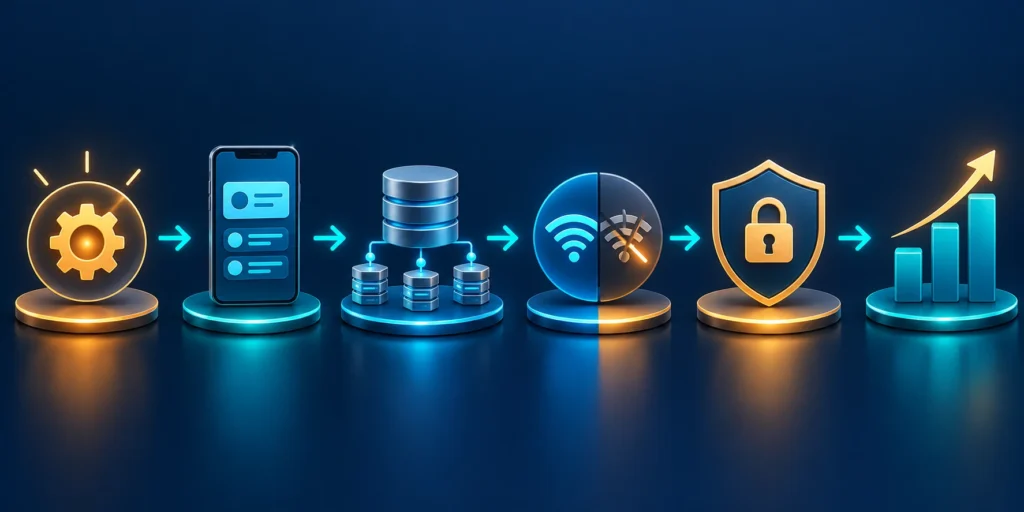
Start with a job a person must complete, not a screen inventory. “We need an app for technicians” is a direction, not a requirement. A usable requirement names the actor, trigger, steps, decisions, exceptions, and outcome. For example: when a technician reaches a customer site, they must confirm the assigned asset, complete an inspection, attach evidence, record parts used, and submit the visit even if the connection drops before the last step.
Map the current workflow from the employee’s point of view and from the systems that receive its data. Observe the task where it happens, if possible. A technician may wear gloves, use a phone in bright sun, scan labels from several feet away, and have only one hand free. A salesperson may need to check inventory while speaking with a customer. A warehouse worker may share a device across shifts. Those conditions change interaction design, authentication, hardware needs, and the acceptable time for each action.
Map essential and exception paths
Separate the essential path from the exceptional path. For the inspection example, the essential path might be open assignment, identify asset, complete required checks, and submit. Exceptions include an asset label that cannot be scanned, a missing part, an out-of-scope repair, an expired login, or a duplicate submission after a timeout. Write these situations as observable acceptance examples. They will guide interface design, API behavior, offline handling, support instructions, and test coverage.
Write measurable outcomes before feature requests
Choose a baseline and a business result before designing the app. A reasonable pilot might target fewer incomplete work orders, less time spent re-entering notes, faster proof-of-service availability, or fewer calls to dispatch. Define the measurement method and owner. “Improve productivity” cannot tell the team whether a release helped; “reduce median visit closeout time while keeping missing required fields below the agreed threshold” can be measured and discussed.
Measure the journey, not only app activity. App opens, taps, and session duration are weak proxies for completed work. Pair product events with an outcome such as accepted work orders, successful proof uploads, or corrected records. Include guardrails: error rates, duplicate transactions, support contacts, accessibility defects, and time spent on manual reconciliation. For sensitive business decisions, use aggregated or minimized analytics rather than capturing the content of customer records.
Prioritize requirements by value and risk
Prioritize requirements by user value, risk, and uncertainty. A two-by-two workshop can compare business impact with implementation or operational risk, but do not let a visual score replace judgment. A rare task with severe safety or compliance consequences may deserve more design attention than a frequent convenience feature. Make trade-offs explicit: what is in the pilot, what remains manual, and what evidence would justify expanding scope.
Inventory the constraints that can change the platform decision
Record the supported devices and operating system versions, whether devices are company-managed or personally owned, the minimum connectivity users can expect, and any required phone capabilities. List identity providers, APIs, device-management policies, data residency needs, accessibility expectations, procurement rules, and support hours. Ask who can approve app-store releases and who owns certificates, signing keys, push notification credentials, and vendor accounts.
Distinguish a hard constraint from a preference. “The scanner must work with our existing rugged handheld” may be a hard requirement; “we prefer a certain UI toolkit” may be a preference. Confirm the hard requirement with the people who own the system. A procurement sheet can say an integration exists while the endpoint, authentication method, rate limit, or data contract needed by the mobile workflow is missing.
Classify data and define the decision brief
For an enterprise app, identify data classification and the effect of a lost device. A technician’s cached schedule may reveal customer locations; a sales app may contain forecasts; a finance app may expose approvals. Decide what can be stored on the device, for how long, and under what protection. Define whether a user can sign out remotely, how access is revoked after a role change, and what must happen when the device is offline during that change.
Finish discovery with a short decision brief: the primary user and job, the first release boundary, expected device and network conditions, critical integrations, data sensitivity, success measures, and unresolved assumptions. Assign an owner and a date to each assumption. If the workflow itself is still unclear, validate it with a prototype or a small operational pilot before building a full application.
2. Choose a cross-platform implementation model
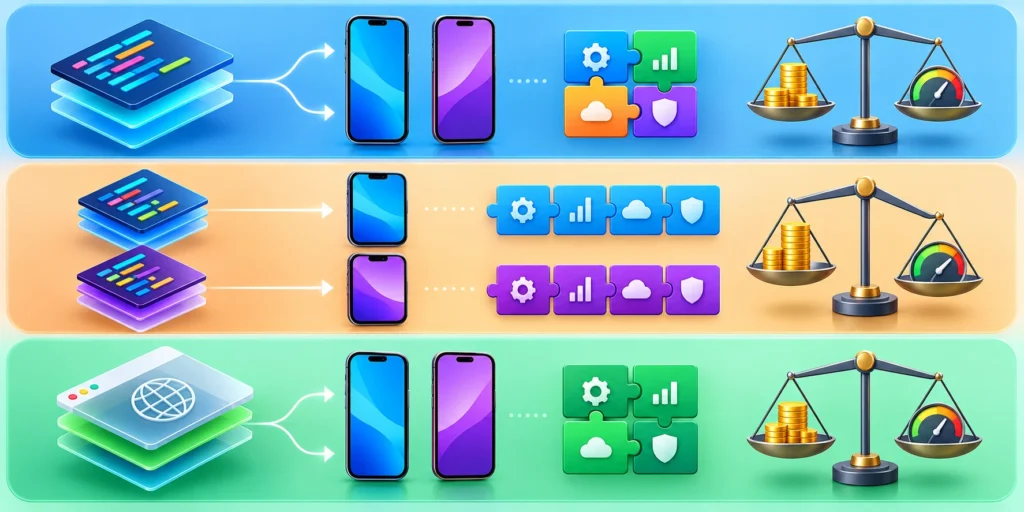
Cross-platform does not mean every line must be shared. It means the team deliberately reuses product logic and delivery practices where they help, while retaining platform-specific behavior where users or the operating system require it. Compare models against the workflow, device capabilities, staffing, release cadence, accessibility, and support burden rather than a claim that one framework is universally fastest.
Shared UI frameworks
A shared UI framework can let one team build and maintain similar experiences across iOS and Android. Flutter uses its own rendering approach and provides a broad widget system; React Native uses JavaScript or TypeScript with native platform views and supports framework-based development. Review the official Flutter architecture guidance and React Native’s framework recommendation when evaluating their current approaches.
The benefit is not a guaranteed percentage of code reuse. Reuse depends on how many screens and behaviors are genuinely the same. Shared validation rules, domain models, and API clients may be valuable even when navigation, permission prompts, accessibility details, or device integrations differ. A small platform adapter is often clearer than a complex abstraction that attempts to hide every operating-system difference.
Prove the framework against a real device requirement
Before selecting a framework, build a thin vertical slice that exercises the hardest requirement: perhaps scanning a barcode on a managed device, uploading evidence with a resumable transfer, using an enterprise identity provider, or operating offline. Test the slice on representative physical devices. A demo that only renders a login screen does not prove that the framework fits the product’s hardest work.
Native applications and hybrid approaches
Native iOS and Android development can be appropriate when the app depends heavily on platform-specific APIs, advanced background behavior, device management, specialized accessibility, or a deeply native interaction model. Separate codebases can also make sense when dedicated platform teams already exist. The trade-off is coordinating feature parity, release timing, testing, and long-term maintenance across more than one implementation.
A web-based or hybrid app can work well for workflows dominated by forms, reference data, and standard network access, especially when rapid updates and shared web skills matter. It may be a poor fit if the app must deliver robust background work, extensive offline behavior, complex hardware integration, or a highly native interaction. Progressive web capabilities vary by browser and operating system; verify the exact behavior on the devices employees will use instead of assuming feature parity.
Choose a hybrid boundary deliberately
Consider a hybrid boundary as well: a native shell can host a web workflow while exposing a small, reviewed bridge to selected device capabilities. This can be useful for internal tools with a stable web team, but the bridge becomes a security and maintenance surface. Document which side owns authentication, storage, navigation, and error handling so the same responsibility is not implemented differently in several layers.
Score a pilot against evidence, not slogans
Use a simple evaluation table with weighted criteria. Include user experience on target devices, offline behavior, required APIs and hardware, accessibility, security review, developer familiarity, build and release workflow, observability, vendor dependency, and the cost of maintaining two platform-specific paths. Give each option a short reason for its score and mark unknowns separately from known weaknesses.
For example, suppose a company has a small TypeScript team and its first release is a technician checklist with barcode scanning, a modest offline queue, and photo evidence. React Native with a supported framework may be a plausible candidate, but only after a physical-device proof validates scanning, offline storage, and managed-device policies. Flutter may also be a candidate if its UI consistency or the team’s experience is a better fit. Native may be preferable if the device-management vendor exposes required capabilities only through mature native SDKs.
Define evidence for the pilot decision
A useful pilot answers specific questions: Can a user finish the task offline and see the sync state? Can the app recover from a forced termination without duplicating a work order? Do the required device APIs behave on the oldest supported model? Can the team produce a signed internal build and observe a staged release? Keep the prototype narrow, time-boxed, and disposable unless the evidence supports continuing with its architecture.
Use a decision gate that can be repeated
Before selecting a model, write a one-page scorecard and ask the product, engineering, security, accessibility, and operations owners to review it. A useful scorecard records the requirement, why it matters, evidence collected, remaining uncertainty, and the person responsible for resolving it. This prevents the loudest preference in a meeting from becoming an unexamined technical constraint.
Then use the same thin slice to compare candidates. Implement one real task end to end, including login, one device capability, one backend write, an interruption, and a recovery. Avoid comparing a polished production app with a rough prototype; compare the smallest implementation that exercises the same risks. Record setup time, build friction, test reliability, and the amount of platform-specific code needed.
Set stop conditions and revisit triggers
Set a stop condition for the experiment. If a candidate cannot support a required device API, fails the organization’s accessibility needs, or requires a bridge the team cannot maintain, document that evidence and rule it out. If two options both meet the essential requirements, prefer the one the team can operate and recruit for without weakening security or user experience.
Record the decision and its revisit trigger. “Use model X for the first two workflows; revisit if the required device API cannot be supported without a fragile bridge or if accessibility testing reveals an unresolvable gap” is more useful than “X is the best framework.” Explain why the selected model fits this product and what evidence would change the decision.
3. Design the application architecture around stable boundaries
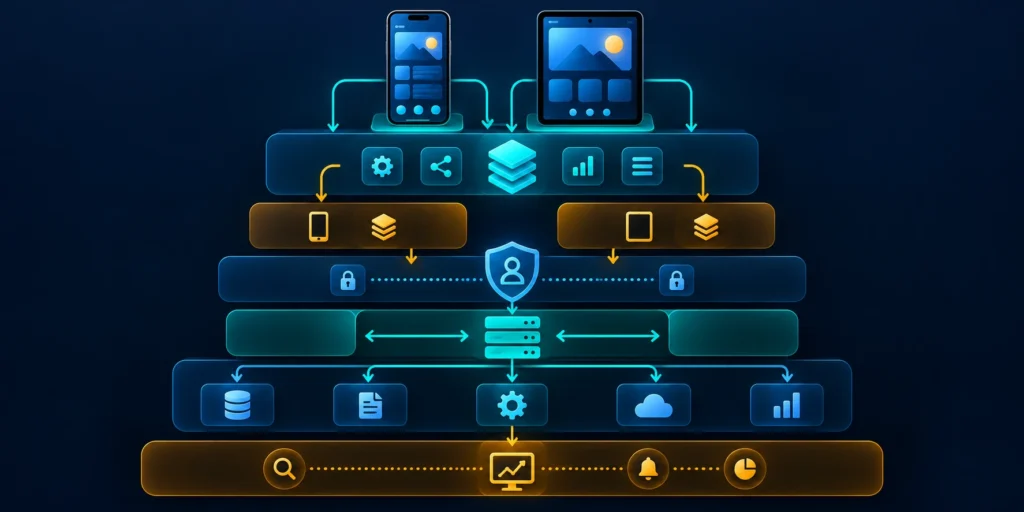
Architecture should make the critical user journey understandable and safe to change. A practical mobile app often has a presentation layer, application or domain logic, data access, platform adapters, and a server API. The exact folder structure is less important than clear ownership: screens should not each implement their own retry policy, token storage, or business validation.
Keep business rules explicit and testable. For instance, the rule that a technician may close a work order only after required checks are complete should exist as a clear domain decision, not as a button’s visibility condition. The server must enforce authorization and authoritative rules as well; client-side logic improves usability but is not a security boundary. If a user lacks permission, the API should reject the action even when an older app version still exposes the screen.
Define contracts with the backend
Agree on API behavior before many screens depend on it. Define identifiers, timestamps and time zones, pagination, error codes, version compatibility, rate limits, and the meaning of partial success. A mobile release may remain installed for months, so a backend contract must support older clients during a planned migration window. Version the contract when needed, but do not create version endpoints for every small change if additive evolution is safe.
Use server-issued identity and permissions. The app can request work orders visible to the current user, but it should not be trusted to submit arbitrary tenant IDs and receive access. The server should derive allowed scope from the authenticated identity and verify each object-level operation. Include negative tests for guessed IDs, revoked roles, expired invitations, and account changes while the device is offline.
Make writes safe to retry
For example, an API request that closes a visit can include the work-order identifier, a stable client-generated operation ID, the observed revision, completion fields, and evidence references. The server validates the user’s role and tenant, checks required fields, compares the revision, records the event once, and returns the authoritative status. A conflict should be explained in the app, not silently overwritten.
For broader service boundaries and choosing when backend modules should be separated, see our guide to B2B web app architecture, scalability, and launch.
Make API errors actionable
Define errors as actionable categories. “Network error” is too broad for support and recovery. Distinguish unauthenticated, forbidden, validation failure, stale record, rate limited, temporarily unavailable, and permanent server failure. Return a correlation identifier that support can use without exposing customer data. Avoid returning internal stack traces or sensitive details to the device.
Make offline behavior deliberate
Offline support requires a product decision for each action. Some screens can show cached reference information; some updates can be queued; some actions should wait until a connection returns. Mark data with a last-synchronized time and a visible state such as saved on this device, syncing, synced, or needs attention. Do not make a successful local save look like a completed server transaction.
Use a durable local outbox for actions that must survive app termination. Each queued operation needs a stable identifier, creation time, account and tenant scope, retry state, and the minimum data required to complete the action. Protect sensitive local data using platform-appropriate secure storage, and define expiration and remote sign-out behavior. Avoid storing passwords or long-lived bearer tokens in ordinary preferences or logs.
Classify retries before syncing
Retry only errors that may recover. A timeout, temporary network failure, or server throttling can be retriable; an authorization denial or invalid field needs user or administrator action. Use bounded retries with increasing delay and jitter to avoid every device retrying at the same time. When retrying a write, use an idempotency key so a delayed response does not create duplicate work, charges, or approvals.
type PendingVisit = {
  operationId: string;
  workOrderId: string;
  expectedRevision: number;
  createdAt: string;
  payload: VisitCompletion;
};

async function syncVisit(item: PendingVisit) {
  return api.post(`/work-orders/${item.workOrderId}/complete`, item.payload, {
    headers: {
      "Idempotency-Key": item.operationId,
      "If-Match": String(item.expectedRevision)
    }
  });
}
This example shows a contract shape rather than a drop-in library implementation. The server must actually honor the idempotency key and revision check; merely sending headers does not create those guarantees. Persist the operation before attempting the request, record the server response, and remove or mark it complete only after the app has enough evidence that the server accepted it.
Separate platform capabilities behind small adapters
Use explicit adapters for camera, barcode scanning, secure storage, push notifications, biometrics, and background tasks. Keep the common application flow independent of vendor-specific types where practical. The adapter should report meaningful outcomes—permission denied, unsupported device, cancellation, temporary failure—so the product can respond without guessing what happened.
Do not build a generalized plugin framework unless several concrete features need it. A small interface around one barcode SDK may be enough. If a device-management provider changes, a narrow adapter gives the team one place to review. If the abstraction erases critical platform behavior, it can make a simple bug harder to reproduce and support.
Map external and platform dependencies
Mobile apps also depend on the backend, identity provider, notification service, app stores, and sometimes a device-management system. Draw these dependencies on one architecture diagram. Mark the owner, credentials, data sent, failure mode, and support contact for each. A feature that appears to be “just the app” may depend on an enterprise login policy or a customer firewall rule that changes the release plan.
4. Build security, accessibility, and reliability into delivery
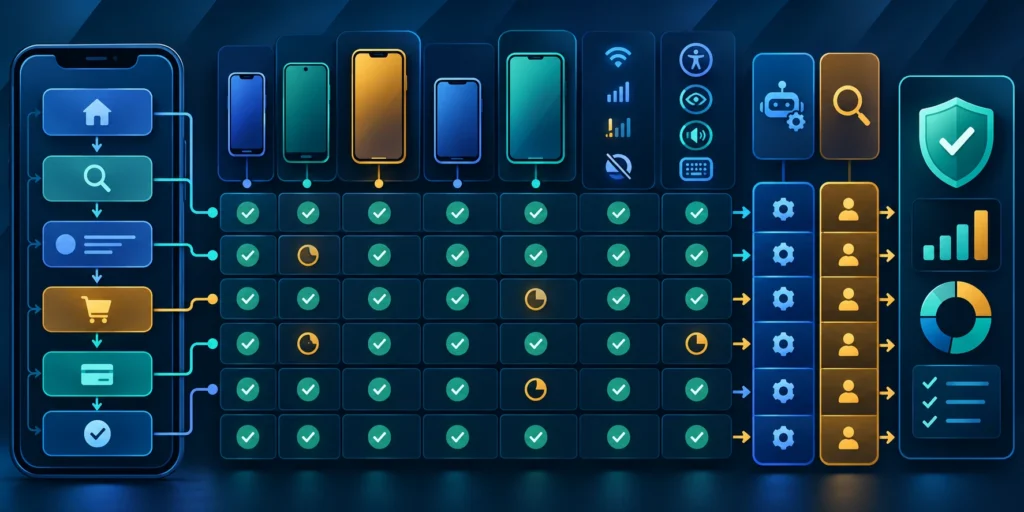
Begin with the data and misuse cases. Identify sensitive records, privileged actions, device loss scenarios, third-party SDKs, and the effect of a compromised account. Then turn each concern into a control and a check. “The app is secure” is not a test plan. A practical case might be: after an employee changes roles, an old device must not keep downloading newly restricted work orders after its next authorization check.
Use the platform’s supported authentication flow for the organization’s identity provider. Handle access-token expiration, refresh, sign-out, and account switching intentionally. Avoid writing tokens, customer details, full request bodies, or attachments to diagnostic logs. Review analytics and crash-reporting SDKs for what they collect, where data is sent, and whether the organization has approved those flows.
Verify server-side authorization
Protect the server API as if a modified client could call it directly. Enforce authorization for each resource, validate input, limit upload size and type, and verify webhook or external callback signatures where applicable. A hidden admin button is not access control. For a field app, a test should attempt to read a work order belonging to another customer by changing its identifier and should confirm the server denies the request without revealing whether the record exists.
Test the real device and network matrix
Choose a representative device matrix rather than trying to test every model. Include the oldest supported OS, a common current device, a small screen, a low-memory or rugged device if relevant, and any managed device configuration used in production. Include real network transitions: airplane mode, unstable Wi-Fi, cellular handoff, captive portal, and an expired session during offline work.
Automated unit tests are useful for deterministic rules such as validation, permissions mapping, retry classification, and data transformations. Integration tests can cover API contracts and storage. UI automation can catch regressions in critical tasks, but it should not be the only evidence for camera behavior, screen readers, interruptions, or platform-specific permission flows. Maintain a small manual checklist for those conditions.
Exercise interrupted workflows
Test process death and interrupted work, not just a graceful app close. Start a visit, add evidence, terminate the app, restart, and confirm that the saved state is accurate. Submit an action while the server accepts it but the response is lost, then retry and verify that the record exists only once. Change the user’s role while a device is offline and observe the behavior at the next sync.
Use test accounts and synthetic or approved anonymized data. Production exports can contain personal or confidential information and should not be copied into a test device simply because it makes testing convenient. Keep test fixtures representative enough to expose edge cases: long names, special characters, large attachments, empty lists, multiple time zones, and conflicting updates.
Make accessibility part of acceptance
Check labels and focus order with the platform screen reader, text resizing, contrast, touch target size, reduced motion, and forms that communicate errors without relying on color alone. A field technician who cannot reach a control with one hand or a low-vision user who cannot read a muted status is experiencing a functional defect. Include people who use assistive technology in usability sessions where possible.
Accessibility requirements belong in acceptance criteria, not in a cleanup phase after the visual design is fixed. For each critical workflow, describe what a screen-reader user should hear, where focus moves after an error, and how progress is announced when a sync takes time. Recheck those behaviors after changing shared UI components, because a common component can spread the same defect across many screens.
Prepare recovery and support
Write a support playbook for the failures users can actually experience: cannot sign in, device lost, work order stuck in sync, upload pending, duplicate record warning, or app version no longer supported. State what the user can safely try, what support needs to collect, and how to escalate without requesting passwords, secret codes, or unnecessary customer data. Give every issue a clear owner.
Use observability that supports diagnosis without collecting more data than necessary. Track app version, OS version, a pseudonymous session or request identifier, error category, and timing. Avoid high-cardinality labels that expose customer identifiers or create expensive metrics. Tie dashboards to the user journey: completed work orders, failed evidence uploads, sync backlog age, and authentication failures are more useful than a chart of raw screen opens alone.
Make recovery and release controls operational
Decide how a release can be paused. If a feature flag is used, document its owner and safe default. If a mobile app release cannot be rolled back after users install it, a server-side kill switch or backward-compatible API may limit impact. Before a risky data migration, verify the backup and rehearse the recovery or forward-fix using a production-like environment.
5. Plan the release, operating cost, and long-term ownership
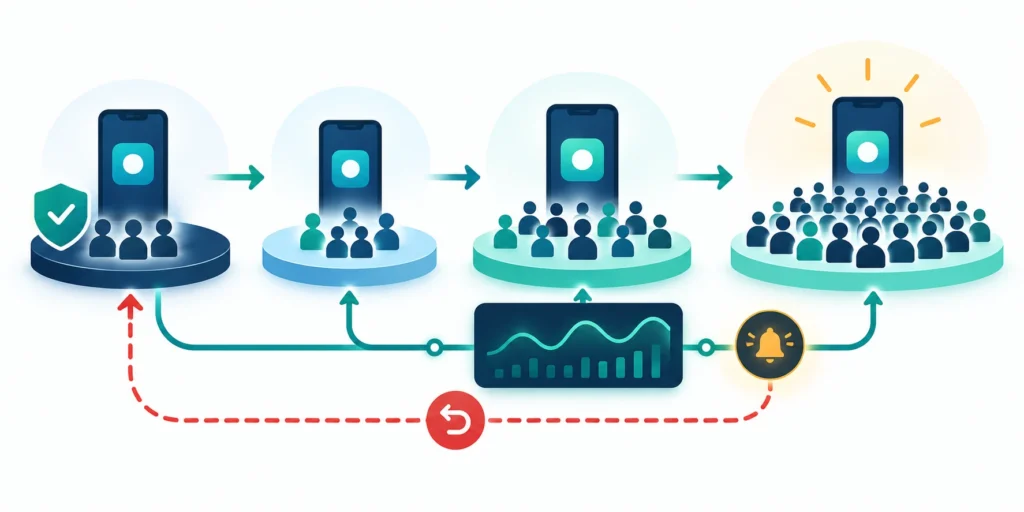
Estimate the full cost of ownership, not only the first build. Include design and engineering, backend changes, identity integration, device procurement, app-store accounts, signing and release work, testing devices, monitoring, support, training, and future operating-system changes. A cross-platform framework may reduce duplicated feature work, but it does not eliminate platform testing, release coordination, backend ownership, or user support.
Estimate by workflow and operating assumption. For a field app, count active technicians, visits per day, average evidence size, expected offline duration, and sync volume. For a customer app, estimate active users, authentication events, push notifications, and support contacts. Mark uncertain figures as assumptions. Pilot data should replace guesses before the organization commits to a large rollout or vendor contract.
Build a cost model that supports a real decision
Separate one-time delivery effort from recurring operating cost. The first estimate answers what it takes to reach a pilot; the second answers what it takes to keep the app useful and safe for several years. Include the time needed to review dependencies, update operating-system targets, test devices, handle user access changes, respond to incidents, and maintain API compatibility for users who do not update immediately.
- Estimate engineering and design by workflow, including backend and integration changes.
- Count devices, management licenses, app distribution, signing, and replacement hardware.
- Estimate support volume, training time, monitoring, storage, bandwidth, and backup needs.
- Identify vendor fees, usage limits, data export costs, and contract renewal assumptions.
- Compare the estimate with the current manual process, including rework and error costs.
For example, if photo uploads are the main variable cost, measure actual evidence size and upload frequency during a pilot before choosing a storage tier. If device support is the largest expense, compare managed-device options and replacement cycles. Keep the calculation simple enough to update, and label ranges instead of presenting a speculative exact total as a fact.
Assign long-term owners before launch. Name the product owner, mobile technical owner, API owner, security contact, release manager, support lead, and business approver. A small team may assign several roles to one person, but each responsibility still needs an explicit name and backup. Decide who handles app-store account recovery, signing-key custody, dependency upgrades, privacy disclosures, and device-management changes.
Release to a controlled cohort
Build separate development, test, and production configurations. Ensure each points to the intended API, identity tenant, analytics destination, and push environment. Use a checklist that verifies the app identifier, version, signing, permissions, privacy disclosures, and release notes. Never rely on someone remembering to switch a URL by hand immediately before a production build.
Begin with internal users who perform the real workflow, then move to a small representative cohort. Define expansion criteria before the pilot: task completion, correctness, crash-free sessions, sync completion time, support volume, and any high-severity security or privacy findings. A rollout should pause when a business-critical action becomes unsafe, not merely when a dashboard looks less polished than expected.
Train for the real production workflow
Train users using the actual production process and device. Explain what works offline, how to identify queued work, what happens after a role change, and where to seek support. Training should not teach users to bypass a validation warning or share accounts. Capture common questions and update in-app help or the support guide where the same confusion repeats.
Use feedback as an operating loop
Review pilot outcomes with users and operations, not just developers. Ask where the app interrupted work, where people reverted to paper, which error messages were unclear, and whether the captured data reached the system that needed it. Compare the outcome to the baseline and document what changed. A release can meet its technical availability target while failing to reduce manual reconciliation.
Prioritize improvements by user impact, risk, and evidence. One small improvement—such as retaining an unsent draft after a crash—may be more valuable than adding a new dashboard. Make the owner and expected result visible for each follow-up. Close the loop with pilot users so they know which feedback changed the product and which requests are deferred with a reason.
Plan lifecycle compatibility
Plan the lifecycle. Set a minimum supported app version, define how users are prompted to update, and check how long older clients can safely use the backend. Monitor adoption by version without collecting unnecessary identity data. When an old version must be blocked, give users advance notice and a recovery path for any unsynced work. A mobile app is a service with a release and support lifecycle, not a one-time deliverable.
Revisit architecture only when evidence changes
After the first release, revisit the architecture only when evidence suggests the current boundary is costly or unsafe. A module that needs a different release cadence, device capability, or scaling profile may deserve separation. Do not split code simply because the user count grew; verify that the new boundary solves a measured problem and that the team can operate the extra complexity.
FAQ
1. Is cross-platform development right for every enterprise mobile app?
No. It can be a strong fit when iOS and Android share most of the workflow and the needed device capabilities are supported well. Native development may be better for apps with intensive platform-specific behavior, demanding background processing, or specialized hardware integration. Prototype the hardest user journey on real devices before deciding.
2. Does cross-platform mean one codebase and half the cost?
No. A shared codebase may reduce duplicated feature work, but total cost still includes platform testing, backend services, device support, store releases, accessibility, security, and operations. Measure the team’s actual reuse and maintenance effort rather than using a fixed savings percentage in a business case.
3. How should we choose between Flutter and React Native?
Compare them against the product’s difficult requirements, team skills, libraries, accessibility needs, release workflow, and device-management constraints. Build a small slice for the most important native integration and offline scenario. Use current official documentation and verify behavior on the exact supported devices; framework popularity alone does not prove fit.
4. Should the app work offline?
Only for tasks where offline work is valuable and can be made safe. Decide which data can be cached, which actions can queue, and which require an immediate server decision. Show users whether work is local, syncing, accepted, or needs attention. Make queued writes idempotent and define how conflicts are resolved.
5. Where should authentication tokens and business data be stored?
Use platform-supported secure storage for credentials or tokens, and minimize sensitive business data stored on the device. Define retention, encryption, remote sign-out, and behavior after device loss or role revocation. Never treat a hidden screen or locally cached permission as final authorization; the server must validate each protected action.
6. How do we avoid duplicate writes after a timeout?
Assign a stable client operation identifier before sending the action and have the server enforce idempotency for that operation. Persist the pending item locally and retry only under defined conditions. Test the case where the server completed the work but the response never reached the phone. Client-side retry logic alone cannot guarantee exactly-once effects.
7. What should a mobile pilot measure?
Measure the completed business task and guardrails around it. A field workflow might track accepted work orders, missing evidence, duplicate submissions, sync backlog age, errors, support contacts, and time to close a visit. Choose a baseline, define data owners, and review the result with users. Do not rely on downloads or app opens as proof of value.
8. How many device models should we test?
Test a representative matrix rather than every model: the oldest supported operating system, common devices, small screens, low-memory devices, and any rugged or managed hardware required for work. Add scenarios for interruptions, network changes, screen readers, and process termination. Expand the matrix when incidents or usage data reveal a meaningful gap.
9. How do we release an enterprise app safely?
Separate build configurations, verify the signed package and environment, test critical tasks, and release to internal users before a small pilot cohort. Define monitoring, support ownership, expansion criteria, and stop conditions in advance. Use backward-compatible APIs where practical and provide a way to address a harmful feature even when installed apps cannot be remotely rolled back.
10. When should we split shared code or backend services?
Split when a measured need justifies the additional boundary: distinct release cadence, platform-specific behavior, different security requirements, or materially different scaling. Before extracting a service, name its API and data owner, failure behavior, and migration plan. Keep shared logic where it improves consistency, but avoid abstractions that hide important platform behavior.
Conclusion: choose a strategy you can evolve

A reliable enterprise mobile strategy starts with a real job, explicit device and data constraints, and a measurable business outcome. Select a cross-platform or native model by testing the hardest workflow, then keep shared behavior separate from platform-specific capabilities. Design for authentication, offline recovery, accessibility, security, support, and gradual release from the beginning.
For the first release, prove one end-to-end journey with representative users and devices. Show what happens when the network fails, a session expires, an upload is interrupted, or a user lacks permission. Measure task correctness and support effort alongside technical performance. Use that evidence to decide whether to expand, adjust the architecture, or narrow the product scope.
Choose the model the team can sustain
The most sustainable choice is the one the organization can build, secure, release, and support with its actual team. Keep assumptions visible and define the evidence that would change them. That turns cross-platform mobile app development from a framework debate into a practical plan for delivering useful work on the devices people rely on.
Leave a Reply