


A WordPress security protocol for businesses is an operating discipline, not a switch that can make a website invulnerable. A business site combines software maintained by different parties, administrator and vendor accounts, a hosting environment, customer data, payment or lead workflows, and integrations that may have their own credentials. A failure in one area can affect availability, reputation, sales, or the ability to demonstrate how sensitive information was handled.
That does not mean every corporate WordPress site needs the same security stack. A public brochure site, a membership platform, and a high-volume WooCommerce store have different exposures and recovery requirements. A useful protocol begins with the business services the site supports, identifies the routes that could interrupt them, and assigns practical controls and owners to those risks. This guide gives business leaders and technical teams a layered method for protecting WordPress and related commerce systems. It covers risk ownership, identities, software updates, hosting configuration, backups, monitoring, and incident response. Treat each recommendation as something to validate against the site’s architecture, host, legal obligations, and current plugin capabilities. A control that breaks checkout, blocks legitimate administrators, or prevents a tested update can create its own operational risk.
A Business-Centered WordPress Security Model

Start with business impact, not a plugin checklist
First list the services that depend on the site. Examples include product discovery, checkout, account login, customer support, lead capture, editorial publishing, and integrations with a CRM or fulfillment platform. For each service, identify what could be lost if its data were disclosed, changed, or unavailable. A temporary outage on a low-traffic campaign page is not the same incident as a compromised store that changes payment routing or exposes customer records.
This exercise helps distinguish three outcomes that are often blended together:
- Confidentiality: someone who should not see information gains access to it.
- Integrity: content, orders, account details, software, or configuration is changed without authorization.
- Availability: customers or staff cannot use the site when the business needs it.
Then map the systems and people that can affect those outcomes. Include WordPress core, themes, plugins, custom code, hosting and DNS, email delivery, payment providers, identity services, backup storage, analytics, deployment tools, and support vendors. The map need not be a complex diagram. It should make trust boundaries, data flows, administrative access, and ownership understandable to the people who must make decisions during an incident.
Prioritize credible paths to business harm
Security teams often start with a list of technical weaknesses. A business-centered review connects each weakness to a plausible path and consequence. For example, a forgotten administrator account can lead to unauthorized plugin installation; an outdated integration may expose an application credential; an untested backup may lengthen recovery after a failed update or ransomware event. Record the control owner, the evidence that shows the control works, and the person who accepts any remaining risk.
Use a simple risk register rather than a single score that hides uncertainty. For each item, capture the affected service, threat scenario, likelihood assumptions, business impact, existing controls, gaps, owner, target date, and status. Revisit it after major changes such as a new payment extension, agency handoff, hosting migration, or acquisition of another site.
Include Operational Failure in Risk Scenarios
Risk review should include normal operational failure as well as deliberate attack. Human error, expired certificates, accidental deletion, a failed extension update, an unavailable identity provider, or a misconfigured cache can have security consequences even when no attacker is involved. Resilience and security overlap: recoverable systems reduce the time pressure that can lead to unsafe shortcuts.
Use Scenarios to Explain Business Risk
To make the exercise useful to nontechnical decision-makers, write scenarios in business language before describing the technical control. For example: “A former contractor retains access to the store and changes where order notifications are sent” is clearer than “review WordPress capabilities.” “A failed database restore loses a day of orders” is more actionable than “implement backup hygiene.” Teams can then identify how they would notice the event, who has authority to act, how much disruption is acceptable, and which evidence would show the risk has been reduced.
Review a small number of scenarios that reflect the site’s real use:
- A privileged password is reused on another service and appears in a credential leak.
- A maintained plugin publishes an urgent security update while a promotion is running.
- A malicious or compromised extension changes site behavior or creates an unauthorized account.
- A payment, identity, email, or hosting provider has an outage or security incident.
- An editor account is phished and content or links are altered before anyone notices.
- A backup exists, but its credentials or storage are accessible from the same compromised administrator account.
- A web application firewall blocks a legitimate payment callback during a busy sales period.
These scenarios expose dependencies that a simple list of plugins will not. They can also reveal that a site owner, agency, host, and finance team each assume somebody else is responsible for a response step. Assign a primary owner and an alternate for high-impact services; responsibility that exists only in a contract or an old support ticket is difficult to use under pressure.
Map trust boundaries and sensitive data flows
Draw the site as a few connected areas: public visitors, staff and administrators, WordPress application, hosting and database, payment and identity providers, support vendors, and backup storage. Mark which direction data moves, which credentials authorize a connection, and where someone can change production. Include browser-based administrative activity, automated deployment, scheduled jobs, REST API connections, and email delivery if they affect the business.
For each connection, answer four questions. What data or action crosses it? Which identity authorizes it? Is the connection needed for the site’s current purpose? If it fails or is abused, what stops the problem from spreading? These questions encourage practical controls such as separating a payment key from a content-editor account or keeping backup administration outside the production WordPress dashboard.
Update the Map When Dependencies Change
Update the map whenever the site adds a customer portal, a new analytics tag, an external fulfillment system, a marketing automation connector, or a vendor with administrative access. Integrations that were set up for a short campaign often remain active after the campaign ends. A periodic connection review helps find tokens, webhooks, and accounts that no longer have an owner.
The Fase Network technology overview describes the broader technology context in which digital services operate. For a particular WordPress installation, replace broad labels with a current system inventory and a named owner for each dependency.
Define minimum control outcomes
Set outcomes before selecting tools. A practical baseline may require unique named accounts, multifactor authentication for privileged access, supported software versions, controlled extension installation, encrypted transport, tested backups, restricted access to production, and a response contact who can reach the host. A more sensitive site may also need centralized identity management, stronger deployment approvals, payment-provider controls, audit retention, or independent security testing.
Translate each outcome into verifiable evidence. “We have backups” is weaker than “the database and uploaded files are backed up together, copies are isolated from production, and a restore test completed on a recorded date.” “We use a security plugin” is weaker than knowing what it monitors, who receives its alerts, what it cannot see, and how the site behaves when its firewall rule blocks a legitimate request.
Use WordPress Hardening Guidance as a Baseline
The WordPress Developer Handbook treats limiting access, containing damage, preparation, and trusted software sources as complementary hardening themes. Use that model as a foundation, then adapt it to the services and data that make this installation important to the business.
Secure Identities and Access Controls

Make every privileged action attributable
Shared administrator accounts make it difficult to determine who performed a change and complicate offboarding. Give each person a named account, assign the least powerful role that supports their work, and use temporary elevation for exceptional tasks where the organization’s tools allow it. Review accounts on a schedule and whenever staff, agencies, or vendors change.
WordPress roles and capabilities are useful, but they are only one part of the access model. A managed host, DNS provider, payment gateway, email service, source repository, and backup console may each have separate users and keys. Maintain an access inventory across those systems, including who owns recovery, where credentials are stored, how access is revoked, and whether an integration uses a human account or a dedicated service identity.
Remove Dormant Access Deliberately
Remove dormant accounts and credentials through the appropriate product workflow. Before disabling an account, confirm ownership of scheduled tasks, API connections, or content. Reassign work deliberately; do not leave an unowned integration active because nobody remembers why it exists.
Protect sign-in and recovery paths
Use unique, long passwords stored in an approved password manager. Require multifactor authentication for administrators, hosting control panels, DNS, payment systems, source control, and remote access wherever those services support it. Prefer phishing-resistant methods when available and practical for the organization. Document secure recovery methods so an employee departure or lost device does not force the team to disable authentication controls during an outage.
Multifactor authentication reduces the value of a stolen password, but it does not protect a compromised endpoint, an abused recovery process, or a malicious session that is already authenticated. Pair it with device hygiene, session revocation procedures, alerts for unusual privileged activity, and a clear process for reporting suspected account takeover.
Plan for Identity Provider Downtime
If a site uses an identity provider or single sign-on, test the administrative recovery path and the effect of identity-provider downtime. Avoid creating an undocumented permanent bypass. If an emergency account is necessary, restrict who can use it, protect its credentials separately, alert on every use, and test the procedure without leaving the account broadly available.
Apply least privilege to people, vendors, and integrations
Give an agency access to the site and environments it needs, for the period it needs them. Avoid giving a support vendor administrator access to every system simply because that is easier to provision. Separate editing, order support, deployment, hosting, and identity administration where the site’s workflow permits it. A vendor managing content may need an editor role; a payment support vendor may need access to its own payment dashboard, not WordPress administrator privileges.
For service accounts and API credentials:
- Create a separate identity for each integration where possible.
- Grant only the required actions and data scope.
- Store credentials in a managed secret store or the provider’s recommended secure location, not in public posts, tickets, or source control.
- Record an owner, purpose, creation date, rotation or expiry expectation, and revocation procedure.
- Rotate a credential after exposure, ownership change, or suspected misuse; verify dependent services after rotation.
Do not rely on hiding the login URL or changing a database table prefix as the main access control. Such measures cannot replace strong authentication, server-side authorization, timely updates, and monitoring. If you add rate limits or a web application firewall rule, test the effect on password resets, REST endpoints, administrator AJAX requests, checkout, and legitimate API consumers.
Treat account changes as a lifecycle
Use a consistent process for joining, changing roles, and leaving. When a person joins, verify the business owner and the access needed for the assignment. When responsibilities change, remove old permissions instead of only adding new ones. When a person or vendor leaves, disable site and provider accounts, revoke application passwords and API tokens, remove access to repositories and backup consoles, and rotate shared secrets that they could have known. Preserve content ownership and business records before removing an account if the user authored important material.
The exit checklist should cover more than WordPress. A user who no longer needs wp-admin access may still be able to change DNS, retrieve backups, manage payment settings, or reset another administrator’s password through the identity provider. Centralize this checklist where possible and make one owner responsible for confirming completion across systems.
Review Elevated Access on a Schedule
Review elevated accounts on a schedule that matches the site’s risk. A small, stable team might review quarterly and after every role change; a site with frequent contractors may need a faster review. Check not only whether each account belongs to a current person, but also whether its role, MFA method, recovery email, sessions, and integrations remain appropriate.
Test the controls that can lock out legitimate users
Authentication controls should be secure and supportable. Before enforcing a new MFA method or host-level restriction across all administrators, test recovery with more than one trusted administrator and confirm the identity provider’s emergency procedures. Keep recovery codes in an approved protected store, not in a shared chat or the website’s media library. If an identity provider is unavailable, use the documented recovery process rather than creating a permanent unaudited bypass.
Session duration, password reset, account email changes, application passwords, and login rate limits all affect operational access. Review whether a session remains active on a lost device, whether former vendors can still use a token, and whether an alert is generated when privileged access changes. Tests should be conducted in a way that does not expose credentials or disrupt a live checkout.
Secure Updates and Software Supply Chain
Inventory what is actually running
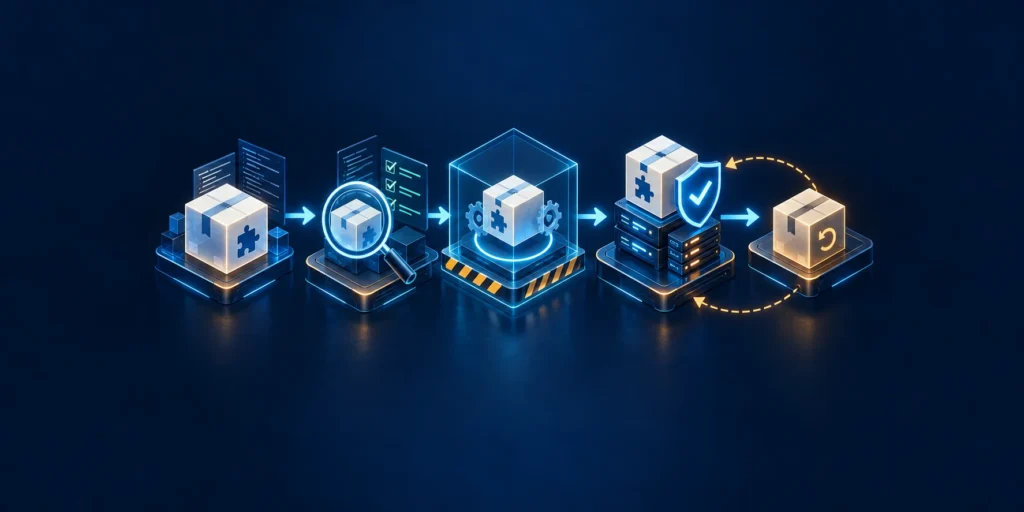
Maintain an inventory of WordPress core, PHP and server components where visible, themes, plugins, custom code, and external integrations. Note whether each component is active, who needs it, where it came from, who maintains it, and what service would fail if it were removed. Delete unused software when ownership and dependency checks show it is safe to do so; an inactive extension can still be forgotten during future reviews and may still contain files on disk.
Choose extensions based on function, maintenance history, compatibility, permissions, and the publisher’s trustworthiness. Prefer established distribution channels and vendors that explain how to report vulnerabilities and provide updates. Avoid nulled or pirated extensions: they remove the normal trust and update path and may contain code that the site owner cannot safely verify.
Keep the Extension Set Deliberate
The number of installed plugins is not a security score by itself. A small set of poorly maintained components can be riskier than a larger set that is necessary, supported, and governed. Conversely, adding overlapping security plugins can create conflicting rules, performance problems, or false confidence. Record the job each extension performs and periodically remove duplication that no longer serves the site.
Patch quickly, but control the change
WordPress and extension updates may address security defects as well as compatibility and reliability issues. Monitor release information and vulnerability notices from the actual publishers. Triage based on exposure, severity, exploitability, available mitigations, and whether the vulnerable component is reachable on this installation. A critical fix should not wait for a quarterly maintenance window simply because that is the usual calendar.
For a business-critical site, define an update path that balances urgency and verification:
- Confirm that a recent, recoverable backup exists and that the team knows how to restore it.
- Review the release and identify likely impacts, dependencies, and rollback options.
- Apply the update in staging when the risk and time available make that practical.
- Test high-value paths such as sign-in, search, forms, checkout, order notifications, and key integrations.
- Deploy to production using a documented process and limit who can change the live environment.
- Monitor errors, availability, security alerts, and business transactions after deployment.
Staging is not a guarantee that production will behave identically. Data, caching, payment credentials, DNS, and traffic can differ. Protect staging itself: restrict access, prevent indexing when appropriate, avoid copying live personal data unless necessary and approved, and remove secrets that are not needed for the test.
Automatic updates can reduce exposure for supported components, especially where the organization can monitor the result and quickly recover. They should be paired with backups, compatibility checks appropriate to the site, and a clear owner for failures. Manual updates also need a defined cadence and a way to spot urgent security releases. The objective is not maximum automation or maximum delay; it is a reliable path from a security fix to a verified production state.
Control code changes and supply-chain access
Limit who can install plugins, edit code, change DNS, and deploy to production. Use separate accounts for development and deployment where possible. Keep custom code under version control and review changes before release. Protect repository access with MFA and restrict tokens to the specific repository and operations they require.
For organizations with a formal software pipeline, record which artifact was reviewed and deployed. Pin dependencies where the development process supports it, monitor advisories, and verify downloaded packages through trusted sources. Avoid copying production credentials into a build job or staging environment. If a vendor supplies a plugin or custom integration, define how the vendor communicates security updates and how the business will respond if the vendor relationship ends.
Track Custom Code Ownership and Support
Make the source and lifecycle of custom code traceable. For each custom plugin or theme modification, record its repository or owner, supported WordPress and PHP versions, deployment method, test coverage for important paths, and contact for a security report. If a contractor builds a one-off integration, agree on source-code handoff, documentation, credential ownership, update responsibility, and a way to disable the integration if the contractor is unavailable.
Avoid Routine Live File Edits
Avoid editing production PHP files directly as the routine deployment method. A dashboard code editor or hosting file manager can be useful in a carefully controlled emergency, but direct live changes are hard to review, repeat, and roll back. Use the team’s supported version-control and deployment process. If the site is small and does not have a formal pipeline, keep a dated record of each live change and save the previous working version in a protected location.
Separate routine updates from emergency patching
Define how the team classifies an update as urgent. Relevant factors include whether a vulnerability is actively exploited, whether an affected component is installed and reachable, whether the site handles sensitive transactions, whether a vendor has released a fix, and whether a temporary mitigation is available. The security owner should be able to approve a rapid deployment without waiting for a routine meeting when delay would leave a material exposure.
An emergency process still needs minimal safeguards: confirm the site identity, create or verify a recoverable backup, identify a rollback route, test the critical user journey that could be affected, notify the people responsible for support, and monitor the result. Record what could not be tested and schedule follow-up validation. The record is not bureaucracy; it allows the business to distinguish an emergency exception from an undocumented permanent change.
Reduce Exposure When No Fix Exists
If no security fix exists, reduce exposure through a supported control such as temporarily disabling the affected feature or limiting its access, after checking the operational impact. Do not assume that hiding a plugin’s menu, changing a slug, or blocking one URL closes a vulnerability. Confirm with the publisher or qualified security staff which mitigation applies to the affected version and configuration.
The WordPress hardening guidance advises using trusted sources and keeping WordPress, plugins, and themes up to date. Those basics remain useful, but they do not replace review of the code’s permissions, maintenance status, business necessity, and deployment path.
Hosting, Network, and Application Hardening

Confirm responsibilities with the hosting provider
Security responsibilities are shared among the site owner, managed host, software publishers, and service providers. Ask the host what it manages: operating-system patching, PHP versions, network filtering, malware response, backups, access logs, account MFA, isolation between accounts, and incident notifications. Ask how to contact support during a security event and what evidence the host can preserve.
Do not assume a hosting plan includes controls simply because a marketing page uses the word “secure.” Record the provider’s actual coverage and the tasks that remain with your team. If the host manages a control, understand how to verify it and where to find the relevant status or support record.
Protect transport and administrative surfaces
Serve the entire site over HTTPS with a valid certificate, redirect HTTP consistently, and avoid mixed content. HTTPS protects data in transit between a browser and the configured endpoint; it does not prove that the endpoint is uncompromised or that a user is authorized. Protect administrative access with MFA, appropriate account roles, and host-level protections that have been tested against required WordPress functionality.
An edge firewall or web application firewall can reduce unwanted traffic, but rules must reflect the site’s real behavior. Test public APIs, form submissions, payment callbacks, media uploads, cron jobs, and administrative requests. Review blocked-request logs and provide a safe exception process rather than permanently weakening a rule whenever a legitimate request is blocked.
Restrict Public Access to Sensitive Resources
Do not expose development copies, database administration tools, backup archives, debug logs, or source-control metadata to the public web. Use supported host controls to restrict these resources. Avoid pasting configuration snippets from generic guides into production without checking the server, multisite status, rewrite rules, host-managed configuration, and rollback plan. A rule aimed at one environment can block legitimate WordPress features or make the site unavailable in another.
Reduce the impact of a compromise
Containment matters because prevention is imperfect. Separate production from staging and unrelated sites where the hosting architecture supports it. Restrict file-write access to the areas that genuinely need it. Keep database credentials scoped to the site and protect configuration secrets with file permissions and host-managed secret handling. Avoid granting application processes broader database or filesystem rights than the installation needs, while validating upgrade requirements before changing database privileges.
Disable dashboard code editing if it fits the team’s support model and you have another controlled deployment route. This can limit one path for changing PHP after an administrator account is compromised, but it does not prevent every form of malicious file upload or code execution. Treat it as a containment measure, not a replacement for preventing account takeover and monitoring file changes.
Combine Security Scanning Signals
Use a web application firewall, host malware scanning, endpoint protection, and vulnerability scanning as complementary signals. Each has blind spots. A scanner that sees only public pages cannot prove that the server’s files are clean; a file scanner cannot determine whether a compromised vendor token is still active. Define who reviews each alert and which response step follows it.
Treat WordPress endpoints and files with care
WordPress exposes routes for normal publishing, media, administration, and integrations. A route being public by design does not mean every action behind it should be anonymous. Keep authorization on the server side, scope application passwords and API access to the intended user and use, and remove integrations that are no longer required. Review the site’s REST API exposure in context: disabling the entire API can break legitimate features, while leaving an overprivileged integration indefinitely creates avoidable risk.
XML-RPC, admin-ajax, scheduled tasks, and webhooks may be required by the site or its extensions. Do not block them blindly. First identify which services use them, then test a narrow restriction and monitor resulting failures. Security controls that rely on a fixed IP allowlist may fail when vendors use changing addresses or shared infrastructure; prefer an authentication method and network policy that the provider actually supports.
Protect Configuration and Diagnostic Logs
Keep configuration files and backup archives outside public access using the host’s supported mechanisms. Avoid exposing debug output on a live site. When enabling diagnostic logging to investigate an incident, restrict who can read the logs, avoid sensitive fields, and disable or rotate the files when they are no longer needed. File permissions should be selected for the hosting model; copying a numeric permission value from a different server can make updates fail or make files more writable than intended.
Keep production changes recoverable
Before modifying DNS, server rules, PHP settings, file permissions, or application configuration, capture the current state and confirm a rollback path. Apply changes in a way that can be reviewed and attributed. Use a staging environment for material changes when available; for emergency changes, document the reason, the approver, the validation performed, and any follow-up test.
For larger organizations, establish a change window and service owner. For smaller teams, a written checklist and a second-person review of high-risk changes can still prevent accidental lockouts. In either case, define the health checks that indicate whether the site remains usable, not just whether the homepage loads.
Test Network Changes Against Critical Flows
Before changing a firewall or caching layer, include authenticated and unauthenticated tests. Confirm that the checkout, login, password reset, REST integration, webhook, and media paths behave correctly, and that cached content does not reveal a private account page to another visitor. Review error rates and blocked requests after deployment. Keep a person available who can restore the previous rule if the change affects revenue or access.
Ask the hosting provider how accounts are isolated, how security incidents are escalated, what logs are retained, and whether backups can be restored without using the production administrator account. The answers may vary by plan and region, so store the provider’s response with the site’s operations records and revisit it after a plan or architecture change.
Data Protection and Recoverable Backups

Know what data the site holds and where it flows
Inventory personal, payment-related, authentication, order, lead, and operational data handled by WordPress and its integrations. Identify what the site stores directly, what the payment provider stores, what is forwarded to a CRM, and what appears in logs, exports, email notifications, or backups. Collect only what the business needs, restrict access to it, and follow the organization’s retention and deletion requirements.
Avoid recording passwords, session tokens, full payment details, or unnecessary personal data in application logs and support tickets. Limit who can export orders or user lists. Use separate access for support tasks when possible and review the permissions of plugins that can read, export, or transmit customer data.
Understand Encryption and Key Access
Encryption is useful, but the phrase is incomplete without key management and access control. Understand which provider encrypts data, where keys are held, who can request decryption, and how access would be recovered after an administrator leaves. A backup encrypted with a key that nobody can retrieve is not a recoverable backup.
Back up the database and files as one recovery set
A typical WordPress recovery needs both the database and files. The database contains posts, settings, users, orders, and other site data; files include core, plugins, themes, uploads, and configuration. A backup of only one side may restore an incomplete or inconsistent site. Keep a record of when each component was captured and how the team would restore them together.
Choose backup frequency based on how much data the business can afford to lose. A store with frequent orders may need more frequent database protection than a brochure site updated monthly. Define recovery time expectations too: how long can checkout remain unavailable, and how long can the business operate with a degraded site? These targets should drive the schedule, storage design, and staffing plan.
Protect and Monitor Backup Copies
Maintain copies outside the production account or network where practical. Protect backup administration with MFA and restricted roles. Consider immutable or offline copies for critical systems. Monitor backup failures and capacity; a scheduled job that silently stops is not protection. Preserve enough history to recover from an issue discovered days after it began, while managing retention and privacy requirements.
WordPress documentation emphasizes backing up the database and files and testing restoration. CISA’s business security resources also stress backups, MFA, and other foundational protections. Use these as starting points, then configure the schedule and retention for your actual business impact.
Test the restore, not just the backup job
Run a restore exercise into an isolated environment. Confirm that files and database match, the site starts, critical plugins load, administrator access works, and the paths that matter to the business can be tested without contacting real customers or capturing live payments. Verify that DNS, secrets, scheduled jobs, email, and payment settings will not accidentally point the test site at production services.
Record the test date, backup identifier, restore duration, validation results, and issues. A test should prove not only that an archive can be unpacked but that the restored service is useful. Include the people who would perform the work during an incident; a procedure stored in one employee’s private notes is a fragile control.
Prepare for clean recovery and dependencies
Before restoring to production after a suspected compromise, establish a clean recovery point and understand when the compromise began. A recent backup may contain the attacker’s access or code. If the source of compromise is unknown or sensitive data may be involved, coordinate with the host and qualified incident-response support before replacing evidence or notifying customers.
Include dependencies in the restore exercise. A database and uploads folder may be intact while DNS, email delivery, payment callbacks, application passwords, or a third-party identity service still prevent the business from operating. Write down which credentials must be reissued after restoration and which provider must be contacted to re-enable the connection. If an external provider holds customer or order data, understand its export and recovery process before an outage occurs.
Test Practical Recovery Constraints
Recovery exercises should expose practical constraints: transfer speed, storage quotas, support response time, staff availability, and the steps needed to validate a restored store. A plan that assumes a technical specialist can restore everything in an hour is not useful if that person is the only one who knows the credentials or is not reachable outside office hours. Adjust expectations and controls based on test results.
Monitoring and Incident Response
Decide which signals deserve attention
Monitoring should answer a business question: can the team see when a meaningful security or availability event occurs, and does someone know what to do next? Relevant signals may include privileged logins, failed authentication spikes, new administrators, plugin and theme changes, unexpected file changes, checkout failures, unusual outbound email, security scans, backup failures, and alerts from the host or payment provider.
Send important logs or alerts somewhere an attacker with WordPress administrator access cannot quietly erase. Restrict access to the monitoring system, set retention that supports investigation, and avoid logging secrets. Synchronize time where possible so events from WordPress, hosting, DNS, and payment services can be compared. Build alerts around thresholds and context; an alert that is too noisy will be ignored, while an alert that never triggers is not evidence of safety.
Test the Alert Route
Test the alert route. Confirm who receives a page outside business hours, who can contact the host, and who can approve a temporary checkout shutdown. OWASP guidance on security logging and monitoring highlights that useful logs need review, escalation, and response—not just storage.
Prepare a response plan before an incident
Write down who leads technical response, who contacts the host, who communicates with customers and executives, who advises on privacy obligations, and who approves service restoration. Store emergency contact details somewhere accessible if the primary site, email, or identity provider is unavailable. Define when to involve outside incident-response specialists, especially for a site processing orders or personal information.
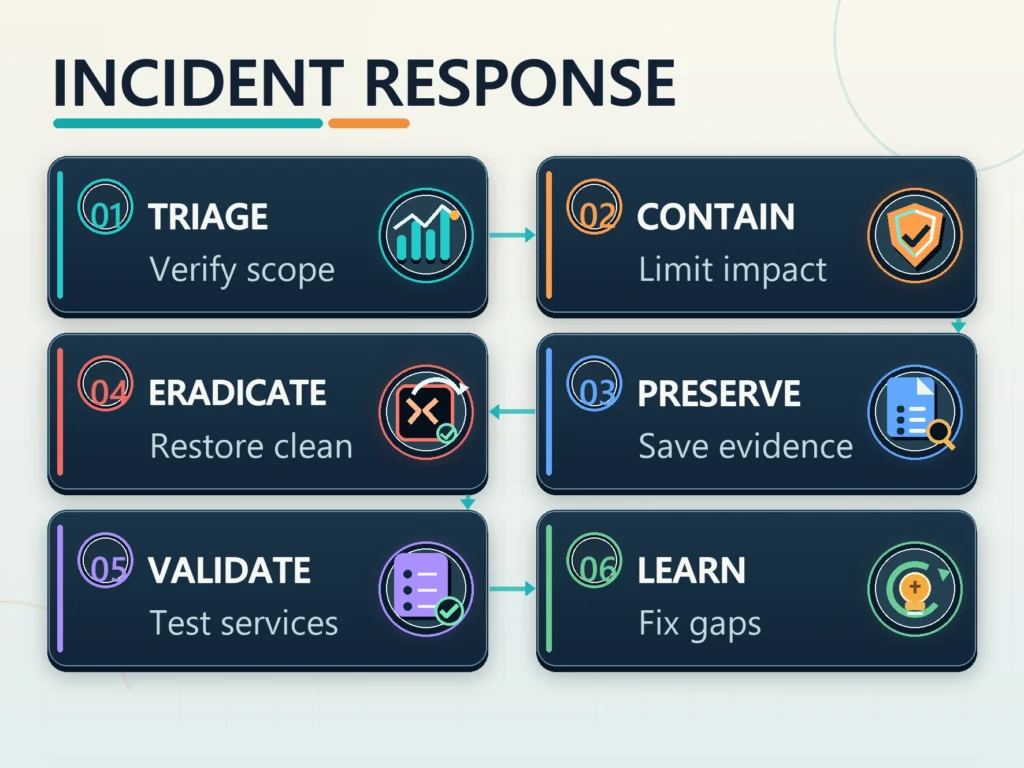
Use a sequence that preserves options:
- Triage: verify the report, establish scope, record time and affected services, and distinguish a compromise from a routine outage where possible.
- Contain: work with the host to isolate a harmful site or disable the compromised credential or integration. Avoid broad changes that destroy evidence without reducing risk.
- Preserve: save relevant logs, alerts, screenshots, file snapshots, and a timeline in a protected location. Label potentially infected copies so they are not restored accidentally.
- Eradicate and recover: identify and close the entry path, remove unauthorized access, restore from a clean source or rebuild as appropriate, patch exposed components, and rotate affected credentials from a trusted device.
- Validate: check user access, payment and form flows, outbound email, DNS, security scans, backups, and business monitoring before returning the service to normal.
- Learn: determine which controls failed, update the risk register, preserve evidence for required investigations, and assign owners and dates for corrective actions.
Different incidents call for different containment decisions. If only a privileged account appears compromised, revoking its sessions and tokens may be less disruptive than taking the whole site offline. If the website is redirecting customers to malicious content or checkout integrity cannot be trusted, the host and business owner may need to disable the affected service temporarily. A suspected exposure of customer information may require privacy, legal, and communications teams to assess obligations before making public statements.
Keep external communications factual and coordinated. Do not speculate about the number of affected customers or claim that a site is clean before a competent verification. Record when notices were sent, who approved them, which services were affected, and where customers can get support. Technical remediation and customer communication may proceed in parallel, but neither should rely on unverified assumptions.
Review Persistence and Access Paths
Changing a password alone may not end a compromise. Attackers may have added another administrator, created an application password, changed DNS, installed a scheduled task, or obtained a long-lived integration token. Review the relevant accounts and systems, revoke sessions and credentials that may be exposed, and verify each change with the responsible provider.
Govern security as ongoing operations
Assign an owner to each control and review it on a regular schedule. A useful operating calendar includes account review, update review, backup failure review, restore testing, plugin inventory, vendor access review, and a tabletop exercise for a scenario such as an unavailable checkout or administrator takeover. Keep the process proportionate: a small business may use a short checklist, while a larger organization may need formal evidence and escalation.
For leadership, track a small set of measures that reveal whether controls work: percentage of privileged accounts protected by MFA, time to apply urgent fixes, number of unsupported components, restore-test success, time to detect and contain incidents, unresolved high-risk issues, and owner coverage for critical services. Do not use a single green score to imply that the site is secure. Explain what was measured, what remains unknown, and which business decision is needed.
Manage Vendor Access and Records
Security governance should also account for people who are not full-time employees. Agencies, freelancers, payment specialists, hosting support, and marketing vendors may each need temporary access. Put access scope and offboarding expectations into the operating process, and review whether a vendor can export data, install extensions, change DNS, or create additional users. If a provider handles information on the business’s behalf, identify its incident-notification channel and the person who receives urgent notices.
Keep operating records proportionate but durable: a system map, account owner list, extension inventory, update log, backup test record, incident contacts, and open-risk list are often more useful than a long policy nobody can follow. Store them in a protected location that remains available when the website or company email is down. Assign a review date and owner, and remove secrets from the record itself.
Map the systems that make the WordPress site work
WordPress is often only one part of the service. Map the domain registrar, DNS provider, hosting account, CDN or web application firewall, email delivery, payment gateway, analytics, CRM, identity provider, backup destination, and external integrations that can read or change site data. For each dependency, record its purpose, data exchanged, owner, access method, recovery contact, and what would happen if it became unavailable. This helps a team distinguish a WordPress defect from a DNS, email, or payment-provider incident.
Pay particular attention to management paths. A compromised registrar account can redirect visitors even when WordPress files are clean. An exposed deployment token can change code without a WordPress login. A mailbox used for password resets may let an attacker take over an administrator account. A payment webhook secret may allow forged events or prevent legitimate order updates if rotated without coordination. Treat these connections as part of the site’s security boundary and include them in access reviews and incident planning.
Keep the System Map Maintainable
The map does not need to become a complex architecture document. A small business can maintain a table with provider, service, data handled, account owner, MFA state, recovery path, and renewal date. Larger teams may add a data-flow diagram and classify systems by impact. In either case, keep the record current when a vendor or plugin changes, and store a copy somewhere reachable if the primary website or company email is down.
Set practical risk ownership and review triggers
Risk decisions need an accountable owner. The person who approves a new extension should also know who monitors it, who applies updates, and who can disable it if it causes a critical failure. The business or service owner should decide how much downtime is acceptable and which customer-facing functions must be restored first. Hosting support can explain provider controls, but the business still needs to decide whether those controls match its obligations and operational needs.
Set review triggers instead of relying only on an annual checklist. Reassess the site when it starts collecting a new category of personal information, adds customer accounts or online payments, changes hosting, adopts an unfamiliar extension, grants a vendor privileged access, or experiences a security incident. A new integration can change the consequences of a compromise even when the visible page design barely changes.
Record Each Material Risk
For each significant risk, record the condition, likely business effect, existing safeguards, owner, next action, and review date. Avoid presenting a risk score as objective fact unless the scoring method is defined and consistently used. A short explanation—such as “orders may be lost if database recovery is older than the last confirmed payment”—is often more useful than a color-coded number without context.
Practice response decisions with realistic scenarios
A short tabletop exercise can expose gaps before an outage forces decisions under pressure. Choose one scenario, such as a new administrator appearing unexpectedly, an update breaking checkout, a hosting alert about malware, or a backup job failing for several days. Give participants only the information they would realistically have at the start. Ask who validates the alert, who can isolate the service, which business functions matter most, what evidence must be preserved, and who communicates with customers or providers.
The exercise should test handoffs and access to information, not reward people for guessing technical details. If the primary email system is unavailable, can the team reach the host? If the only person with registrar access is absent, can a recovery contact help? If checkout is disabled, how will pending orders be reconciled? Record decisions, missing contacts, unclear authority, and unrealistic timing. Assign each improvement to an owner with a date, then repeat a short exercise after meaningful changes.
Keep Exercises Out of Production
Do not use real customer data or make production changes during a tabletop. If a technical recovery drill is needed, use an isolated environment and a controlled plan. Keep the scope proportionate: a short discussion with the right people can be more useful than a long simulation nobody can complete.
A practical 30-, 60-, and 90-day sequence
First 30 days: identify system and account owners, require MFA for privileged services, remove clearly unnecessary access, confirm a recent backup and restore contact, inventory core and extensions, and establish a security-event contact route.
By 60 days: test an isolated restore, document high-impact data flows and dependencies, set an update and emergency patch process, review hosting responsibilities, verify incident contacts, and close the most consequential access or software gaps.
Keep the Schedule Proportionate
By 90 days: run an incident tabletop, validate critical site and commerce flows after a controlled update, review vendor and service-account access, improve monitoring based on test findings, and report residual risks with owners and dates.
The schedule is a practical starting point, not a universal compliance standard. Accelerate work when a credible exposure or active incident requires it. Add controls only when they address a defined risk and can be operated, monitored, and recovered safely.
Leave a Reply