

Set ASO outcomes and diagnose the funnel

B2B app store optimization helps a business application earn qualified discovery and turn the right store visitors into users who understand its value.
For B2B teams, success is not a download spike alone. The listing must attract people who match the product, explain the workflow, and support adoption.
Set the business outcome first
Begin with a business outcome, then map the store actions that could contribute to it. This keeps optimization connected to product and revenue.
A B2B listing should set realistic expectations about the user, task, and account context before someone installs or requests access.
Separate discovery, conversion, and activation
Store impressions, product page visits, first opens, activated accounts, and retained teams describe different stages. A change can improve one stage while harming another.
For example, a broad keyword may attract more visits but fewer relevant organizations. A narrower workflow message may draw fewer visitors and more qualified trials.
Use these actions to separate discovery conversion and activation:
- Track impressions and page views to understand visibility and listing engagement.
- Measure install or first-open conversion against the platform’s available definition.
- Connect activation and retention to analytics or CRM events when consent and identity permit.
- Review qualified opportunities separately; do not treat an app-store download as booked pipeline.
Suppose a field-service app receives 1,000 listing visits, 180 installs, and 35 activated teams. The useful baseline includes each rate, not installs alone.
If a new screenshot increases installs but reduces team activation, investigate whether it promised a workflow the product does not deliver.
Set thresholds before the first change
Agree on what counts as a meaningful improvement before editing screenshots. For example, require an install-rate gain without a decline in activation.
Use a minimum observation period and segment the report by locale, device, and acquisition source when data supports those cuts.
Use these actions to set thresholds before the first change:
- Set the primary metric and a quality guardrail before the change goes live.
- Record the baseline dates and any release or campaign changes that could affect results.
- Set the observation window and minimum sample before evaluation.
Research buyer search intent and competitors
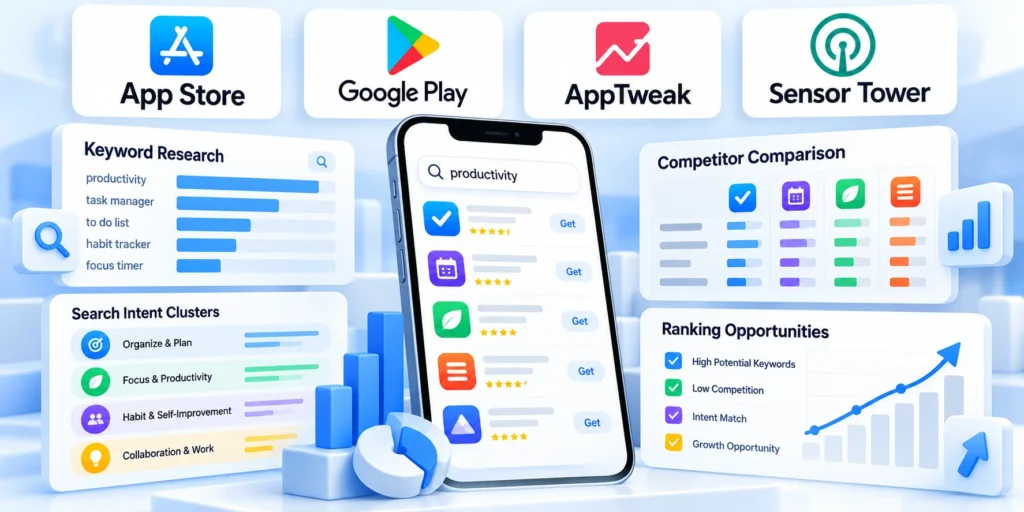
Research begins with how a business user describes a task, not with a list of high-volume phrases. Buyers often search for a workflow or system connection.
Capture language from customer interviews, sales calls, support tickets, onboarding questions, and existing campaign queries. Remove confidential information before analysis.
Build a small, evidence-backed query map
Group phrases by problem, user role, workflow, and buying stage. A facilities manager searching for inspections has a different need from an administrator comparing asset platforms.
Use these actions to build a small evidence-backed query map:
- Problem terms describe a pain, such as delayed approvals or missed field inspections.
- Workflow terms describe the job, such as assigning work orders or reviewing expenses.
- Category terms name the product type, such as inventory management or field service.
- Use integration terms only when the app supports the named system or data flow.
Use platform search suggestions and competitor listings as research inputs, not proof of ranking volume. Validate candidate language with actual customer evidence and campaign data.
Create a compact research matrix before editing. It records the audience, search phrase, available product proof, and destination page or campaign.
| Audience and need | Example query theme | Listing proof to show |
|---|---|---|
| Field operations lead | Mobile work orders | Assign, update, and close a real service task |
| Finance manager | Expense approvals | Submit a claim and see its approval status |
| IT administrator | Identity and integrations | Explain supported sign-in and connected systems |
Do not borrow competitor names or imply an integration because another product supports it. Every phrase and visual should describe your own app accurately.
For a separate platform-choice decision, the existing enterprise mobile strategy guide covers architecture and delivery tradeoffs.
Turn research into a brief
For each candidate phrase, record who uses it, what job they mean, where the phrase came from, and what product proof supports it.
Score ideas by fit, evidence, and implementation cost instead of search volume alone, which may not reflect a niche B2B audience.
Key considerations for turn research into a brief include:
- Keep exact customer wording when it is clear, but do not quote private conversations.
- Remove ideas that describe a capability the app does not provide.
- Validate candidate terms against actual store search suggestions.
Build store metadata around user intent

The title, subtitle or short description, long description, and keywords each have different roles. Write for the store field and the reader, not for a keyword density target.
Keep the product name recognizable. Use supporting fields to explain the audience and core job, while avoiding a chain of synonyms or claims the app cannot prove.
Respect each store’s fields and limits
Apple currently limits an app name and subtitle to 30 characters each and provides a 100-character keyword field. Its guidance discourages irrelevant, duplicated, or competitor keywords.
Google Play currently allows a 30-character app name, an 80-character short description, and a 4,000-character full description. Its metadata policy requires accurate, relevant descriptions.
Key considerations for respect each store’s fields and include:
- Draft a concise brand-focused title; do not stuff every target phrase into it.
- Use the short field to state the user and main outcome in plain language.
- Use the long description to explain supported workflows, requirements, integrations, access model, and limitations.
- Enter keywords only in fields that the platform actually provides, and follow its current rules.
A useful description names the audience, explains the job, shows how the workflow works, and answers practical questions. Include prerequisites such as an account, administrator invitation, or supported device.
Avoid unsupported promises such as guaranteed productivity, security certification, or universal integration. Link claims to product behavior and approved documentation where the store allows it.
Write and review field by field
For Apple, verify the app name and subtitle against their 30-character fields; keyword phrases share the 100-character field and cannot include irrelevant terms.
On Google Play, keep the app name at or below 30 characters, the short description at or below 80, and full description at or below 4,000.
Use these actions to write and review field by field:
- Use the store’s own preview and character counters before submission.
- Ask product and legal owners to confirm claims, availability, and terminology.
- Confirm localized metadata preserves the same product promise.
Create listing assets that demonstrate the product

Screenshots should prove the product story in a few seconds. Show real interface states, readable labels, and a sequence that matches the main use case.
Do not use generic device mockups as a substitute for product evidence. If the interface is confidential, create a safe demonstration environment with representative data.
Tell one coherent workflow
Choose a first image that answers what the app helps a user accomplish. Follow with the key steps and the result, rather than unrelated feature screens.
For a field-service product, a sequence might show a technician receiving a work order, recording completion, and a manager reviewing status.
Key considerations for tell one coherent workflow include:
- Use current, production-like screens with fictitious names and non-sensitive data.
- Make the first visible screen useful independently; some visitors will not swipe through everything.
- Keep captions brief and consistent with the interface and supported functionality.
- Use app previews only when motion shows an interaction better than a static sequence.
Review screenshots on the devices and store surfaces where they appear. Check crop, localization, text size, contrast, and whether a key interaction remains visible.
Compare the listing promise with onboarding. If a screenshot presents a dashboard that requires several setup steps, explain that dependency instead of implying an immediate result.
Use a storyboard, not a feature collage
Before exporting assets, map each frame to one question: Who is this for? What can they do? What happens after the task is complete?
Keep the sequence truthful to the current app build; if a screen depends on administrator setup, make that requirement clear elsewhere in the listing.
Apply these criteria to a storyboard not a feature collage:
- Put the highest-value workflow in the first frame.
- Use one consistent visual treatment across a listing without repeating the same claim.
- Show authentic interface states instead of decorative abstractions.
Adapt listings by market and campaign

Localization is more than translating strings. Roles, workflow terms, screenshots, compliance expectations, and buying language vary across markets and industries.
Start with markets where product availability, support coverage, legal requirements, and customer demand make localization practical.
Use audience-specific pages when supported
Apple custom product pages can highlight distinct features or content through separate URLs. Google Play custom store listings can tailor a listing to acquisition context or audience.
A campaign-specific page should preserve a clear connection to the app’s actual default experience. It must not promise functions unavailable to the audience who sees it.
Apply these criteria to audience-specific pages when supported:
- Match paid campaign language to the destination listing and the product experience.
- Localize screenshots and calls to action with fluent reviewers, not machine translation alone.
- State region-specific requirements, availability, or account setup where they affect adoption.
- Keep a source listing and owner for each localized variant, including when it was reviewed.
For example, an operations campaign can emphasize dispatch workflows while a finance campaign highlights approval and reporting. Both should show the same product accurately.
Use unique page links to distinguish campaigns only when measurement and governance are in place. Avoid creating nearly identical variants with no audience rationale.
Choose markets the team can support
Prioritize a language only when support, legal review, product availability, and customer onboarding can handle the resulting demand.
For each locale, have a native or professional reviewer check terminology, dates, currencies, role names, and screenshot labels in context.
Use these actions to choose markets the team can support:
- Name a reviewer and update owner for each localized page.
- Retire campaign pages when their offer or product capability is no longer available.
- Measure localized conversion separately before scaling the variant.
Run experiments and measure meaningful gains

An experiment is useful when it isolates a decision. Change one major asset or message at a time, keep the comparison period meaningful, and define the outcome before launch.
Apple Product Page Optimization and Google Play store listing experiments support tests of certain listing elements. Available fields, eligibility, and reporting differ by platform.
Write an experiment brief before changing the page
A concise brief prevents teams from selecting a winner after seeing the result. It should state the hypothesis, audience, variable, metric, and decision rule.
Use these actions to write an experiment brief before changing:
- Hypothesis: the workflow-first screenshot will help qualified visitors understand the core task.
- Audience: eligible store traffic for the selected locale or listing.
- Variable: replace only the first screenshot while holding other assets constant.
- Primary metric: the platform’s install or download conversion measure.
- Guardrail: monitor activation or early retention for a quality regression.
Apple reports product page test results in App Analytics and applies its own statistical analysis. Google Play offers experiment settings and result guidance within Play Console.
Do not stop an experiment as soon as a small early lead appears. Follow the platform’s guidance, check data sufficiency, and record inconclusive outcomes honestly.
Check downstream quality
When conversion improves but activation falls, review the promise, onboarding steps, and segment mix. The outcome may reveal a mismatch rather than a successful optimization.
Store experiments cannot establish causal effects on qualified revenue by themselves. Join them carefully with campaign, CRM, and product data, respecting consent and attribution limits.
Avoid testing several stories at once
If you change the headline and first screenshot together, a higher conversion rate cannot tell you which message caused the difference.
Keep a dated copy of the baseline and define when to stop or apply a result before the test starts.
Key considerations for avoid testing several stories at include:
- Avoid overlapping tests on the same listing elements and audience.
- Label outcomes as positive, negative, inconclusive, or insufficient data.
- Document the winning hypothesis and its applicable audience.
Build a practical 30-day ASO operating cycle

A small team can begin with one market, one listing, and one acquisition problem. A 30-day cycle creates a review rhythm without promising a statistically conclusive test.
The schedule below is a working plan. Adjust it for store review time, traffic volume, product releases, and the size of the change.
Week-by-week implementation
Key considerations for week-by-week implementation include:
- Baseline (days 1–5): confirm availability, metadata, audience, acquisition sources, store conversion, and activation quality.
- Research (days 6–10): review customer language, support themes, search terms, positioning, and workflow proof.
- Prepare (days 11–15): draft field-specific metadata and screenshots; check policy, accuracy, localization, and approvals.
- Days 16–20: release or submit assets, then verify the live listing and analytics.
- Days 21–30: test with sufficient eligible traffic; otherwise extend baseline measurement.
At the end, decide whether to keep the change, revise it, or gather more evidence. Document owner, page version, locale, experiment dates, result, and follow-up.
A quarterly review can retire stale screenshots, check feature accuracy, revisit market priorities, and align store claims with the current product. Do not change high-impact fields without an owner.
Turn the result into a next decision
A repeatable process beats a one-off keyword rewrite because it connects customer evidence, listing presentation, and downstream product quality.
Choose the next action according to evidence quality, audience fit, and operational capacity. A clear negative or inconclusive result can prevent a costly rollout.
Record the decision
Write a one-sentence decision record: what changed, whom it targeted, which metric moved, whether downstream quality held, and what happens next.
Assign an owner for the next review so screenshots, claims, and links stay accurate as the app and its store tools evolve.
Coordinate listings with product releases and activation

Store listings must describe the product version that intended users can actually install and operate. Release coordination protects trust, eligibility, and meaningful activation after acquisition.
Align product, marketing, support, analytics, and customer-facing teams before changing high-impact claims or assets. The listing should never promise a workflow that remains unavailable.
Coordinate listing and product releases
Revise screenshots, claims, compatibility, support links, privacy information, and localization when the corresponding product experience changes.
Do not advertise a workflow before the supported version reaches the intended market and users can complete it reliably.
Confirm these dependencies before changing a listing:
- Supported app version and eligible market
- Current screenshots and accurate workflow claims
- Working support, privacy, and account links
- Analytics events for activation and retention
- Named owners for release and rollback
Use a release record that links the listing version with product changes, approval evidence, submission dates, and measurement windows. Preserve earlier versions for later comparison.
Verify the live listing after store review. Check text, screenshots, localization, destination links, device compatibility, and analytics before interpreting any performance movement.
Review store traffic quality
Compare listing visitors, installs, account eligibility, first meaningful action, retention, support demand, and qualified business outcomes.
A higher install rate can be harmful when positioning attracts users whose devices, roles, markets, or needs do not fit.
Connect acquisition with activation evidence
Segment results by market, listing, campaign, device, and customer eligibility when the sample supports interpretation. Keep store conversion separate from downstream product value.
Send listing discrepancies to product or support. If the issue is unreliable onboarding or a missing integration, include the fix in the app development scope.
Govern feedback and preserve experiment comparability

Ratings and reviews reveal expectations, defects, support friction, and language customers use. They should inform decisions without becoming a selective collection of favorable quotations.
Experiment records provide the context needed to interpret listing changes. Without stable audiences, dates, assets, and downstream measures, apparent gains may reflect unrelated conditions.
Govern reviews and customer feedback
Monitor recurring themes across ratings, support, sales, retention, and product analytics while preserving privacy and avoiding selective quotation.
Route product defects and misleading expectations to accountable owners, then revise the listing after the underlying experience or claim changes.
Classify feedback using these practical categories:
- Expectation mismatch caused by listing claims
- Product defect affecting task completion
- Eligibility or compatibility misunderstanding
- Onboarding, support, or account friction
- Requested workflow supported by repeated evidence
Compare themes with product analytics and support records before prioritizing action. Review volume, version mix, market conditions, and selection effects can distort isolated comments.
Document how feedback changed a claim, screenshot, roadmap decision, or support process. Close the loop without promising features or outcomes the team has not approved.
Preserve experiment comparability
Record locale, audience, assets, metadata, release version, traffic source, dates, eligibility, and downstream measures for each comparison.
If several elements change together, describe the result as a package change rather than crediting one keyword or screenshot.
Stop tests when evidence becomes invalid
Pause a comparison after policy risk, inaccurate assets, technical defects, tracking failure, overlapping releases, or a material audience shift. Protect users before preserving a test.
Retain inconclusive outcomes and their conditions. They prevent repeated mistakes and help the team design a stronger next comparison when traffic or instrumentation improves.
Conclusion

B2B app store optimization connects discovery with accurate product expectations, qualified activation, retention, and commercial outcomes. More downloads alone do not establish that the listing attracts suitable users.
Begin with a defined audience and business outcome. Research customer language, respect each store’s fields, and demonstrate one coherent workflow using current product evidence.
Run ASO as a controlled operating cycle
Maintain a stable baseline before changing metadata or assets. Document the hypothesis, eligible audience, measurement window, store version, downstream signals, and responsible owner.
Coordinate listing changes with product releases, support capacity, localization quality, and analytics. Verify the live result before comparing performance or expanding the rollout.
Use these controls throughout every ASO cycle:
- Define audience, market, and desired activation
- Use accurate metadata and current workflow assets
- Change one meaningful variable when practical
- Measure store conversion and downstream quality
- Record decisions, owners, and review dates
Interpret ratings and reviews with product, support, sales, and retention evidence. A recurring complaint may expose inaccurate positioning, a real defect, or an eligibility misunderstanding.
Preserve negative and inconclusive tests. Their conditions help future teams avoid repeating an invalid comparison or scaling a result that applies only to one audience.
Improve qualified adoption without artificial fragmentation
Add headings, lists, and tables when they clarify distinct decisions. Do not split one idea into shallow blocks merely to satisfy a structural measurement.
Keep store claims synchronized with the available product. Listing optimization should reduce uncertainty and improve fit, not disguise onboarding, compatibility, or support limitations.
Review these outcomes before choosing the next change:
- Relevant discovery across priority query themes
- Listing conversion among eligible audiences
- Successful first meaningful product action
- Retention and support demand by cohort
- Qualified opportunities or customer outcomes
A durable ASO program improves the connection between promise and experience. Teams learn which markets, messages, and workflows attract users who can realize the intended value.
The result is a governed acquisition system that balances store visibility with product truth, measurement quality, and accountable improvement across each release cycle.
FAQ
These answers address common ASO decisions for B2B application teams across discovery, conversion, activation, and governance.
What does ASO mean for a B2B application?
App store optimization is the work of improving a mobile app’s discoverability and store-page performance. For B2B products, it also means attracting relevant organizations and setting accurate adoption expectations.
Does adding more keywords guarantee a higher ranking?
No. Store algorithms are not fully disclosed, and metadata rules differ. Use relevant language in the fields provided, avoid repetition, and measure the outcomes available to your team.
Should a B2B app optimize for downloads or qualified users?
Use both. Store conversion measures the listing step, while activation, retained teams, and qualified opportunities indicate whether the app attracts the intended audience.
How often should a team change its screenshots?
Update when the product or audience changes, or when a controlled test gives useful evidence. Avoid frequent untracked changes that make results difficult to interpret.
Can a small company run ASO experiments?
Yes, if the platform makes the feature available and the team has enough traffic. With limited traffic, prioritize customer research and make careful, documented updates instead.
Should screenshots show every feature?
No. Show representative, current workflows that help the intended user understand value, sequence, and realistic expectations.
How should ASO localization be prioritized?
Use market eligibility, customer evidence, product support, language quality, store traffic, and downstream adoption potential.
Can ratings be compared across markets?
Compare cautiously because sample size, version mix, expectations, support, and review behavior may differ materially.
When should an ASO test stop?
Stop after policy risk, inaccurate assets, technical defects, invalid measurement, or enough evidence for the planned decision.
Who should approve store claims?
Use accountable product, marketing, legal, compliance, support, or technical reviewers according to the claim and market.









Leave a Reply