


Define the Personalization Goal and Audience

B2B campaign personalization works when a useful signal changes what a recipient sees or does next.
Start with one business outcome and a clear audience boundary, then personalize only the campaign decisions that help achieve it.
Choose an outcome teams can observe
“More engagement” is too broad to guide a campaign. Define the action that matters, its owner, and the evidence that confirms completion.
For a meeting-generation campaign, the outcome might be a qualified target account requesting a consultation and sales accepting the meeting.
Distinguish booked, held, and accepted meetings
Use the milestone that reflects the campaign objective and preserve later outcomes for quality analysis.
Record whether the team is optimizing for a booked meeting, a held meeting, or an opportunity accepted by sales. Those events have different meanings.
Define who should receive the campaign
Describe the audience using business-relevant criteria: account fit, buying role, lifecycle stage, expressed need, and permission to receive the message.
For example, a cloud-cost workshop may suit finance and engineering leaders at accounts evaluating infrastructure changes, but not every contact in those companies.
Use these actions to define who should receive the campaign:
- Name the account or customer segment the offer serves.
- Identify the roles that can use the information or influence the decision.
- State the signal that makes the campaign timely.
- Exclude customers, open opportunities, or contacts who should receive another communication.
These boundaries reduce irrelevant messages and give marketing and sales a shared description of the intended audience.
Separate personalization from the campaign strategy
Personalization changes a relevant detail for a known audience; it does not repair an unclear offer, weak evidence, or missing follow-up.
Write the campaign’s core promise first. Then decide whether account, role, lifecycle, or behavior data should change the message or next step.
Personalize only when the data changes the action
If the message and next step remain unchanged, a general experience is clearer and easier to maintain.
If no reliable data changes the recipient’s experience in a useful way, keep the campaign broadly relevant instead of adding a token for appearance.
Build Usable Audience Segments

Useful segments are built from fields that are accurate, current, and connected to a campaign decision.
In B2B systems, that usually means combining account context with contact role, lifecycle status, consent, and a meaningful recent signal.
Audit the fields before using them
Before building an audience, inspect where each field comes from, who maintains it, how often it changes, and what an empty value means.
Do not treat a blank industry value as a separate industry or assume an old job title still reflects a person’s current role.
Follow this sequence to audit the fields before using them:
- Choose the campaign decision the field will control.
- Check representative records against the source system.
- Measure missing, stale, and conflicting values.
- Set a safe default for records that do not meet the rule.
If the source field is unreliable, improve or exclude it before using it to personalize live communications.
Use a small number of explainable segments
A segment should have a distinct need or next step. Splitting audiences by attributes that do not change the campaign creates maintenance without useful differentiation.
Consider a software company launching an integration guide. It may distinguish active customers, qualified prospects, and existing opportunities because each group needs a different action.
| Audience | Useful signal | Campaign action |
|---|---|---|
| New evaluator | Relevant research activity | Share foundational guidance |
| Active opportunity | Verified CRM stage | Coordinate with sales |
| Existing customer | Product and account context | Use customer guidance |
| Unknown context | Missing or conflicting data | Show the general fallback |
Keep segment definitions visible to campaign owners so the group can explain why a contact qualifies and what happens when the data is incomplete.
Make Consent and Exclusions Part of Eligibility

Do not place consent in a separate afterthought. Treat communication permission and suppression status as eligibility checks before any personalization rule runs.
Also exclude unsubscribed contacts, invalid addresses, open sales conversations, and people already receiving a conflicting sequence.
Limit data to a clear, appropriate purpose
Exclude fields that are stale, ambiguous, sensitive without justification, or unavailable when the decision occurs.
Apply the privacy requirements relevant to the organization and recipient. Minimize stored attributes and avoid using sensitive data for message variations.
Document the eligibility decision
Check these eligibility conditions before activating personalization:
- Current permission for the intended channel.
- No applicable unsubscribe or suppression status.
- Reliable data tied to a defined purpose.
- No conflicting sales or service conversation.
- A safe fallback for incomplete context.
Record the source, refresh schedule, permitted use, exclusion logic, fallback, owner, review date, and downstream systems for every rule before activation.
This record helps campaign, privacy, sales, and operations teams resolve disagreements during launch reviews and later audits without guessing why a contact entered a variation.
Assign ownership for corrections
Name the team responsible for correcting source data, pausing affected delivery, and confirming dependent audiences are updated before delivery resumes across every channel.
Provide buyers with a practical correction path when inaccurate context changes the message, offer, communication frequency, or next recommended action across connected channels safely.
Design Reusable Content Variations

Build one coherent campaign with a few intentional variations rather than maintaining a separate asset for every audience combination.
Change the parts that affect relevance—such as the example, proof point, or call to action—and keep the core promise consistent.
Map each variation to a real difference
Start with a short content matrix. For each segment, state its need, the evidence that supports a tailored message, and the next action.
Use these actions to map each variation to a real:
- Executives: connect the offer to operational or financial outcomes and provide a concise decision brief.
- Technical evaluators: include architecture details, implementation prerequisites, and an evaluation checklist.
- Existing customers: point to adoption guidance or a relevant capability instead of repeating acquisition copy.
- Unknown role: use the general version with a clear, broadly useful next step.
Keep each variation factually consistent. A different audience may need different evidence, but it should not receive a different or exaggerated product claim.
Protect the default experience
Every rule-based component needs a useful default for recipients whose data is missing, late, or outside the defined segments.
In HubSpot, personalization tokens can display a fallback when a contact property is unknown; check the token and default before sending.
Preview the default message before sending
HubSpot’s documentation on personalization tokens explains the contact-property and default-value behavior in its editors.
Preview the general version as carefully as the personalized versions. A default that contains a blank greeting or an irrelevant offer can harm the whole send.
Control the Number of Personalization Combinations

Limit combinations before production so every active variation has a distinct purpose, owner, fallback, and measurable audience.
Personalizing role, industry, region, lifecycle, and intent simultaneously can create a large matrix of content and testing work.
Keep rules maintainable
Use the fewest dimensions needed to change the next action. Start with one or two meaningful decisions, then expand only when evidence supports the added complexity.
Prefer reusable content blocks and shared rules when your platform supports them, while documenting the owner and source of each variation.
Review examples across segments
Have a campaign owner review at least one real or safely anonymized record from every segment, plus records with missing fields.
Check that the message is relevant, the offer is available, the link matches the copy, and the fallback remains understandable without personalization.
Approve each new dimension
Use these controls to limit unnecessary combinations:
- One documented purpose per active dimension.
- A measurable audience for every variation.
- A reviewed default for missing context.
- Named accountability and an expiration date.
- A preview covering representative records.
Require evidence before production launch that a new dimension changes the buyer’s next useful action for a defined audience, not merely a word, label, or visual detail.
Estimate the added production, review, testing, measurement, and retirement work across every connected channel before approving and expanding the variation matrix.
Orchestrate Campaigns Across Lifecycle
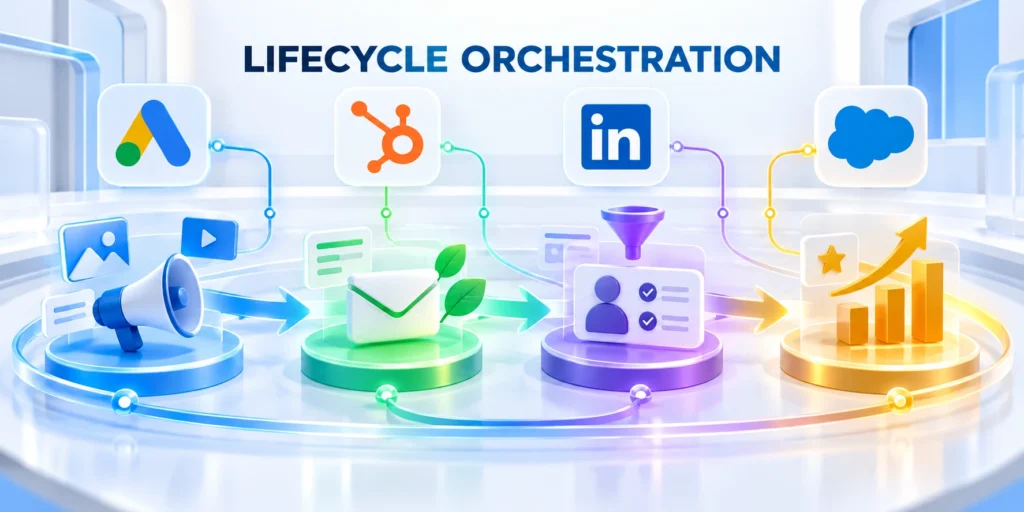
Personalization becomes more useful when campaign timing, channel choice, and sales ownership follow the customer’s lifecycle.
Define how a person enters, what happens next, and which events stop or change the sequence.
Create one explicit campaign path
For a prospect who requests a technical consultation, a practical path might acknowledge the request, route it to an owner, and send preparation material.
Follow this sequence to create one explicit campaign path:
- Confirm consent, account fit, contact role, and request details.
- Assign the request to the correct sales or solutions owner.
- Send a useful confirmation with a realistic response expectation.
- Stop promotional nurture when an active conversation or booked meeting begins.
- Record the outcome so the next campaign decision uses current lifecycle status.
Make the handoff visible in the CRM. A personalized email cannot compensate for an unowned task or a lead that never reaches the right team.
Connect the campaign to the wider program
The B2B demand generation guide covers audience, offer, qualification, and sales handoff choices at the program level.
Use related program guidance to keep the audience and offer consistent while this workflow handles the personalized sequence.
Review the supporting automation setup
For workflow design and scoring context, see the HubSpot automation and lead scoring guide.
This article focuses on applying audience-specific campaign content and lifecycle rules without duplicating every program asset.
Set Timing, Suppression, and Exit Rules

Write down what happens when a contact books a meeting, becomes a customer, changes account, unsubscribes, or enters another high-priority workflow.
Set frequency limits across campaigns, not just within one automation. Otherwise, several individually reasonable sends may combine into excessive contact.
Resolve overlap with active sales conversations
Define which sales states suppress campaigns and who can restore eligibility after the conversation changes.
Use an owner or contact-level suppression rule when sales is managing an active conversation. Resume marketing only when the agreed exit condition is met.
Respect platform-specific content rules
Marketing platforms differ in how they evaluate dynamic content, segment membership, and defaults. Confirm behavior in the selected product and subscription before production.
Adobe Marketo Engage, for example, uses segmentation to select dynamic email content and describes default content for people outside a segment.
Verify behavior in the selected edition
Adobe’s Marketo dynamic-content documentation shows how segments and content variations work in that platform.
Menu paths, feature availability, and data prerequisites can vary by product edition. Use the current in-product help before relying on a specific implementation detail.
Test transitions between programs
Coordinate these lifecycle events before campaign activation:
- Meeting booked or accepted by sales.
- Opportunity stage or account owner changed.
- Customer onboarding or support escalation started.
- Consent, unsubscribe, or preference status changed.
- Another higher-priority workflow became active.
Use representative records to confirm that entry, suppression, exit, and re-entry rules behave consistently across connected channels.
Include delayed synchronization and missing updates so the team understands how long conflicting messages could remain possible.
Measure, Test, and Govern Personalization

Measure whether personalization improves the campaign outcome, not whether a recipient opened a message or clicked any link.
Track message quality, downstream business results, and the risks created by inaccurate data or excessive contact.
Choose a comparison before launch
Compare a personalized experience with a relevant general version, using comparable audiences and a stated measurement period.
Where the audience and platform allow, hold back a representative group from the personalization change to estimate whether it contributed incremental value.
Separate association from incremental effect
Use controlled comparisons when the decision requires evidence that personalization changed the outcome.
Do not present a simple before-and-after change as proof of causation when seasonality, sales follow-up, or audience mix also changed.
Measure the full path to the outcome
Pair delivery and engagement indicators with the outcomes that justified the campaign: qualified responses, meetings held, accepted opportunities, or another agreed milestone.
Use these actions to measure the full path to the:
- Check delivery, bounce, unsubscribe, and complaint rates.
- Compare response and conversion quality by audience rule.
- Measure speed and completeness of sales follow-up.
- Track qualified meetings and later pipeline outcomes when attribution is supportable.
- Review whether missing or outdated fields caused the wrong content to display.
Use a consistent definition for each measure and state the data source. Platform-reported engagement is not automatically equivalent to buying intent.
Keep a lightweight governance record
For each rule, record its business purpose, data source, owner, fallback, suppression behavior, review date, and the teams permitted to change it.
Set a review trigger for changes in product positioning, data definitions, consent practices, or campaign ownership—not only a calendar date.
Retire stale data and unused variations
Set expiration rules and owners so outdated conditions cannot silently remain active in production.
Remove unused fields and variations. Fewer, well-maintained rules are easier to explain, test, and repair when the underlying systems change.
Roll out changes in a controlled sequence
Test with internal records or a small eligible group first, then expand after confirming routing, rendering, suppression, and measurement.
Keep a rollback path: preserve the general campaign version, know how to pause the workflow, and assign someone to monitor the first live send.
Define the pause and recovery action
Document who can stop delivery, preserve evidence, correct affected records, and authorize a controlled restart.
When an issue appears, pause the affected rule, switch to a safe default, and inspect the source data before restoring personalization.
Build a Personalization Decision Table

For each variation, record the audience condition, data source, message change, default, owner, evidence, channel, expiry, and intended outcome.
Use conditions that improve relevance to a real decision. Avoid superficial name or industry substitutions that do not change the reader’s value.
Resolve Missing and Conflicting Data
Define source priority and safe defaults before launch. Missing data should show a useful general message, not an empty token or incorrect assumption.
Route material conflicts to data owners. Do not let campaign logic silently overwrite verified CRM information or infer sensitive characteristics.
Key considerations for resolve missing and conflicting data include:
- Use approved data sources only.
- Set a useful general fallback.
- Expire stale audience conditions.
- Record material rule changes.
Prevent Combination Explosion
Limit variations to meaningful decisions and supported segments. Test every allowed combination across channels, devices, languages, and lifecycle states.
Retire variants with weak evidence or high maintenance. A smaller governed system can outperform a complex one that nobody can verify.
Audit Personalization Outcomes and Harm
Measure qualified response, progression, complaints, opt-outs, correction requests, and support themes by segment. Review whether treatment remains appropriate and accurate.
Look for excluded groups, outdated assumptions, embarrassing errors, sensitive inference, and messages that pressure buyers based on private or unexpected data.
Give Buyers Appropriate Preference and Correction Controls
Let people manage relevant communication choices and correct important profile data where appropriate. Synchronize preferences across connected channels and suppression systems.
Do not make opting out harder because a campaign is personalized. Respect channel, purpose, frequency, and legal requirements throughout the lifecycle.
Explain Unexpected Personalization
When useful, explain why a recommendation or message appears and which general preference can change it. Avoid exposing internal scoring or protected information.
Provide a route to report incorrect company, role, lifecycle, or interest assumptions. Feed verified corrections into the authoritative source.
Key considerations for explain unexpected personalization include:
- Honor channel and purpose preferences.
- Keep suppression updates timely.
- Route correction requests to owners.
- Remove unsupported sensitive inferences.
Audit Preference Enforcement
Test new, changed, revoked, and conflicting preferences across email, ads, website, CRM, and sales outreach. Verify regional and account-level rules.
Monitor complaints, duplicate messages, delayed suppression, and unexpected re-enrollment. Fix the source and every dependent workflow.
Keep a Pause and Correction Route
Allow operators to disable one rule without stopping every campaign. Preserve the fallback, affected audience, release history, and correction owner.
When an error reaches buyers, correct the underlying data and every dependent channel. Do not repair only the visible message.
FAQ
These answers clarify personalization data, variations, fallbacks, preferences, errors, measurement, and retirement decisions.
What is B2B campaign personalization?
It adapts a campaign detail or next step using reliable business context, such as account fit, role, lifecycle stage, or an expressed need.
The change should make the message more useful and support a defined business outcome.
Which data should I use to personalize B2B campaigns?
Start with current, permission-appropriate data that changes the audience, evidence, or next action.
Common examples include account fit, buying role, lifecycle stage, product relationship, and a clear recent request or behavior.
How many audience variations should one campaign have?
There is no universal number. Begin with the fewest versions that change a meaningful part of the experience for a distinct audience need.
Add another variation only when the team can maintain, test, and measure it.
What should happen when personalization data is missing?
Use a clear general default or exclude the contact when the data is required for eligibility or consent.
Test missing and stale values before sending so recipients do not see blank tokens or an inappropriate offer.
How do I know whether personalization is working?
Compare the personalized experience with a suitable general version and measure the business outcome that motivated the change.
Include message health and downstream quality; clicks alone do not show that the campaign created a qualified opportunity.
Should personalization use inferred job roles?
Use inferred data only with an approved purpose, adequate confidence, appropriate disclosure, and a safe fallback. Avoid sensitive inference.
How should stale personalization data be handled?
Record freshness, set expiry rules, and return to a general message when data is no longer reliable for the decision.
Can personalization cross email, ads, and website content?
Yes, when identity, consent, data purpose, timing, and message rules are consistent and tested across the complete journey.
What should happen after a personalization error?
Pause the affected rule, correct source data, find dependent channels, notify owners, and review whether buyer communication is necessary.
When should a personalization variant be retired?
Retire it when evidence weakens, data becomes unreliable, maintenance exceeds value, or the message no longer supports the buyer’s decision.
Conclusion

Scalable B2B personalization begins with a defined outcome, usable audience evidence, controlled variations, and a reliable general fallback.
The objective is not maximum variation; it is a more relevant action without sacrificing consent, clarity, maintainability, or measurement.
Start with one decision and limited variation
Choose an observable outcome, define the eligible audience, audit the required fields, and map each variation to a real difference.
Keep combinations small enough for teams to preview, approve, measure, correct, and retire responsibly.
A sustainable personalization program includes these controls:
- Approved data with explicit eligibility rules.
- General fallbacks for missing or conflicting context.
- Timing, suppression, and exit coordination.
- Buyer preference and correction controls.
- Measurement connected to qualified outcomes.
Test relevance without hiding risk
Compare personalization with a credible general experience and monitor conversion, pipeline, opt-outs, complaints, errors, and uneven outcomes.
Pause delivery when data, rules, preferences, or supporting operations cannot produce a reliable experience.
Scale through reusable decisions
Use decision tables, reusable components, named owners, review dates, and controlled releases instead of unmanaged campaign-specific exceptions.
For related automation planning, read AI in B2B Marketing: Automating Workflows and Analytics.
Preserve a useful general experience
The general version should remain accurate, relevant, and actionable when eligibility evidence is absent, delayed, conflicting, or withdrawn.
That standard keeps personalization additive instead of making the buyer experience dependent on perfect data.







Leave a Reply