

Plan the integration contract
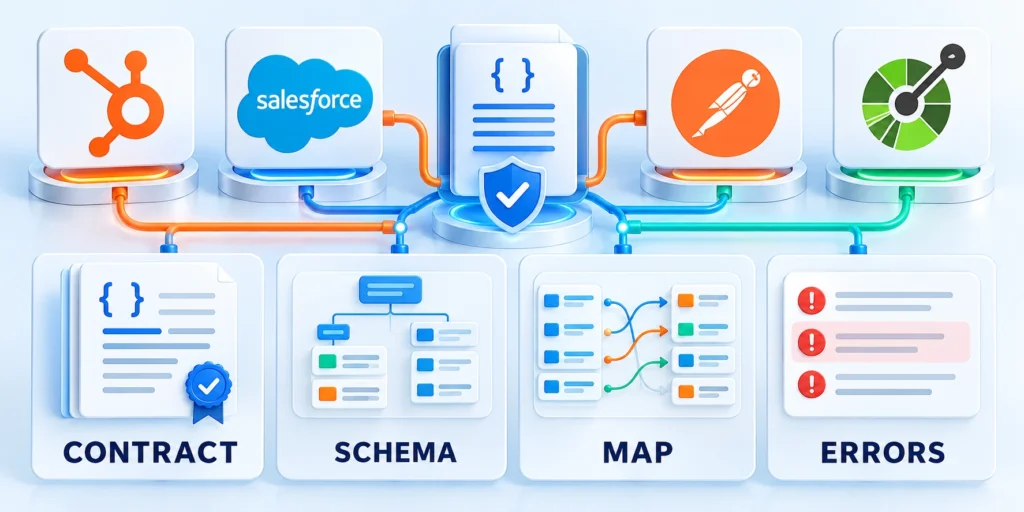
Start by syncing one lead workflow. If you use HubSpot automation and lead scoring, map the contact properties that the scoring rules and workflow triggers actually read.
Define the trigger, records, fields, direction, owner, and expected response before choosing a library or writing endpoint code.
Choose synchronous or asynchronous delivery
A synchronous call waits for the CRM response. Use it when the screen needs an immediate confirmation and the action finishes quickly.
An asynchronous job returns quickly and completes later. Use it for bulk work, slow operations, or workflows that can tolerate a short delay.
| Pattern | Useful when | Main tradeoff |
|---|---|---|
| Synchronous API call | A user needs an immediate result | CRM latency affects the user request |
| Background queue | Work can finish after the page responds | Requires job status and retry handling |
| Webhook event | The CRM must notify your app of a change | Events can be delayed or delivered again |
| Scheduled reconciliation | Missed updates must be detected | Data is not instantly current |
Write a small integration contract
For the first workflow, document which application starts it and which system owns the final value for each field.
Then agree on a success response, duplicate behavior, timeout, retry rule, and a person responsible for unresolved failures.
Use these actions to write a small integration contract:
- Trigger: a user submits a qualified lead in the app.
- Request: validate fields and identify the signed-in user.
- CRM action: update the mapped contact or create one once.
- Response: show a saved state or a clear retryable error.
Keep this workflow narrow at first. The broader custom API integration playbook covers other system-to-system patterns.
Define a safe first release boundary
Scope the first CRM integration release around one direction and record type so permissions, failure behavior, and ownership are easier to test.
Do not begin with a full two-way sync. Add the second direction only after conflict rules and duplicate handling have been proven.
Use these actions to define a safe first release boundary:
- Limit the first workflow to a small set of fields.
- Choose a test account and a named business owner.
- Define how to pause the integration if data quality drops.
Map CRM objects and data ownership
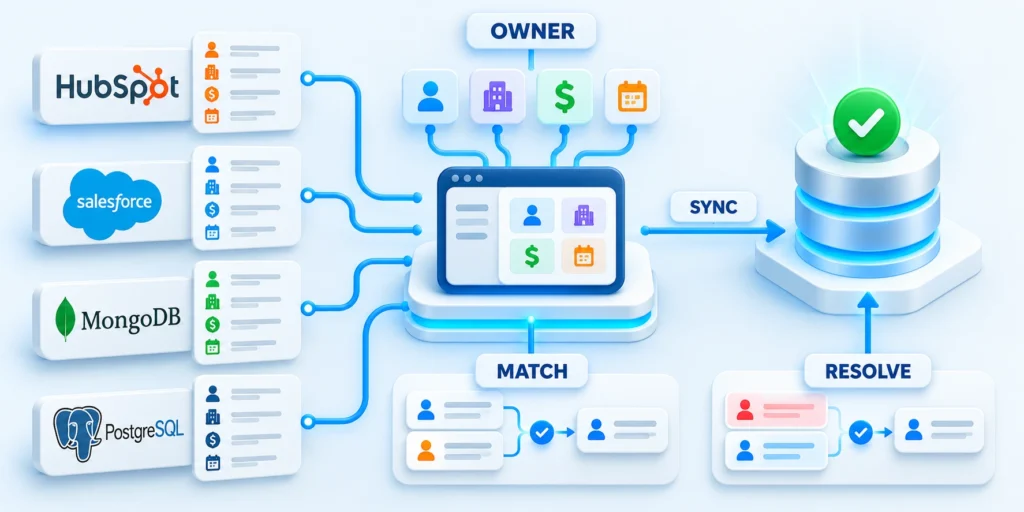
CRMs model people, companies, and commercial opportunities as separate records. Your app may use different entities or combine several into one screen.
Translate between the models explicitly. A field name that looks similar does not prove that both systems mean the same thing.
Draw the record relationships
For a B2B app, a contact usually represents a person, a company represents an account, and a deal represents a potential transaction.
Decide whether one company can have many contacts and many deals. Record those relationships before designing sync logic.
| App entity | CRM record | Mapping question |
|---|---|---|
| Workspace member | Contact | Can one person belong to multiple workspaces? |
| Customer account | Company | Which domain or account key identifies it? |
| Sales opportunity | Deal | Which event moves it to the next stage? |
| Subscription | Custom object or property | Does the CRM need detail or just a summary? |
Choose a source of truth for each field
Assign one authoritative writer for fields such as email, account status, deal stage, and product usage.
If both systems can edit a field, define conflict rules using timestamps, ownership, or a review queue.
Use these actions to choose a source of truth for:
- Sync only fields that support a real business action.
- Document normalization for country, phone, currency, and lifecycle values.
- Keep sensitive data out of the CRM unless teams need it.
- Log the mapping version so a changed rule can be investigated.
Store a durable cross-system identifier
Save the CRM record identifier beside your application record identifier in a mapping table with a unique constraint.
Do not rely on a person’s name as a key. Names change, collide, and may be formatted differently across systems.
Create or update records deliberately
Before creating a record, check the mapping. Update the linked CRM record or create one, then persist its identifier atomically.
This mapping is central to data quality. See the CRM data governance guide for a broader ownership model.
Choose authentication and API scopes

Authentication determines which CRM account the integration can access and which records its token can read or change.
Choose the model from your deployment: one organization’s internal app differs from a product installed by many customer accounts.
Use the right connection model
For a private integration serving one account, an account-level app token may be sufficient when the CRM supports that model.
For multi-tenant products, use OAuth so each customer grants access to their account. See HubSpot’s authorization and refresh-token guide and RFC 6749.
Request only the scopes the workflow needs
List each API operation and identify the smallest permission that allows it. Do not request broad write access for a read-only feature.
Separate CRM access from application user access. A valid CRM token does not prove that the current user may edit that account.
Follow this sequence to request only the scopes the workflow:
- Register the integration and configure its exact redirect URI.
- Request only the required record scopes.
- Exchange the authorization code on the server over HTTPS.
- Encrypt access and refresh tokens at rest.
- Support revocation, disconnect, and credential rotation.
Keep credentials out of the browser
Store secrets in your server’s secret manager or protected environment configuration, not in JavaScript bundles, URLs, or client storage.
Keep credentials out of logs and error responses. Use separate credentials for development, testing, and production accounts.
Plan revocation and token rotation
Provide a disconnect action that stops scheduled jobs, removes stored credentials, and records who disconnected the account.
When access is revoked, stop retrying authorization failures. Ask an account administrator to reconnect rather than hiding the problem.
Use these actions to plan revocation and token rotation:
- Encrypt refresh tokens and restrict access to the worker service.
- Rotate secrets through a documented deployment step.
- Alert the owner when a token cannot be refreshed.
Build a secure server-side integration
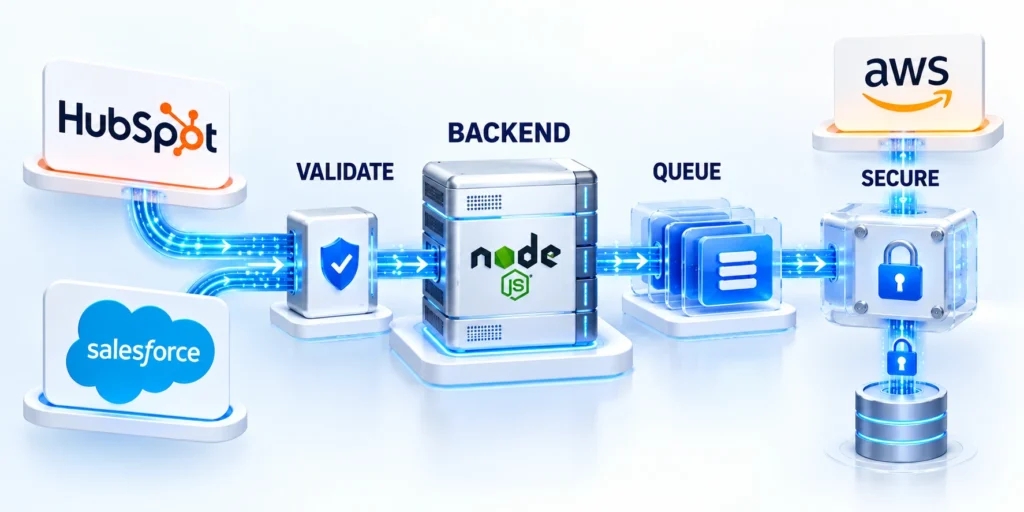
The browser should call your application backend, and the backend should call the CRM. This keeps tokens out of public code.
Validate the signed-in user, authorize the requested record, map allowed fields, set a timeout, and return only necessary data.
Use a mapped CRM ID for updates
The example below updates a contact already linked to an application record. Load its CRM identifier from trusted server storage, not browser input.
It uses Node.js built-in fetch and HubSpot’s contact update endpoint. Adapt session checks and database access to your server.
async function updateHubSpotContact({ crmContactId, email, firstName, lastName }) {

  if (!crmContactId) {

    throw new Error("CRM mapping not found");

  }

const response = await fetch(

    "https://api.hubapi.com/crm/v3/objects/contacts/" + encodeURIComponent(crmContactId),

    {

      method: "PATCH",

      headers: {

        Authorization: "Bearer " + process.env.HUBSPOT_ACCESS_TOKEN,

        "Content-Type": "application/json",

      },

      body: JSON.stringify({

        properties: {

          email,

          firstname: firstName,

          lastname: lastName,

        },

      }),

      signal: AbortSignal.timeout(8000),

    },

  );

if (!response.ok) {

    const retryable = response.status === 429 || response.status >= 500;

    throw new Error(retryable ? "CRM temporarily unavailable" : "CRM rejected the update");

  }

return response.json();

}
Keep credentials out of responses
Save the token in HUBSPOT_ACCESS_TOKEN on the server. Never expose it to a browser or place it in a source repository.
HubSpot’s contact update API accepts a record ID and a properties object for this operation.
Validate inputs and shape the response
Validate identity, account access, ownership, field types, and allowed transitions before sending any provider request.
Return a stable application response that reveals the outcome without exposing credentials, personal data, or unnecessary provider details.
Follow this sequence to validate inputs and shape the response:
- Require an authenticated app session and check its account-level permissions.
- Load the app record and CRM ID from server-side storage.
- Allowlist properties; reject fields the current workflow does not own.
- Call the CRM with a bounded timeout and handle non-success responses.
- Return a stable app error code without leaking tokens or personal data.
Separate transient and permanent failures
A timeout, rate limit, or temporary server error may succeed after a controlled retry. A malformed field or missing permission needs correction.
Honor the provider’s retry guidance, use a capped backoff, and stop after a small number of attempts. Send exhausted jobs to an operator-visible queue.
Process webhooks and reconcile records
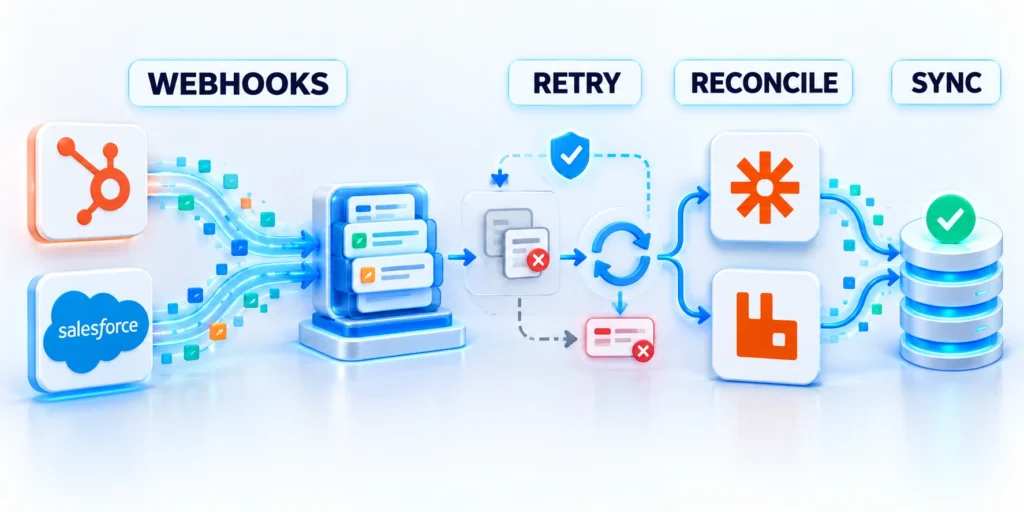
Polling asks the CRM repeatedly whether something changed. Webhooks let it notify your application when configured events occur.
Many integrations use both: events reduce delay, while a slower reconciliation pass catches missed or rejected notifications.
Accept events safely and quickly
Validate the webhook signature using the provider’s current documentation before trusting the payload. Reject invalid or stale requests.
Persist the event or enqueue it durably, then acknowledge promptly. Do the slower CRM lookup and app update in a background worker.
Follow this sequence to accept events safely and quickly:
- Verify the signature and timestamp where the provider defines them.
- Record the event ID or a stable deduplication key.
- Queue the work and return the expected success response.
- Process the event once, with retries for transient errors.
- Send exhausted events to a reviewable dead-letter queue.
HubSpot’s webhook guide describes its event subscriptions and request-signature checks.
Design for duplicate and out-of-order events
Providers may retry notifications. Make processing idempotent so the same event does not create another contact, task, or payment.
Compare event versions or updated timestamps before overwriting newer data. Do not assume delivery order matches the order of changes.
| Failure | Handling | Operator signal |
|---|---|---|
| HTTP 429 | Honor retry guidance and back off | Rate-limit count and queue age |
| Temporary 5xx or timeout | Retry with a capped delay | Attempts and last error class |
| Invalid property or scope | Stop automatic retries and fix configuration | Actionable error with request ID |
| Duplicate event | Detect the deduplication key and acknowledge | Duplicate count, without duplicate writes |
Reconcile when the event stream is incomplete
Compare a bounded set of recently changed CRM records with your mapping table on a schedule appropriate to the business risk.
Repair only known differences, record the change, and alert an owner when the systems disagree on a field’s source of truth.
Limit the data handled by each job
Request only properties needed for the workflow. Smaller payloads reduce exposure and make field mapping easier to review.
Set retention for raw webhook payloads and remove them when operational or legal needs no longer require them.
Key considerations for limit the data handled by include:
- Redact email addresses and tokens from routine logs.
- Restrict job inspection to staff who troubleshoot the integration.
- Keep audit events separate from full customer payloads.
Test, monitor, and recover the integration

A successful API call is not enough. Test whether the right record changed, whether retries duplicate work, and whether staff can diagnose failures.
Begin with a test account or sandbox when available. Use representative records with synthetic or approved data, not an uncontrolled production export.
Test the complete workflow
Test from the initiating application action through the final CRM record, acknowledgement, mapping, monitoring, and recovery evidence.
Include valid, invalid, repeated, delayed, unauthorized, and interrupted operations so the workflow proves correctness beyond its normal path.
Follow this sequence to test the complete workflow:
- Submit a valid record and confirm the CRM ID mapping is stored.
- Repeat the same action and confirm it does not create a duplicate.
- Test missing fields, invalid scopes, and expired credentials.
- Simulate a timeout and confirm retries do not repeat side effects.
- Send a bad webhook signature and confirm the event is rejected.
- Confirm an operator can inspect, retry, and resolve a failed job.
Monitor outcomes, not just uptime
Track successful syncs, failure rates, API latency, retry volume, oldest queued event, and last successful reconciliation.
Use alerts for meaningful thresholds, such as a queue that stops draining or an authentication error affecting every customer.
Set operational targets
Agree on a normal delivery delay, acceptable error rate, and maximum queue age before production rollout.
Use thresholds that reflect the workflow. A delayed sales note may be tolerable; a failed account cancellation may need immediate attention.
| Signal | Review question |
|---|---|
| Queue age | Are events waiting longer than the agreed target? |
| Retry rate | Did a new error or traffic pattern change? |
| Reconciliation drift | Are records diverging or mappings missing? |
Prepare a safe recovery path
Document who can pause sync, where failed events are reviewed, and how to replay a record after its mapping is corrected.
Back up the mapping store and test its recovery. Keep a manual correction route for critical customer records.
Connect integration checks to launch readiness
For broader launch planning, use the B2B web application architecture and launch guide alongside this integration checklist.
Make CRM evidence part of the release decision whenever application behavior depends on mappings, permissions, queues, or provider availability.
Define operating criteria before execution

For CRM integration with custom web applications, define data ownership, synchronization direction, identity matching, and failure handling before changing campaigns, code, content, or workflow.
That shared context gives every contributor a practical boundary for action.
Use these actions to define operating criteria before execution:
- Write the decision, owner, assumptions, and known constraints.
- Identify dependencies that could change the expected result.
- Set a reversible first step when uncertainty remains.
- Keep the decision record accessible to contributors.
- State what evidence is sufficient to proceed.
- Note which decisions cannot be reversed cheaply.
- Define the time frame for the decision.
- Record the intended business benefit.
- Confirm the available capacity and budget.
Turn assumptions into enforceable boundaries
Translate every assumption into a mapping, permission, validation, timeout, retry, or ownership rule that engineers and operators can verify.
Mark unresolved choices explicitly. Hidden uncertainty becomes production behavior, while a recorded decision can receive evidence, review, and a responsible owner.
Assign evidence and escalation ownership
Name who approves mappings, credentials, business outcomes, incident handling, and recovery. Technical ownership alone cannot resolve disputed customer or revenue records.
Define which logs, reconciliation results, and user reports justify escalation. Give each escalation a response path, deadline, and accountable decision maker.
Review criteria before implementation changes
Recheck the criteria whenever fields, CRM configuration, identity rules, vendors, or application workflows change. An earlier contract may no longer describe reality.
Version the approved criteria beside release records. Teams can then connect an unexpected outcome to the exact assumptions governing that deployment.
Test the workflow under realistic conditions
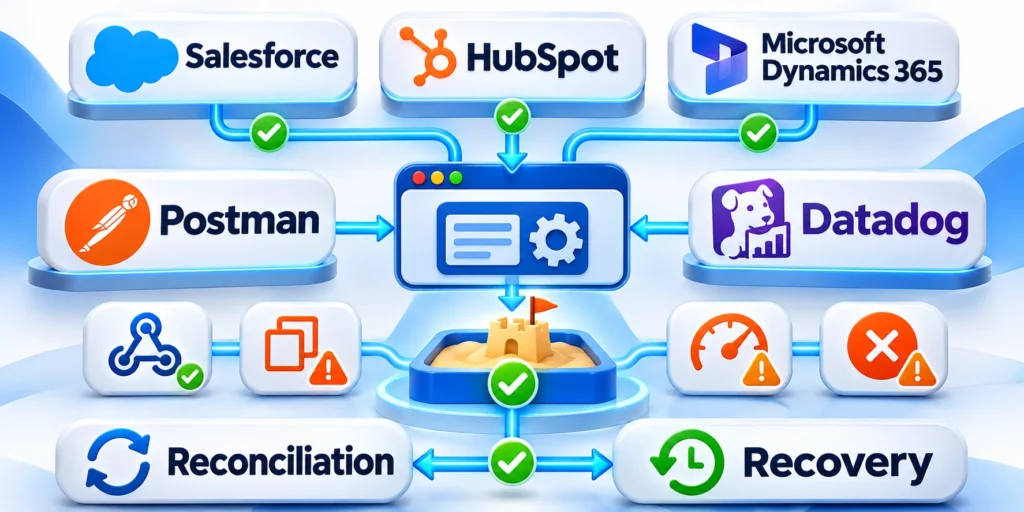
Evaluate CRM integration with custom web applications across the real mapping, implementation, testing, rollout, and monitoring sequence.
A narrow test can hide handoff issues, exceptions, integration failures, or user behavior.
Follow this sequence to test the workflow under realistic conditions:
- Choose a representative task or audience segment.
- Run the workflow from its first input to the final outcome.
- Capture exceptions, delays, and manual work.
- Compare results with the agreed baseline.
- Decide whether to improve, repeat, or scale.
- Document the limits of the test.
- Confirm that owners can support the next step.
- Review assumptions with people doing the work.
- Capture feedback from affected customers or users.
Use representative identities and records
Test new, existing, duplicate, incomplete, restricted, and conflicting records. Include identities with different roles, permissions, ownership, and lifecycle states.
Use controlled non-production data that preserves realistic relationships. Sanitized records should still expose mapping, validation, association, and authorization behavior.
Exercise delayed and repeated delivery
Delay responses, repeat webhook deliveries, interrupt workers, exhaust rate limits, and replay queued operations. Confirm that retries cannot create duplicate business actions.
Inspect the final application and CRM state after each disruption. A successful HTTP response does not prove reconciliation or business correctness.
Verify recovery with accountable operators
Ask the people responsible for support to diagnose a failed operation using documented logs, correlation identifiers, dashboards, and recovery procedures.
Record missing evidence and unsafe steps before launch. A recovery plan is credible only when another authorized operator can execute it.
Measure outcomes and tradeoffs together

Track record accuracy, sync latency, error rate, user adoption, and business outcome together rather than optimizing a single favorable metric.
Costs, risk, quality, and effort can otherwise distort the apparent value.
Use these actions to measure outcomes and tradeoffs together:
- Use business and technical indicators in the same review.
- Record data gaps before interpreting a result.
- Explain material changes with evidence, not timing alone.
- Preserve the baseline and reporting period.
- Share findings with the teams responsible for follow-up.
- Check whether the outcome can be reproduced.
- State the confidence level behind each conclusion.
- Compare actual effort against the original estimate.
- Assign responsibility for the next reporting cycle.
Connect technical signals to business effects
Review latency, failures, queue age, reconciliation, and data quality beside lead handling, customer service, reporting, and user completion.
A technically successful sync can still impose operational cost when ownership, timing, or field meaning prevents teams from using the resulting record.
Preserve comparable decision evidence
Keep measurement definitions, reporting windows, release references, exclusions, and known data gaps with every conclusion. Otherwise, later comparisons can misrepresent improvement.
Separate correlation from verified cause. Use controlled changes, repeatable tests, and release records before attributing a business shift to the integration.
Keep the practice current
Review the approach when CRM fields, application workflow, integration vendor, or data policy changes.
Past decisions may still help, but their assumptions require current evidence.
Use these actions to keep the practice current:
- Schedule ownership and review dates with the operating team.
- Retire outdated instructions, definitions, and unsupported claims.
- Record the next action and accountable owner.
- Link related internal guidance when it helps execution.
- Decide whether to improve, replace, or stop the practice.
- Share changed instructions with affected contributors.
- Keep the latest decision record easy to find.
- Confirm whether the documented standard remains usable.
- Escalate material risks before the next release.
Conclusion

A reliable CRM connection starts with a narrow contract, stable record mappings, explicit field ownership, and server-side credentials.
Durable event handling, safe retries, reconciliation, and monitoring then protect that contract when providers, networks, users, or records behave unexpectedly.
Use a measured rollout
Begin with one workflow, one record family, and a limited group. Expand only after the team can explain success, failures, ownership, and recovery.
Preserve the baseline, mapping version, permissions, release reference, and rollback condition. These details make later incidents diagnosable and decisions reversible.
Confirm these controls before expanding the integration:
- Record ownership and mappings are approved
- Credentials follow least-privilege access
- Retries cannot duplicate business actions
- Reconciliation detects missing or conflicting records
- Operators can diagnose and recover failures
For the broader framework, read Enterprise CRM Implementation: Strategy, Migration, and Adoption.
Keep outcomes and operations aligned
Measure technical reliability beside record accuracy, user completion, support demand, and business usefulness. No single metric proves that the integration creates value.
Review changes to fields, identities, workflows, vendors, and policies before each release. Update the contract whenever its assumptions no longer match production.
Treat recovery as a product capability
Maintain bounded replays, manual correction paths, backup procedures, and escalation ownership. Recovery should preserve authoritative records rather than hide discrepancies.
A disciplined integration remains understandable under failure, measurable after release, and adaptable without sacrificing data trust or customer experience.
FAQ
These answers address common implementation, security, reliability, and recovery questions for custom web application CRM integrations.
Should my browser call the CRM API directly?
Usually not for authenticated CRM operations. Route requests through your backend so credentials stay private and user permissions can be enforced.
Should I use webhooks or polling?
Use webhooks for timely change notifications and a scheduled reconciliation process to detect missed events or processing failures.
How do I prevent duplicate CRM records?
Persist a stable app-to-CRM ID mapping, check it before creating records, and make background event processing idempotent.
When should I use OAuth?
Use OAuth when customers connect their own CRM accounts to your multi-tenant application. A private account token may suit a single internal integration.
What should I retry after an API error?
Retry only transient timeouts, rate limits, and temporary server errors. Fix invalid fields or permissions instead of repeating the same request.
How should CRM API credentials be stored?
Keep credentials in a managed server-side secret store. Restrict access, rotate them deliberately, and never expose tokens in browser code or logs.
What integration data should be logged?
Record correlation IDs, operation state, provider references, timestamps, and redacted errors. Avoid tokens, sensitive fields, and unnecessary full payloads.
How should field ownership be defined?
Assign one authoritative system for each business field. Document permitted updates, conflict rules, validation, and the team responsible for exceptions.
How can missed webhooks be recovered?
Run scheduled reconciliation using stable identifiers and bounded time windows. Queue mismatches for safe replay or human review instead of creating duplicates.
What should be tested before production?
Test credentials, permissions, mappings, duplicates, rate limits, timeouts, retries, reconciliation, and rollback with representative non-production data.








Leave a Reply