

Start With the Content Model, Not a Field List
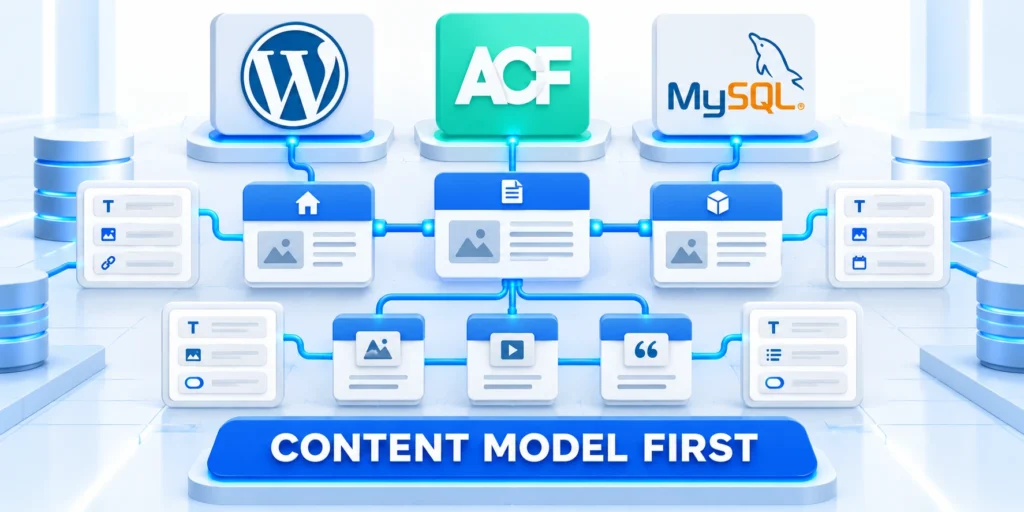
Scalable ACF field architecture keeps WordPress data structured, but field groups become technical debt when they mirror layouts, duplicate facts, or lack ownership.
Start by listing the entities your organization owns and how they connect.
Separate entity facts from page presentation
A product’s SKU, support tier, and compatibility are structured facts. A campaign headline or a one-off promotional layout is presentation and should not automatically become product data.
Ask whether a field will be reused, queried, validated, translated, or sent to another system. If none applies, ordinary block content may be simpler and more flexible.
Use these actions to separate entity facts from page presentation:
- Use a custom post type for entities with distinct lifecycles, permissions, archives, or editorial workflows.
- Taxonomies provide shared classification for filtering or grouping many records.
- Post meta stores attributes belonging to one record that need structured handling.
If you are still choosing a publishing platform, see our enterprise CMS comparison.
For example, a case study can remain a post while fields capture client industry, project period, approved metrics, and related services.
Turn requirements into a schema decision
Interview an editor and a system owner before defining fields. Ask which decisions the data supports and which teams need to read or update it.
Document source of truth, requiredness, units, allowed values, privacy, and retention. This catches conflicting definitions before templates depend on them.
Key considerations for turn requirements into a schema include:
- “Industry” may be a taxonomy if many posts need consistent filtering.
- “Project launch date” is a date field when sorting or reporting uses it.
- “Case-study summary” is editorial prose when readers need a narrative rather than a fixed value.
If a value must be reused across records, model the shared entity once and relate records to it instead of copying the value repeatedly.
Decide when a value should be a taxonomy
A taxonomy works well when editors need a shared vocabulary and visitors or reports need to filter many records consistently.
A select field is useful for a small, tightly controlled choice that belongs only to one model. It does not automatically create an archive or cross-content relationship.
Apply the choice to a real field
Document the consumer, validation, query behavior, display fallback, and change owner before the field becomes a shared dependency.
For example, “industry” may be a taxonomy across case studies and services, while “approval status” may remain an internal field on one content type.
Design Fields Around Editorial Decisions

Field labels should describe what an editor must enter; field names should remain stable machine identifiers. Treat changing a field name as a data migration, not a cosmetic rename.
Group fields by the decisions editors make, not by the order in which a developer happened to add them.
Use stable names and useful instructions
Treat field names as durable contracts because templates, exports, APIs, reports, and integrations may depend on them.
Prefer names such as support_level or case_study_metrics over generic names like field_1. Use lowercase snake case and avoid names that collide with WordPress reserved terms.
Explain the field to its editor
Write short instructions that clarify units, allowed values, ownership, and whether the field is public.
Editors should not have to guess whether “Revenue” means annual recurring revenue or total contract value.
Key considerations for explain the field to its include:
- Label: “Annual contract value”; name:
annual_contract_value; type: number; unit: USD. - Label: “Customer quote approval”; name:
quote_approved; type: true/false; instruction: confirm written permission. - Documentation URL: label “Product documentation URL”; name:
documentation_url; type: URL; use the help page.
Keep labels stable for editorial clarity, while code integrations use field names or keys rather than translated labels.
Specify validation before adding fields
Decide whether a field is required, what counts as a valid value, and how an empty value should appear. Do not make a field required just because it exists.
For a numeric contract value, define currency, minimum, maximum, and whether zero is valid. For a URL, define whether a relative path is accepted or only HTTPS.
Test conditional paths
Verify every parent choice, hidden value, required state, permission level, and saved record before releasing conditional logic.
Conditional logic can reduce editor clutter, but it should not hide data that downstream reports still require. Test every branch with realistic records.
Choose storage and return formats deliberately
Relationship and Post Object fields can return IDs or post objects. An ID is compact and predictable; a post object is convenient in templates but can encourage repeated queries.
For a relationship, limit selectable post types and statuses so editors do not accidentally connect a case study to a draft or unrelated page.
Test return-format changes
Review templates, API consumers, exports, caches, and existing records because the stored value and returned value may differ.
Test the stored value and the template output after changing return format. Existing code may depend on the old shape even when the editor interface appears unchanged.
Choose Field Types for How Data Will Be Used

Choose the simplest field type that captures the value and supports the planned display, filtering, validation, and integration.
Do not select a complex field only because its interface looks convenient. Confirm licensing, return format, query needs, and migration cost first.
Match type to cardinality and meaning
Key considerations for match type to cardinality and include:
- Text or textarea: a single short value or plain editorial note.
- Number: quantities that must be compared or calculated; define units and permitted ranges.
- Select or radio: a controlled set of mutually exclusive values.
- Relationship or Post Object: links to another WordPress record; choose a return format deliberately.
- Group: a fixed set of related subfields when supported by the chosen ACF edition.
Use a relationship to connect a case study to service pages instead of copying each service title into free-text fields. This avoids drift when a service name changes.
ACF PRO includes additional field types such as Repeater and Flexible Content; confirm license and feature availability before adopting them.
| Need | Structure | Reason |
|---|---|---|
| Shared classification | Taxonomy | Consistent filtering |
| Single record attribute | Post meta | Structured ownership |
| Independent entity | Custom post type | Separate lifecycle |
| Flexible narrative | Gutenberg blocks | Editorial composition |
Avoid duplicate and ambiguous data
Store a fact in one authoritative place whenever possible. If a company address is maintained in a location record, do not also copy it into every related case study.
Duplicate fields create reconciliation work: editors update one copy, while templates or integrations read another. Relationships reduce that risk when the entity is reusable.
Register Fields and Expose Data Safely

ACF stores field values as post metadata, but storage alone does not define a safe public interface.
For REST integrations, register metadata with an appropriate type, authorization policy, and schema. Avoid exposing sensitive operational notes just because an endpoint can return them.
Example: register a public text field
Use a stable meta key, explicit type, single-value setting, sanitization, authentication rules, and authorization appropriate to the field.
Use this pattern for a deliberately public text value in a site-specific plugin. Confirm that the custom post type supports custom fields and REST before testing.
add_action( 'init', function () {
    register_post_meta( 'case_study', 'project_outcome', [
        'type'              => 'string',
        'single'            => true,
        'show_in_rest'      => true,
        'sanitize_callback' => 'sanitize_text_field',
    ] );
} );
Place the code and test the response
Place the code in a version-controlled site plugin rather than a parent theme file. That keeps the registration independent of theme updates.
Test with a non-sensitive draft and an authorized editor account. The expected result is a typed metadata value in the REST response for the intended post.
Check access and failure cases
If the value is absent, check the post type name, field key, REST support, and user permissions.
Test the same endpoint while logged out. If private data appears, remove REST exposure immediately and review the site’s access controls.
Reduce risk before exposing metadata
Inventory every consumer and test logged-out, editor, administrator, integration, and error behavior before approving public or authenticated access.
Back up the site and test on staging before exposing metadata or changing permissions. Remove the registration or restore the previous code if access expands beyond the intended audience.
Confirm registration through these implementation checks:
- Stable key, type, and single-value behavior.
- Sanitization and authorization match intended use.
- Existing records return safe fallback values.
- Public responses exclude restricted metadata.
Review ACF API Exposure Field by Field

Expose a field only when a defined application, public experience, or authorized workflow needs the value through a documented interface.
Visibility in a template, editor, database, export, and API are separate decisions that require separate evidence and access rules.
Use these actions to review exposure one field at a:
- Expose only fields meant for the receiving application or public page.
- Test a public post while logged out and a restricted post using the intended role.
- Check whether REST update permissions match the content editor’s actual responsibility.
- Keep credentials, internal notes, personal information, and approval comments out of public metadata.
Do not assume that hiding a field in a template makes its stored value private. API responses, exports, and plugins may expose metadata through separate routes.
Test consumers and permission boundaries
Check the intended request while logged out and with every relevant role, then confirm unsupported writes, fields, and records remain unavailable.
Review authentication, authorization, sanitization, schema, error responses, caching, and logging before another application depends on the endpoint.
Document the public data contract
Record the field key, type, null behavior, permitted values, ownership, consumers, compatibility expectations, review date, named incident contact, and retirement path.
Version breaking changes and notify every affected consumer before deployment instead of silently changing the meaning, availability, or shape of a shared value in production systems.
Version-Control Field Groups With Local JSON
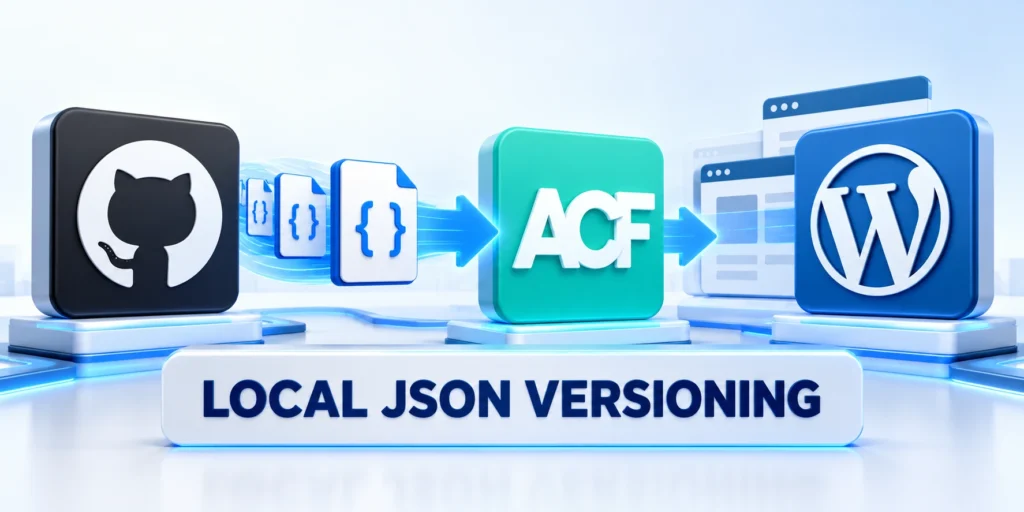
ACF Local JSON saves field-group definitions into files that can be reviewed and versioned.
Keep the JSON directory in a maintained plugin or project location when the field group belongs to the site’s data model rather than one replaceable theme.
A practical Local JSON setup
Keep the directory in a maintained plugin when the field model must survive theme replacement and support several environments.
Create a directory such as acf-json inside the site-specific plugin, then register it as an ACF load and save path.
add_filter( 'acf/settings/save_json', function ( $path ) {
    return plugin_dir_path( __FILE__ ) . 'acf-json';
} );

add_filter( 'acf/settings/load_json', function ( $paths ) {
    $paths[] = plugin_dir_path( __FILE__ ) . 'acf-json';
    return $paths;
} );
Deploy and confirm the local definition
Save a field group in the admin and confirm its JSON file appears. Commit the file, then deploy it to a test environment.
ACF can detect eligible local definitions for synchronization. Review the detected change before importing it into the database.
Keep one source of truth
If administrators also edit field groups in production, document which copy is authoritative and how changes return to version control.
Otherwise, a production edit may later be overwritten by an older repository copy. Keep environment-specific values out of shared field definitions.
Resolve configuration conflicts before release
When the database and JSON disagree, compare the field keys, modification dates, and intended change before synchronizing. Do not select an import just to clear a dashboard notice.
Capture the current definition and test one representative record before syncing. If values or field keys would change, prepare a migration and rollback plan separately.
Use a controlled deployment sequence
Separate definition deployment from value migration so teams can verify each change and reverse the correct layer safely.
Follow this sequence to use a controlled deployment sequence:
- Export or save the current field configuration and database backup.
- Make the field change in development and review the JSON diff.
- Test editor screens, saved values, templates, REST output, and old records in staging.
- Deploy the reviewed JSON and code, then synchronize only the intended group.
- Verify representative records and retain a rollback path.
A JSON file does not migrate or transform existing content values by itself. Renaming, deleting, or changing a field’s return format may require a separate data migration.
Validate Performance and the Editorial Workflow

Test how fields behave on real records, including old posts with missing values, unusual edge cases, and users with limited permissions.
A field model that passes a developer demo can still slow editors down or encourage inconsistent data entry.
Use a release checklist
Apply these criteria to a release checklist:
- Can an editor identify the required value and its format without asking a developer?
- Do conditional fields appear only when their parent choice makes them relevant?
- Do templates handle empty, zero, missing, and unexpected values safely?
- Are relationship queries bounded and filtered to the intended post types and statuses?
- Does the REST response expose only fields intended for that audience?
- Can the previous field group and code be restored without losing newly entered values?
For a large field group, ask representative editors to enter one realistic record and note where labels, instructions, or ordering cause hesitation.
Measure page and API behavior with representative data volume. Avoid assuming that a relationship query is cheap merely because it works with a handful of records.
Observe the complete editorial task
Ask representative editors to create, revise, validate, preview, publish, correct, and archive records using realistic permissions, instructions, and production-like content.
Record hesitation, invalid values, hidden dependencies, unnecessary handoffs, and recovery gaps before carefully approving the field model for wider organizational use across teams.
Test ACF Field Migrations and Query Scale

Field names and return formats are part of the interface used by templates, exports, and integrations.
Before changing one, test old and new records together. Check saved meta keys, rendered output, REST responses, and any scheduled or automated jobs.
Validate migration through these representative conditions:
- Empty, legacy, invalid, and complete records.
- Templates, exports, APIs, and reports.
- Relationship queries at realistic volume.
- Interrupted migration and safe retry.
- Rollback of definitions and values.
Preserve rollback ownership
Define whether rollback restores definitions, code, stored values, or all three because each layer can require a different recovery action.
Record a rollback point and the owner who can restore the previous definition. A field configuration rollback may not undo values already transformed by a migration.
Set practical query boundaries
For relationship fields, check how many records a template loads and whether it can filter at the query rather than after retrieving every result.
Test with production-like record counts, not only a handful of posts. Include pagination, caching, and empty relationships in the test plan where they apply.
Measure query behavior before release
Use production-like counts, relationship depth, filters, sorting, pagination, cache conditions, and concurrent requests during performance testing.
Capture representative timings and query plans so later regressions can be compared with an evidence-based baseline.
Separate definition rollback from value recovery
Restoring a field group does not automatically reverse values already renamed, transformed, deleted, duplicated, or written by an integration.
Maintain backups, migration logs, idempotent scripts, reconciliation rules, and named recovery authority for every material data change.
Scale ACF With Clear Ownership and Change Control

Scalable field architecture depends as much on ownership as on field types. Name who approves schema changes, who maintains templates, and who resolves invalid records.
Keep a short data dictionary with the field name, definition, type, allowed values, visibility, owner, and systems that consume it.
Treat schema changes as product changes
Before removing or renaming a field, search templates, exports, automations, reports, and external integrations that may read its key.
For a risky change, add a replacement field, migrate values in batches, compare counts and samples, update consumers, and retire the old field only after evidence confirms it is unused.
Use these actions to treat schema changes as product changes:
- Version field definitions in a controlled repository.
- Record compatibility expectations for templates and integrations.
- Review access whenever a field becomes public or available through REST.
- Revisit the model when the underlying business process changes.
This approach keeps ACF useful as the site evolves: content remains understandable to editors, and structured values remain dependable for templates and systems.
Use a small governance review
Review the data dictionary when a new integration, content type, or reporting requirement is proposed. Ask whether an existing field already represents the same concept.
Keep decisions concise: why the field exists, who owns it, what depends on it, and what would justify changing it.
Keep the process proportional
Use lightweight review for low-impact additions and deeper migration, security, performance, and compatibility evidence for shared or sensitive fields.
This lightweight record reduces guesswork for future developers without turning routine content edits into a formal architecture meeting.
FAQ
These answers clarify field modeling, storage, Local JSON, migrations, API exposure, queries, governance, and editor responsibilities.
Should every page element be an ACF field?
No. Use fields for structured facts, validation, reuse, filtering, or integrations. Use Gutenberg blocks for flexible narrative content and one-off page composition.
Should field groups live in a theme or plugin?
Put reusable site data definitions in a maintained plugin when they should survive theme changes. Theme-specific presentation settings may belong with the theme.
Is Local JSON a database backup?
No. It versions field definitions, not the content values stored on posts. Back up the database and test migrations separately.
Can Local JSON synchronize field changes automatically?
ACF detects eligible local JSON definitions for synchronization, but deployments and synchronization should follow a reviewed release process.
Can ACF values appear in the WordPress REST API?
They can be exposed through registered metadata or supported ACF integrations, but the data type, permissions, and privacy implications must be configured deliberately.
When should an ACF value become a taxonomy?
Use a taxonomy when editors need a shared classification across records, archive pages, filtering, or term-level metadata. Keep unique attributes in post meta.
How should teams rename an existing field?
Treat the field name as a data contract. Plan migration, update templates and integrations, test existing records, and keep a rollback path before changing production.
Are repeater fields suitable for every repeated item?
No. Repeaters work for bounded data owned by one record. Use separate posts or entities when items need independent permissions, URLs, search, or lifecycle management.
How can ACF queries stay performant?
Query only necessary records and fields, avoid broad meta queries on large datasets, cache stable results, and measure representative production data before promising scale.
What belongs in an ACF field governance record?
Record the field key, purpose, owner, storage type, validation, consumers, exposure rules, migration history, and retirement plan. This helps teams assess changes before deployment.
Conclusion

A scalable ACF model connects editorial decisions with stable storage, documented ownership, deliberate API exposure, and tested deployment behavior.
Fields should represent durable facts or relationships, while Gutenberg remains available for flexible narrative and page composition.
Treat every shared field as a contract
Identify templates, queries, APIs, exports, reports, integrations, editors, and external applications that depend on the field before changing it.
Review storage, return format, validation, permissions, migration, performance, and rollback together instead of treating the admin screen as the complete system.
Maintain the contract through these controls:
- Stable names with documented meaning.
- Validated values and explicit ownership.
- Controlled definitions in version control.
- Tested consumers and permission boundaries.
- Recoverable migrations and retirement plans.
Scale through evidence and proportional governance
Measure query behavior with realistic data, test editorial workflows with representative users, and inspect API exposure using intended roles.
Use lightweight review for simple additions and deeper compatibility evidence when a field affects shared data, security, performance, or integrations.
Keep architecture connected to business use
Retire unused fields through a controlled release and revisit the model when the underlying business process changes.
For the broader framework, read Enterprise WordPress Development: Architecture, Security, and Scalability.
Preserve the evidence behind each change
Keep schema decisions, consumer inventories, migration results, performance baselines, approvals, and rollback evidence beside the versioned field definition.
This record helps future teams distinguish an intentional contract from a temporary implementation detail or undocumented workaround.





Leave a Reply