


When Multisite Fits a Corporate Brand

This guide compares WordPress Multisite vs Single Installation for corporate brands choosing between shared administration and independently managed site environments.
For a corporate brand portfolio, that shared administration is useful only when the sites also share clear technical and governance boundaries.
Start with the reason for having multiple sites
A company may operate regional sites, product brands, franchise locations, or campaign properties. Multisite can centralize routine platform work when those sites use a consistent operating model.
It is not a content-sharing system by itself. Each site has its own posts and site-specific tables; sharing content or workflows requires a deliberate integration or plugin.
Example: a regional brand portfolio
Suppose a company runs five country sites with one theme, shared security controls, and a central web team.
Multisite may reduce repeated platform administration while each country team maintains its own pages.
When this shared model stops fitting
Review when this shared model stops fitting with representative sites before expanding authority or changing shared platform behavior.
That fit weakens if every region needs a different release calendar, unrelated plugins, independent administrators, or distinct infrastructure. The organizational chart alone is not a reason to choose Multisite.
Use separate installations when independence matters
Separate installations provide stronger operational separation: one site’s plugin change, database work, or maintenance window can be planned independently from another’s.
They also create more environments to patch, back up, monitor, and audit. Compare that recurring work with the shared operational risk of a single network.
Review these portfolio controls before deciding:
- Common platform standards
- Central operational ownership
- Compatible release schedules
- Accepted shared risk
What Changes Between Multisite and Separate Installs

Both models can serve multiple brands and domains, but they place shared code, administration, and recovery responsibilities in different places.
Multisite separates site content inside one WordPress installation; separate installs separate the application lifecycle as well as the content.
Understand what Multisite shares and separates
A network shares WordPress core files and installed themes and plugins. Each site has separate content tables and media, while accounts are shared across the network.
Shared accounts do not automatically grant a person access to every site. Site membership and roles are assigned per site, while network-wide administration belongs to Super Admins.
A shared plugin file is still a shared release
A network-activated plugin runs across all sites. A plugin activated only on selected sites can be limited in reach, but the installed code still comes from the same plugin files.
Plugin settings may be network-wide or site-specific depending on how that plugin was built. Confirm this before assuming a network setting can differ by brand.
Compare the operating model, not only hosting count
| Decision | Multisite | Separate installs |
|---|---|---|
| Code | Shared release path | Independent releases |
| Content | Tables separated by site | Separate databases |
| Users | Shared account directory | Independent accounts |
| Maintenance | Centralized changes | Repeated per site |
| Failures | Broader shared impact | Narrower isolation |
The table is a starting point, not a guarantee of isolation. Hosting architecture, backup design, plugin behavior, and deployment practices determine the actual failure boundary.
If brands need separate frontend releases while sharing content administration, compare headless WordPress as a separate design decision from choosing Multisite.
Review these portfolio controls before deciding:
- Shared code boundaries
- Separate content ownership
- Identity implications
- Failure isolation
Choose Based on Governance and Data Boundaries
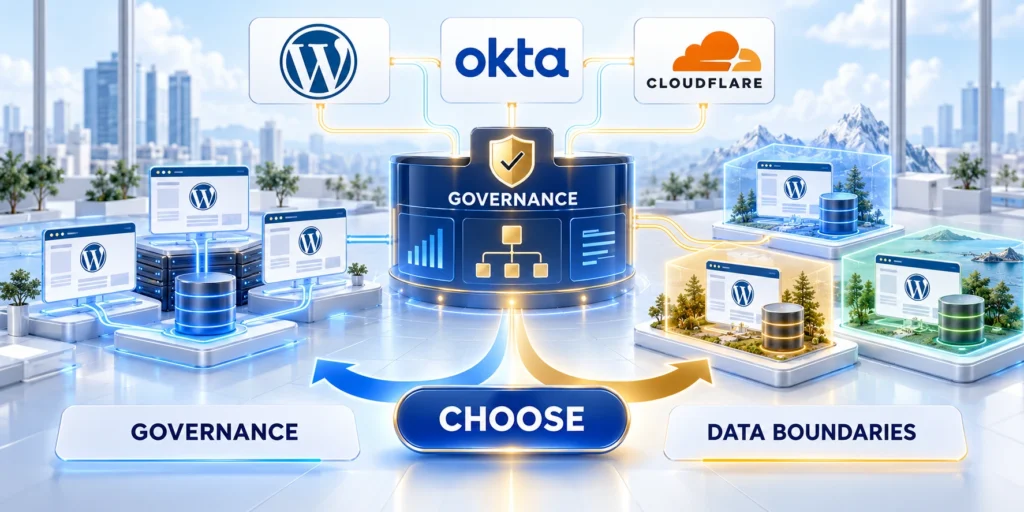
Governance determines whether central control helps the portfolio or creates a bottleneck for teams with different responsibilities.
Document who can manage network code, site content, users, integrations, and recovery before selecting the architecture.
Separate platform authority from site publishing
In a network, define a small group of Super Admins who own core configuration and shared code. Assign site administrators only the capabilities needed for their own property.
Test permissions with representative users. A regional editor should be able to update approved pages without gaining access to another region’s content or network-level plugin controls.
Create a responsibility matrix
| Area | Central team | Local team |
|---|---|---|
| Platform | Deploy and recover | Test local workflows |
| Content | Set standards | Maintain local content |
| Access | Define role policy | Request role changes |
| Incidents | Coordinate response | Report business impact |
Record an owner and escalation path for every row. If two teams assume the other owns plugin updates or consent changes, a centralized network can amplify the gap.
For regulated workflows, assess data flows, access boundaries, processors, and retention with privacy and legal teams. Separate site tables alone do not prove compliance isolation.
Decide whether shared identities are acceptable
Multisite uses a common user account system, even when access differs by site. This can simplify single sign-on, but a compromised privileged account may have a wider potential reach.
Use least privilege, strong authentication, documented offboarding, and periodic role reviews. If independent identity stores are a strict requirement, separate installations may fit better.
Review these portfolio controls before deciding:
- Platform authority
- Publishing authority
- Access review
- Incident ownership
Plan Domains, Branding, and SEO

A network can use subdirectories, subdomains, or mapped domains, but each choice changes DNS, certificates, ownership, and migration work.
Set the URL model and brand boundaries before launch. Changing an established network’s address structure can require careful redirects and data updates.
Choose a URL structure deliberately
Subdirectories place sites under one domain, such as example.com/region. Subdomains use names such as region.example.com and require corresponding DNS and server routing.
Mapped domains let a subsite appear under a separate domain. WordPress supports native domain mapping in modern versions, but DNS and SSL still need correct configuration for every domain.
Build a domain launch checklist
Use this domain launch checklist:
- List the intended canonical domain and site owner for every brand.
- Set DNS records to route each domain to the correct hosting environment.
- Install and verify an HTTPS certificate for every mapped domain.
- Configure the site address in Network Admin; test login, redirects, media, and REST endpoints.
- Check canonical tags, sitemaps, analytics properties, and search-console ownership before launch.
Test in staging first. A mapped domain may load while canonical URLs, login cookies, or media links still point to the original network address.
Ask the hosting provider to confirm any server-level prerequisites, especially when the network needs wildcard subdomains or custom domain routing.
Keep brand separation visible to users
Separate sites can use different logos, navigation, language, and editorial permissions while sharing approved themes or plugins. Define which elements are centrally controlled and which each team may change.
Do not assume a mapped domain creates a separate security boundary. It changes the address users see; it does not move the site into another WordPress installation.
Manage Plugins, Themes, and Releases
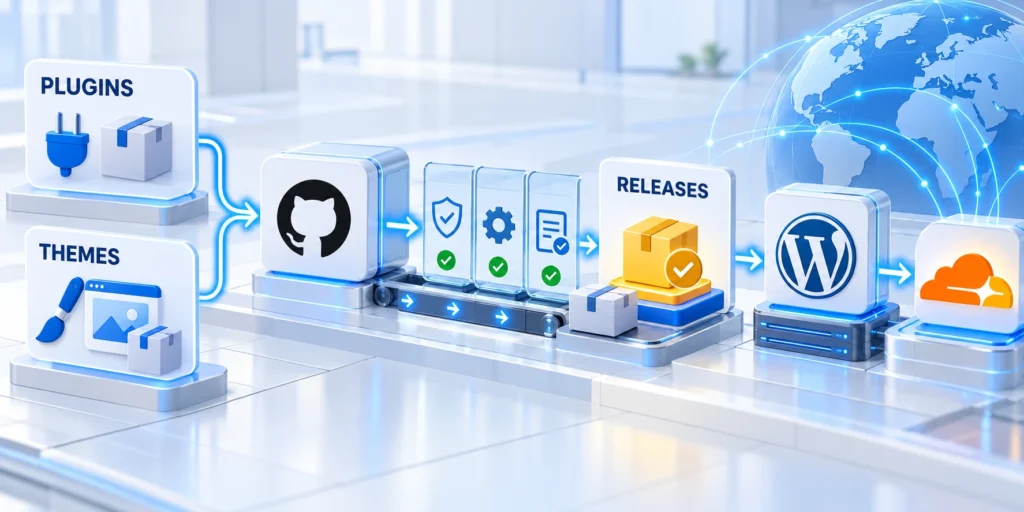
Multisite centralizes installed code, but it does not remove the need for release testing or site-specific acceptance checks.
A shared plugin update can affect several brands at once, so the release process should include a representative staging site and a rollback plan.
Classify each component by reach
Maintain a list of network-active plugins, site-activated plugins, shared themes, and site-specific configuration. Record the business owner and sites affected by each component.
Network activation makes a plugin active across sites, while site activation can limit where it runs. Check its documentation because data storage and settings scope depend on implementation.
Release a shared plugin safely
Follow this shared release sequence:
- Inventory affected sites and plugin settings before changing code.
- Back up the database and files, and verify that recovery can restore a test copy.
- Install the release in staging and test each distinct theme, form, integration, and permissions model.
- Deploy during an agreed maintenance window and monitor errors and business-critical workflows.
- Roll back code and restore data only when the approved recovery plan requires both.
Keep the deployment record with the version, affected sites, test results, owner, and rollback decision. This makes a shared release traceable when a local issue appears later.
Separate installations allow staggered releases more naturally. That flexibility costs extra deployment and patch work, so automate repeatable checks where possible.
Check host and plugin compatibility first
Some plugins assume a single site or store settings in ways that do not suit networks. Check current multisite support documentation and test the exact workflow.
Do not infer compatibility from successful activation. Verify data visibility, permissions, scheduled jobs, email delivery, and updates on both network and individual sites.
Compare Operations, Risk, and Recovery

A single network can reduce duplicated maintenance, but it also concentrates shared components and increases the potential reach of some incidents.
Compare the full operating cost: staff time, release controls, support, recovery objectives, and business impact when a shared layer fails.
Model failure impact before choosing
Ask what happens if the database, hosting account, shared plugin, or Super Admin credential becomes unavailable or compromised. A multisite can contain site content separately while still sharing important infrastructure.
Separate installations can narrow some incidents, but sites may still share a host, account, network, or backup destination. Separation must be designed and tested rather than assumed.
Test a recovery path
Restore a representative site or a full network backup in a nonproduction environment. Confirm that pages, users, media, domains, and integration credentials behave as expected after restoration.
Document recovery time and recovery point objectives with business owners. A backup schedule is not evidence of recoverability until a restore test succeeds.
Estimate ongoing work, not just setup
Estimate annual hours for routine updates, staging, access reviews, incident exercises, support requests, and domain renewals. Compare that estimate with the cost of running multiple installations.
Include the cost of slower approvals if every brand depends on one central team. Shared administration can become a queue when ownership and service expectations are unclear.
Review these portfolio controls before deciding:
- Failure impact
- Recovery objectives
- Maintenance workload
- Support capacity
Use a Practical Decision Framework

Choose Multisite when shared governance and common platform releases are benefits the organization can operate responsibly.
Choose separate installations when independent releases, identity boundaries, integrations, or recovery requirements outweigh centralized administration.
Score the portfolio with evidence
Rate each factor from one to five, where five means the portfolio strongly needs that capability. Treat the score as a discussion aid, not an automatic architecture decision.
| Factor | Multisite fit | Separate fit |
|---|---|---|
| Code | Common stack | Different stacks |
| Governance | Central operations | Independent ownership |
| Identity | Shared accounts | Separate identity |
| Branding | Common standards | Different infrastructure |
| Recovery | Shared risk accepted | Independent recovery |
List the nonnegotiable requirements first. A single requirement for independent identity, release authority, or recovery may matter more than several convenience scores.
For a second opinion, compare your requirements with our enterprise WordPress development framework and document any assumption that needs a pilot.
Run a bounded pilot before migration
Start with two representative sites: one with typical publishing needs and one with the most complex domain, plugin, access, or integration requirements.
Test deployment, permissions, analytics, restore, and support handoffs. Set measurable acceptance criteria and a rollback date before moving production traffic.
Example pilot acceptance criteria
Review example pilot acceptance criteria with representative sites before expanding authority or changing shared platform behavior.
Verify these pilot acceptance conditions:
- Editors can publish only to their assigned site.
- Shared plugin updates pass the agreed staging test suite.
- Mapped domains resolve over HTTPS with correct canonical URLs.
- A tested restore meets the agreed recovery objectives.
- Support requests have named owners and response expectations.
If a criterion fails, adjust the model or keep the pilot isolated. Do not expand the network simply because the initial setup completed successfully.
Bottom line for corporate teams
WordPress Multisite is a strong fit when related brands can share a platform team, codebase, and release discipline while keeping site content and permissions distinct.
Separate installations suit portfolios that need greater operational independence. Compare governance, identity, release reach, domain needs, and tested recovery before committing.
Test Isolation, Recovery, and Change Control
Choose representative sites with different domains, teams, plugins, traffic, data sensitivity, and release schedules. Exercise the same operational scenarios in both architectures.
Measure how a shared failure spreads, how quickly one site can recover, and which owners need access during an incident.
Rehearse Site-Level and Platform-Level Recovery
Restore one site, one database state, shared code, uploads, domains, and network configuration. Confirm recovery objectives with realistic data volumes.
Exercise these four recovery scenarios:
- Test one-site content recovery.
- Test shared platform recovery.
- Verify domains and certificates.
- Confirm owner access during incidents.
Multisite convenience can increase shared impact, while separate installs can increase coordination work. Price both risks instead of assuming one is simpler.
Control Plugin and Theme Changes
Inventory compatibility, network activation, site-specific settings, dependencies, and rollback. A shared update should not surprise local brand teams.
Use a staging portfolio that represents critical variations. Test authentication, publishing, forms, commerce, integrations, and caching before broad release.
Define the Corporate Operating Model
Assign central and local responsibilities for hosting, code, domains, users, content, privacy, analytics, support, releases, and incident response.
Choose an architecture that matches real authority. Technical centralization cannot resolve unresolved ownership between corporate and regional teams.
Monitor Performance and Shared Resource Risk
Measure representative sites separately and as a portfolio. A shared resource problem can affect brands differently because traffic, media, plugins, and integrations vary.
Set service objectives and ownership for availability, response time, publishing, background work, search, forms, and critical customer journeys.
Test Noisy-Neighbor Scenarios
Simulate traffic spikes, large imports, scheduled jobs, media processing, failed integrations, and administrative work on one site. Observe effects across the portfolio.
Use isolation, limits, queues, scheduling, and capacity controls appropriate to the hosting architecture. Document which team responds when shared thresholds fail.
Monitor these shared capacity signals:
- Measure each critical site independently.
- Alert on shared resource exhaustion.
- Test background job contention.
- Keep capacity decisions reviewable.
Plan Caching and Purge Boundaries
Confirm whether cache keys, purge actions, cookies, domains, and personalization remain isolated. One brand’s release should not invalidate or expose another site.
Rehearse cache failure and bypass for authenticated or sensitive content. Treat caching as part of the tested architecture, not a universal repair.
Plan Portfolio Changes
Test site creation, cloning, ownership transfer, separation, merger, archival, and deletion. Confirm how identities, media, redirects, and records move.
Keep an exit route for a brand whose legal, commercial, performance, or integration needs diverge from the shared model.
Plan Site Separation and Portfolio Migration
Plan site separation before a brand leaves a network or an independent installation joins one. Define the business reason, accountable owner, acceptable interruption, and rollback trigger.
Select representative sites with complex media, mapped domains, integrations, redirects, permissions, and operational dependencies. A simple brochure site cannot expose every migration risk.
Define site separation planning boundaries
Inventory content, users, domains, settings, plugins, integrations, and historical records. Mark what transfers automatically, what requires transformation, and what must remain archived.
Assign acceptance, exception, rollback, and defect owners. The separated site is not ready until business owners verify publishing, customer journeys, records, and operational access.
Use these site separation planning controls:
- Inventory network dependencies
- Map users and roles
- Preserve canonical URLs
- Test integration changes
- Approve rollback authority
Test site separation planning evidence
Rehearse the separation with a recoverable copy and representative workflows. Reconcile counts, relationships, URLs, access, media, and integration behavior after every test run.
Record migration defects by impact and owner. Include missing redirects in the WordPress migration and SEO review before approving cutover.
Operate site separation planning safely
Keep the source state recoverable throughout validation. Freeze only data requiring consistency, and communicate the cutover window, rollback threshold, and verification owner to affected teams.
After release, preserve reconciliation results and the decision record. Future teams need this evidence to reverse, repeat, or consolidate the architecture safely during later compliance reviews.
Define Support and Service Ownership

Define support ownership before selecting a shared network or independent installations. Assign platform, brand, infrastructure, security, and integration responsibilities with measurable response expectations.
Map common requests and incidents to accountable teams. Include publishing failures, access changes, broken integrations, performance degradation, certificate renewal, releases, and recovery.
Define portfolio support ownership boundaries
Separate network authority from local publishing authority. Document who approves shared changes, who supports editors, and who communicates portfolio-wide incidents.
Publish an ownership matrix with primary and backup contacts. Every service boundary needs an escalation path that remains usable during a platform-wide incident.
Use these portfolio support ownership controls:
- Name platform owners
- Set local support boundaries
- Define incident escalation
- Track shared capacity
- Review service expectations
Test portfolio support ownership evidence
Exercise the support model with realistic tickets and incidents. Confirm routing, escalation, evidence collection, communication, resolution authority, and handoff between central and local teams.
Record support exercises by response time, ownership accuracy, handoff quality, resolution authority, and communication. Correct unclear boundaries before expanding the portfolio.
Operate portfolio support ownership safely
Review service performance by site and shared component. Repeated ownership gaps should change the operating model, training, documentation, or architecture instead of becoming accepted delays.
Revisit ownership after organizational, vendor, or architecture changes. Service responsibility must follow the current system rather than an obsolete project chart. Test backup contacts during incidents and scheduled absences.
Conclusion

WordPress Multisite fits portfolios that genuinely share code, standards, identity assumptions, operational ownership, and release timing. It centralizes administration, but also broadens the impact of shared failures and changes.
Separate installations fit brands that require independent infrastructure, release schedules, access boundaries, or recovery. Their isolation reduces shared impact while increasing repeated maintenance and coordination.
Choose the operating model first
Start with governance, service ownership, failure tolerance, identity, data boundaries, domains, and change control. Hosting count alone does not explain which model the organization can operate reliably.
Use a responsibility matrix to distinguish central platform authority from local publishing authority. Every role should have defined access, support, review, and escalation expectations.
Keep these portfolio decisions visible:
- Shared code scope
- Identity boundary
- Release authority
- Recovery ownership
- Separation conditions
Prove the decision with representative sites
Run a bounded pilot using different themes, permissions, integrations, traffic profiles, and domain requirements. Test publishing, updates, incidents, recovery, and support rather than only initial setup.
Preserve evidence for the rejected option and record conditions that would reopen the decision. Portfolio needs change when ownership, regulation, scale, or brand independence changes.
Keep the architecture reversible
Document how a site could be separated, consolidated, or recovered before the portfolio grows. Reversibility depends on clean ownership, tested exports, mapped users, and controlled dependencies.
The right architecture is the one teams can support during routine work and incidents. Centralization is valuable only when shared authority and shared risk are explicit.
FAQ
These answers clarify shared code, users, domains, security, recovery, and operating ownership across both models.
Does WordPress Multisite share content between sites?
No. Each site has separate content tables. Cross-site content sharing needs an explicit integration or plugin.
Are users shared in a Multisite network?
User accounts are shared across the network, but site membership and roles are assigned per site.
Can each subsite use a different domain?
Yes. Domain mapping is supported, but each domain needs correct DNS, HTTPS, and WordPress site configuration.
Can each site use different plugins?
Plugins share installed files; activation can be network-wide or limited to sites. Settings scope depends on plugin implementation.
Is Multisite cheaper than separate installations?
It may reduce repeated administration, but shared releases and recovery require governance. Compare total operating effort and risk, not hosting cost alone.
For the broader framework, read WordPress Security Protocol for Corporate and E-commerce Ecosystems.
Can a Multisite subsite be separated later?
Yes, with planning and testing. Content, users, media, domains, settings, and plugin dependencies may require different migration steps.
How should corporate teams handle local administrators?
Grant the minimum role needed, define support boundaries, review access, and keep network-level authority with accountable central owners.
Does Multisite improve security automatically?
No. It changes administration and shared impact. Security still requires supported code, access control, monitoring, backups, testing, and response.
Which model supports different release schedules?
Separate installs offer stronger independence. Multisite can still stage changes, but shared code and network policy may constrain timing.
What should a corporate WordPress pilot prove?
Prove publishing, access, domains, integrations, updates, performance, recovery, support, and portfolio changes with representative sites and owners.





Leave a Reply